Matrox QuadHead2Go Series – User Guide 44
Mounting your QuadHead2Go unit
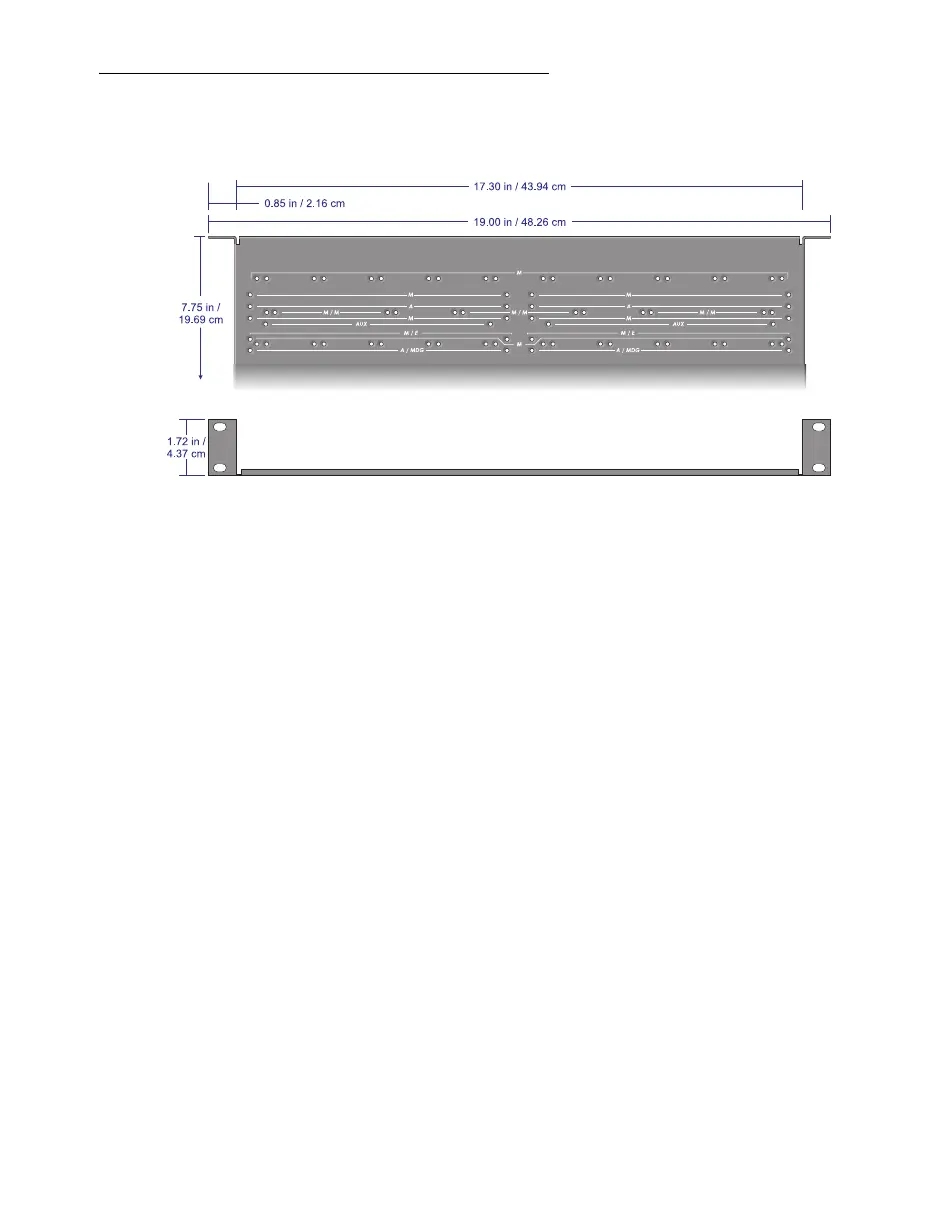
This section provides guidelines for mounting your QuadHead2Go unit in rack mounts using one or
multiple mounting kits available from Matrox.
Mounting your units horizontally
Using the mounting shelf kit in a rack mount, you can mount three (3) QuadHead2Go units
horizontally on a single shelf.
To mount your QuadHead2Go unit, use the holes labeled
M/M
. These holes are 2 inches
/ 5.08 cm from the front edge of the mounting shelf.
Your QuadHead2Go unit has two (2) mounting holes under its casing. Use two (2) 6 mm
M3 flat-head screws (included in the kit) to secure each unit.
Mounting your units vertically
Using the mounting shelf kit in a rack mount, you can mount ten (10) QuadHead2Go units vertically
on a single shelf.
Mounting QuadHead2Go units vertically requires the height of a 3U shelf.
To mount your QuadHead2Go unit vertically, use the holes labeled
M
. These holes are
1.25 inches / 3.18 cm from the front edge of the mounting shelf.
Your QuadHead2Go unit has two (2) mounting holes on each side. Use two (2) 6 mm
M3 flat-head screws (sold separately) to secure each device to the mounting shelf. The
holes used to secure the device to the shelf differ depending on which side (left or right)
the device is mounted.



 To Next Page