40 Chapter 4: Matrox Radient eV-CXP hardware reference
You can use any of the following MIL-Lite functions to subsample image data:
➠ MdigControl() with M_GRAB_SCALE_X/Y, using a factor of less than 1.
➠ MimResize() with ScaleFactorX and ScaleFactorY set to a value less than 1.
➠ MbufCopy() or MbufTransfer(), setting the destination buffer size smaller
than the original image.
Note that Matrox Radient eV-CXP does not support cropping in hardware. To
crop image data, you must preprogram the region of interest in the video source.
Another option is to use MbufCopy() or MbufTransfer() to set the destination
buffer size smaller than the original image, as stated above.
• Flipping. Images can be flipped horizontally or vertically, using the MIL-Lite
MdigControl() function with M_GRAB_DIRECTION_X/Y.
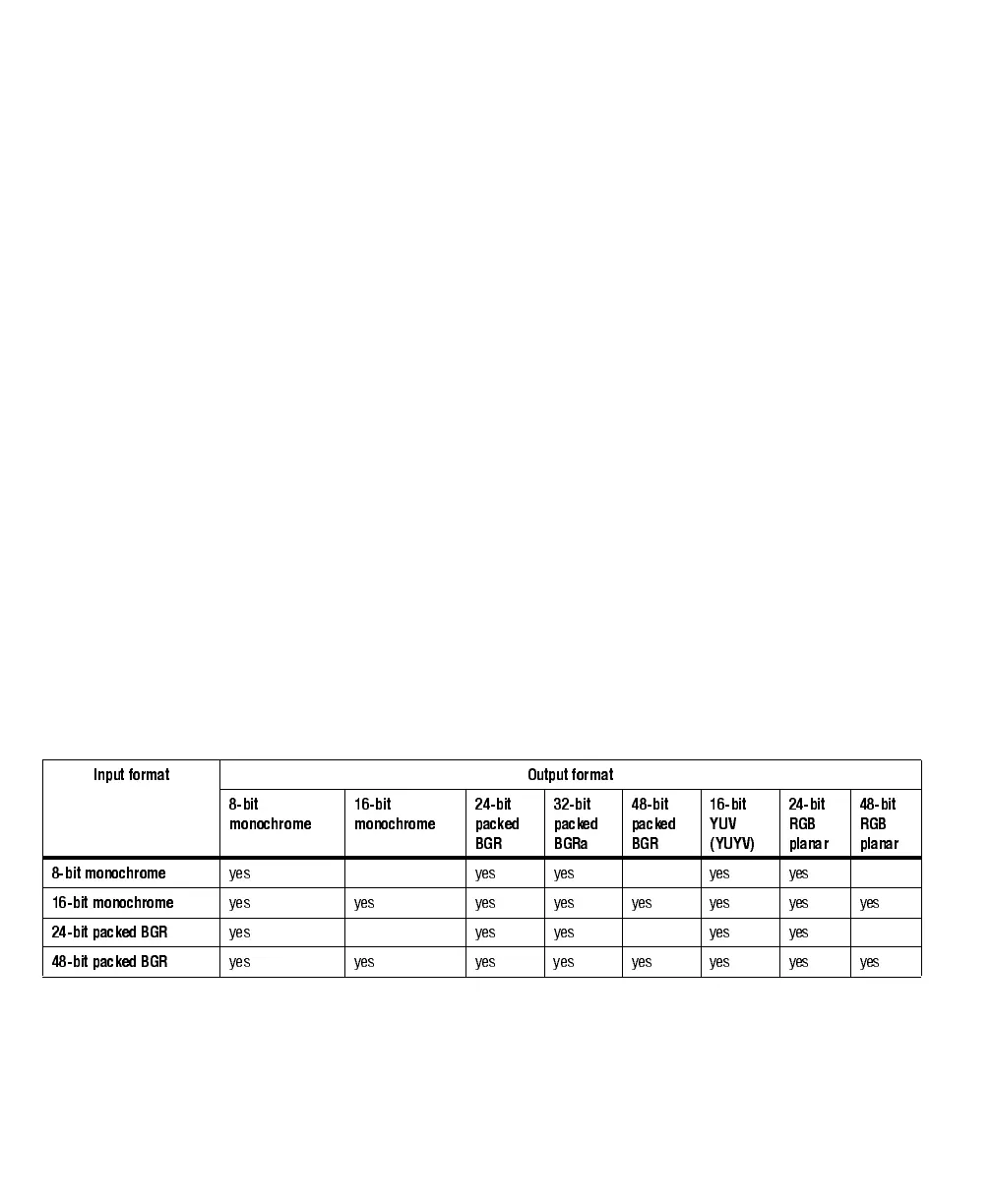
• Color space conversion. The color space converter and image formatter formats
an image based on its type and the bit-depth and color format of the destination
buffer. You can set the bit depth and color format of the destination buffer when
you allocate it using the MIL-Lite function MbufAlloc...(). The format of the
source image is established in the DCF.
Image data can be converted as follows:
Input format Output format
8-bit
monochrome
16-bit
monochrome
24-bit
packed
BGR
32-bit
packed
BGRa
48-bit
packed
BGR
16-bit
YUV
(YUYV)
24-bit
RGB
planar
48-bit
RGB
planar
8-bit monochrome
yes yes yes yes yes
16-bit monochrome
yes yes yes yes yes yes yes yes
24-bit packed BGR
yes yes yes yes yes
48-bit packed BGR
yes yes yes yes yes yes yes yes



 To Next Page