22 Matrox TripleHead2Go – User Guide
3
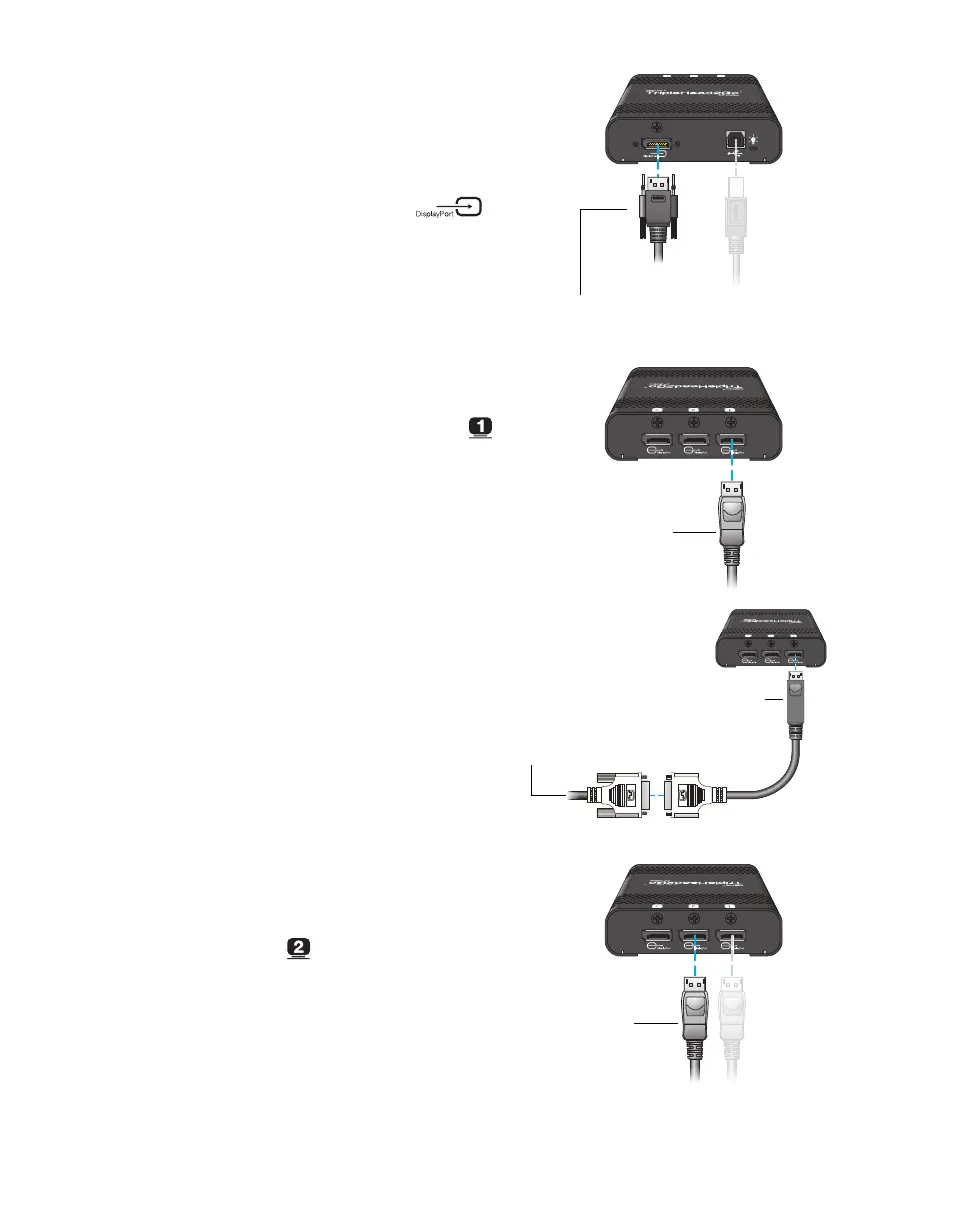
Attach the Matrox input cable
Attach one end of the Matrox DisplayPort
cable provided with your Matrox product to
the graphics connector on your computer.
Attach the other end of the cable to the
DisplayPort input connector ( )
on your Matrox product.
4
Connect the first monitor
Use your monitor cable to connect your first
monitor directly to the first connector ( )
on your Matrox product.
If your monitor has a DVI connector, use a
DisplayPort to DVI adapter (sold separately)
to connect your monitor to the connector.
If your monitor has an HD-15 connector,
use a DisplayPort to HD-15 adapter (sold
separately) to connect your monitor to the
connector.
5
Connect the second monitor
Use your monitor cable to connect your
second monitor directly to the second
connector ( ) on your Matrox product.
Matrox input cable
(DisplayPort to DisplayPort)
Monitor cable
(DisplayPort)
Monitor cable
(DVI)
DisplayPort to DVI
adapter
Monitor cable
(DisplayPort)


 To Next Page