1
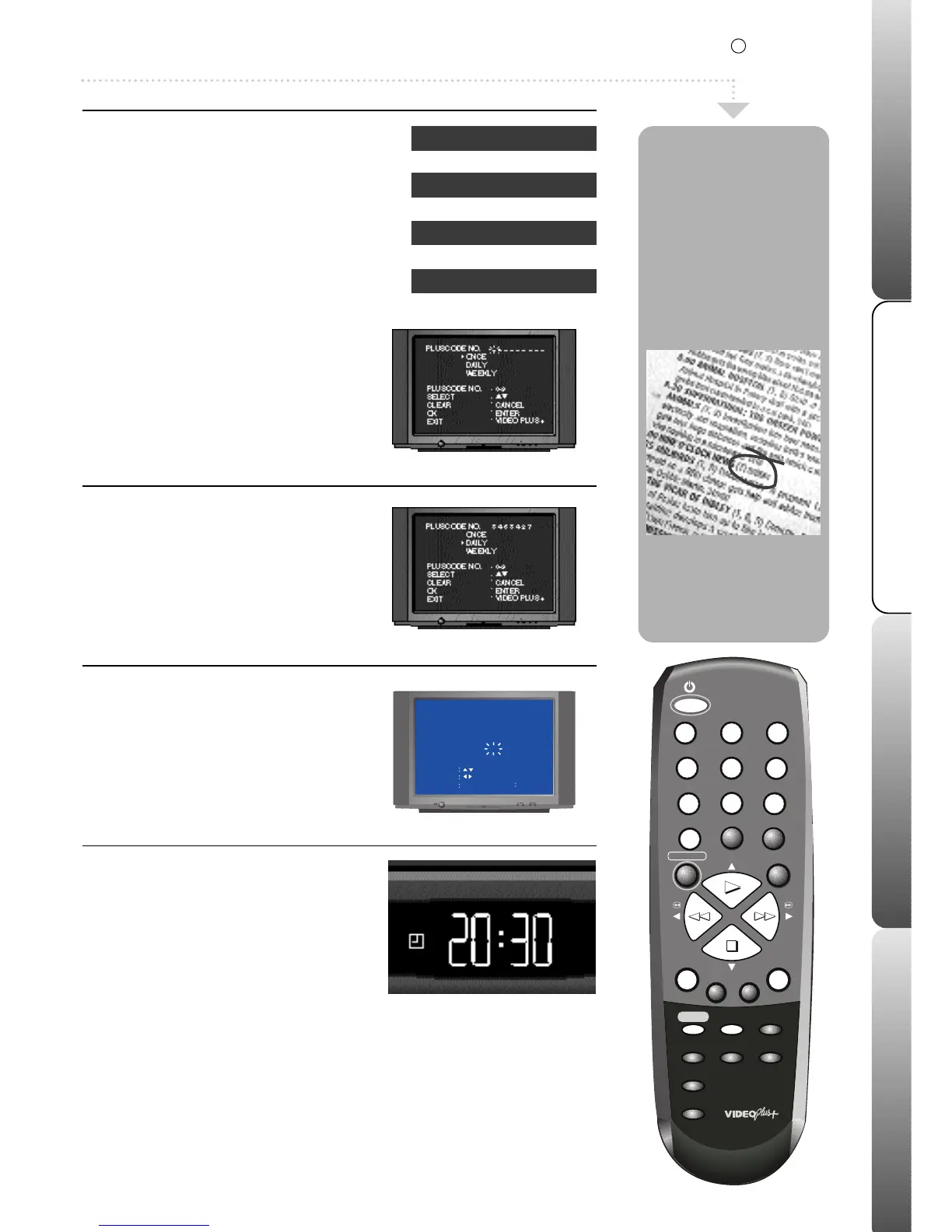
Enter a PlusCode
Insert a blank tape.
Press VIDEO Plus+/PROGRAM button
on the remote control.
Enter the PlusCode number for the
programme you wish to record using the
NUMBERED buttons.
If an incorrect PlusCode
is entered, the word ‘ERROR’ will be displayed.
2
Select how often to record
Repeatedly press PLAY or STOP to select
once, daily or weekly.
Select once for a single recording, daily to
record at the same time each day and weekly to
record at the same time weekly.
Press ENTER.
3
Set tape recording speed
Press PLAY or STOP to select SPEED (see
page 4 for more details). Press REW or
F.FWD to select the tape recording speed
(SP or LP).Press ENTER to confirm your
recording. To edit a recording, press PLAY
or STOP to highlight the recording and
then press ENTER.
4
Set to Timer Record Mode
Press the MENU button twice to remove the
timer recording screen.To programme further
recordings repeat stages 1 to 3. Press the
TIMER REC button to set your timer
recording.
(If the record protection tab has been
removed from your tape it will be ejected.)
Your
VCR will go into timer record mode (this
looks like standby, but the timer set symbol
will appear in the VCR display).If you do not
put your VCR into timer record mode your
recording will not take place. Your timer
recording is now set. At the set time your
VCR will switch on and record your
programme then go back into timer record
mode.When your VCR has recorded all your
programmes, press the TIMER REC button
to bring it out of timer record mode.
This recording system
makes programming a
recording much easier.
By entering the
PlusCode (the long
number after each
programme in your TV
listings) the correct
start time, end time,
channel and date are
set for you
automatically.
The VCR's timer allows
up to 8 programmings
to be set within a 1
month period.
VIDEO Plus+ and PlusCode are registered trademarks of Gemstar Development Corporation.
The VIDEO Plus+ system is manufactured under license from Gemstar Development Corporation.
5
VCR Channel
1
2
3
4
5
6
Station
BBC1
BBC2
ITV
Channel 4
Channel 5
decoder (if fitted)
In order for the VIDEO Plus+ system to work
correctly the channels in your VCR must be
stored in the order opposite. See the Quick
Start Guide tuning stations into your VCR to
change channel order.
R
system
This feature is only available on certain models.


 To Next Page
 Loading...
