The Matsuko Switch Box is a range of outdoor power control units designed for pond and garden environments. These devices provide a safe, weatherproof, and robust solution for managing electrical appliances outdoors. The range includes three models: the Switch Box, the Switch Box Timer, and the Switch Box Timer + PumpGuard™.
Function Description:
The Matsuko Switch Box range allows users to control up to five outdoor electrical appliances. The basic Switch Box model offers manual on/off control for each connected device. The Switch Box Timer adds programmable scheduling capabilities, allowing users to set individual on/off times for each connected appliance. The top-tier Switch Box Timer + PumpGuard™ model includes all the features of the Timer version, plus advanced PumpGuard™ technology for pump protection and a power consumption monitor.
Important Technical Specifications:
- Model Ratings: All models operate on 220-240V.
- Lines: All models feature 5 independent power lines.
- Max. Power Per Line: Each line can deliver up to 1500W of power (when installed with appropriate household electrical wiring).
- Max. Total Output: The total unit output for all models is limited to 3000W.
- Ingress Protection (IP) Rating: All units are IP56 rated, indicating protection against dust ingress and powerful water jets.
- Certifications: All units are CE approved.
- Internal Fuses: 6.3A G-Fuse 5 mm x 20 mm.
- Double Layer Capacitor (Switch Box Timer & Switch Box Timer + PG only): Stores electrical energy to retain programming for at least 24 hours during a power cut when fully charged. Requires a minimum of 48 hours of uninterrupted power to fully charge.
- Dimensions: 226 mm (width) x 160 mm (height) x 70 mm (depth).
Usage Features:
- Manual Control (Switch Box): Each connected device can be manually powered on or off at the touch of a button on the front panel.
- Programmable Control (Switch Box Timer & Switch Box Timer + PG): Users can individually program on/off times for each of the five lines. The programming menu is accessed via the "Menu" button, and settings are adjusted using "Up," "Down," and "Enter" buttons.
- Date and Time Setting: The date and time can be set in DD/MM/YYYY and 24hr clock format.
- Device Descriptions: Users can assign descriptive names to each line from a predefined list (e.g., Air Pump 1, Filter 1, Light 1, Feeder 1, UV 1, Aux 1, Pump 1, ).
- Program Slots: Each line can have up to five different program time slots (labelled "a" through "e").
- Program Slot Management: Program slots can be turned on/off, and on/off times can be set. Existing program slots can be edited or deleted.
- Manual Override: If a line is programmed to be off, it can be manually turned on/off by pressing its corresponding button. If a line is programmed to be on, it can be manually turned off and will revert to its programmed "on" state at the next scheduled time.
- Power Saving Mode: After 5 minutes of inactivity, the display enters power saving mode. Pressing the "Menu" key reactivates it.
- New Feeder Timer Function (Switch Box Timer & Switch Box Timer + PG): Allows users to specify the duration (in minutes and seconds, up to 20 minutes) for a feeder connected to line 4 or 5 to operate. This is programmed similarly to other line settings, with specific options for feeder type and duration.
PumpGuard™ Features (Switch Box Timer + PG only):
- Pump Protection: PumpGuard™ is a patent-pending smart technology designed to prevent pump damage due to blockages or overloads.
- Learning Mode: Line 1 automatically learns the normal operating behavior of a newly connected pump over a 20-minute period at different power levels.
- Monitoring Mode: After learning, PumpGuard™ continuously monitors the pump for signs of overloading or cutting out.
- Fault Detection and Response: If a pump constantly restarts, PumpGuard™ will attempt to run it on a lower intensity program. If the problem persists, it will disconnect power to prevent further damage.
- Alarm System: In case of a pump failure, PumpGuard™ sounds a stop alarm (fast beeping sound, red LED on line one) and displays "pump fail."
- Clearing a Fault: Faults can be cleared by accessing the PumpGuard™ menu, selecting "Clear," and pressing "Enter."
- Adding a New Pump: To allow PumpGuard™ to learn a new pump, access the PumpGuard™ menu, select "new pump," and press "Enter." The system will indicate "current deleted" and begin the 20-minute learning process.
Power Consumption Monitor Features (Switch Box Timer + PG only):
- Dual Readings: The digital display shows two electrical consumption readings:
- Line 1 individual power consumption.
- Total power consumption of all lines (1-5 combined).
- Individual Line Monitoring: To monitor an individual line's consumption, switch off all other lines.
- Accuracy: Provides an indicative reading with an accuracy of +/-5%.
Installation and Maintenance Features:
- Safety First: Always turn off the mains electricity supply before opening the cover or performing any maintenance.
- Qualified Electrician Recommended: Consultation with a qualified electrician is always recommended for any electrical installation.
- Isolation from Mains: Always isolate the unit from the mains electricity supply before carrying out any maintenance.
- Earthing: The unit must be earthed.
- Fuse: Never use a fuse larger than 13 amps on the power lead.
- Water Safety: The unit must not be submerged in water. Young children should always be supervised near water.
- RCD Requirement: Power must be supplied through a Residual Current Device (RCD) with a residual operating current not exceeding 30mA.
- Cover Opening: The cover is opened by inserting a small screwdriver into a round opening at the base, pushing a fastening connection to the left, and gently lifting the cover to a maximum angle of 100 degrees.
- Cable Connections: Wires are connected to appropriate Live, Neutral, and Earth pins. Power input is via a separate mains channel. Cables are secured with two screws and a cable grip. The supplied cable gland sealing ring should be turned clockwise for a firm, sealed connection.
- PCB Terminal Blocks: Features easy click-push connectors for power in and out cables. A screwdriver is used to push the fastening clip, allowing cable insertion, then releasing to secure. Ferrule clamps are recommended for safe connections.
- Closing Screw: The lid must always be secured with the closing screw (packed with blanking plugs) after connecting appliances.
- Blanking Plugs: Two blanking plugs are supplied to replace cable glands if a device is not wired into a particular port.
- Power Failure Restart: Following a power failure, the Switch Box will restart with each line in the same position as before the interruption. The Switch Box Timer will resume its programming, provided the backup capacitor is fully charged (requires 48 hours of uninterrupted power). Long-term outages may require re-programming.
- Disposal: The product is designed for recycling. Users should contact their local authority for correct disposal of electrical and electronic equipment, in accordance with European Directive 2002/96/EC.

 Need help?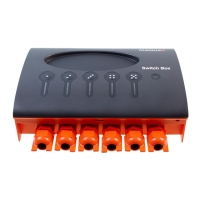

 To Next Page
 General