10
EN
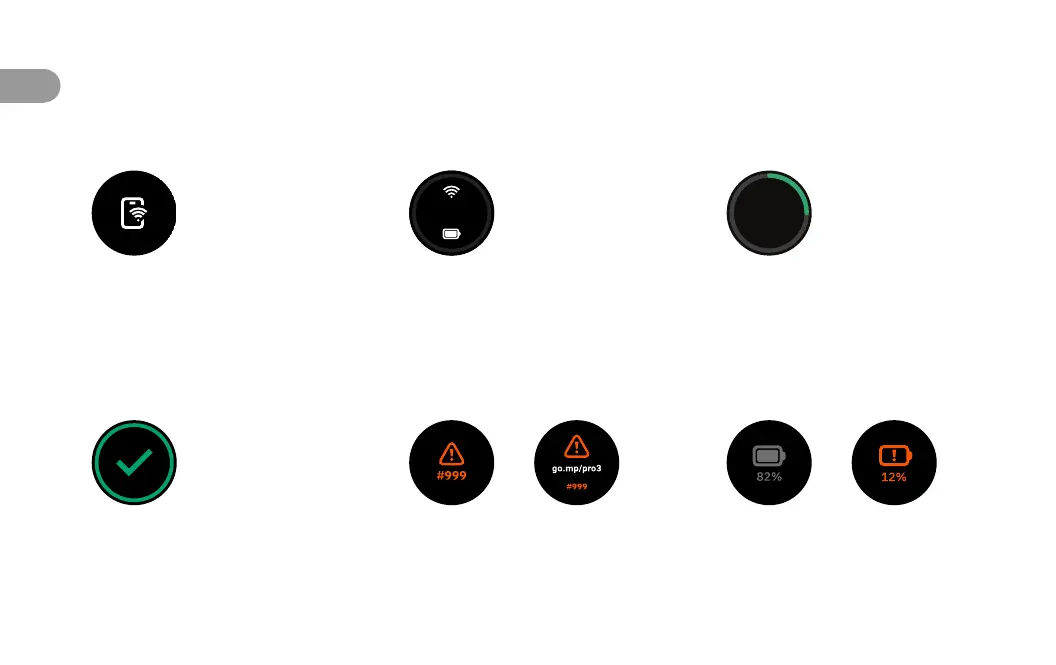
Connected
Indicates the camera is connected
to Wi-Fi.
Ready to Scan
Indicates the camera is ready for
rapid scanning from point to point.
Scanning
Green line indicates scan progress as
the camera rotates.
Ready to Move
Once a scan is complete, this
indicates the camera is ready to
move to the next scan point.
Error Status
Check the Matterport app or visit
go.mp/pro3 to look up the error
code on the screen.
Battery Status
When the camera is off, tap the
power button to check the battery
level without booting up the camera.
Camera Display Guide


 To Next Page
 Loading...