14.6. Odometers review
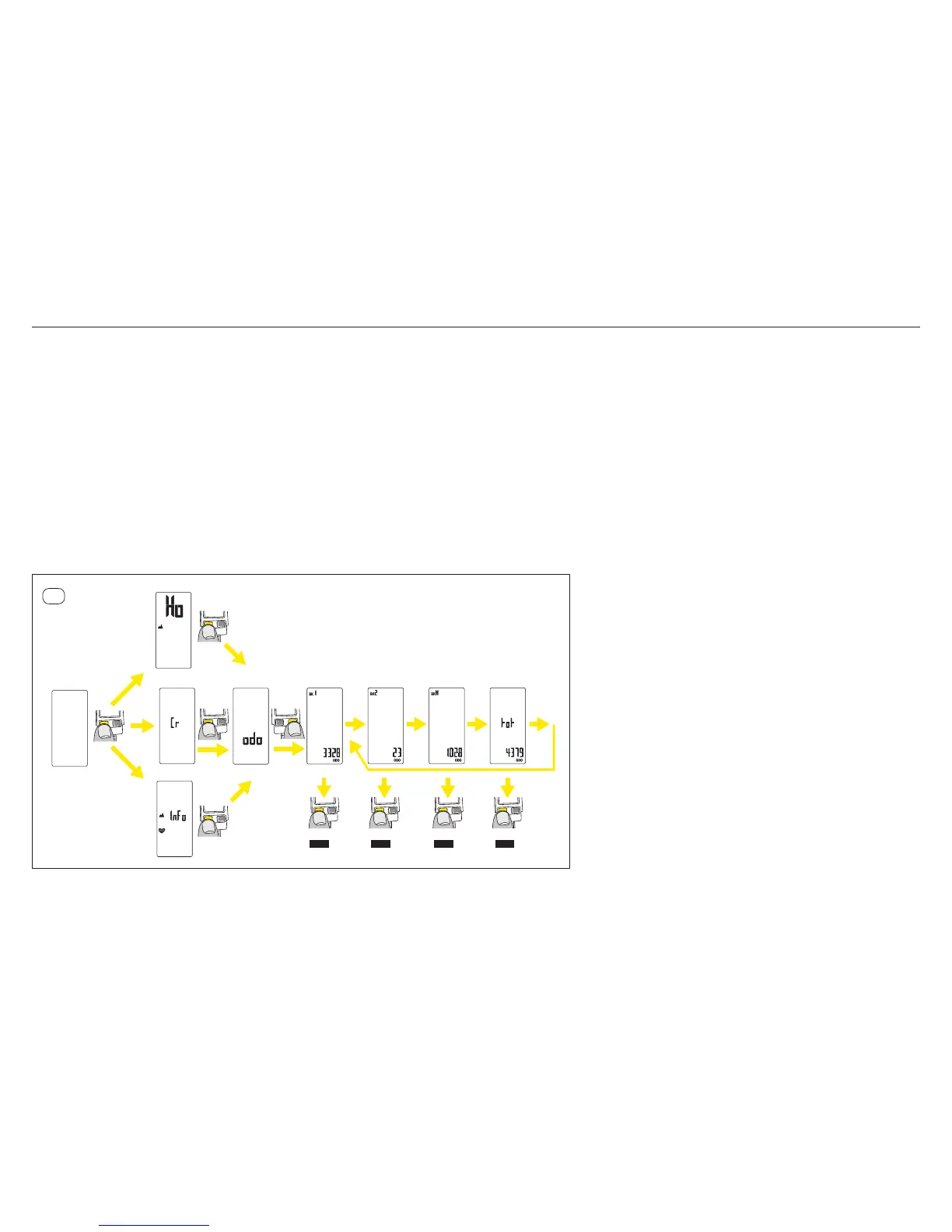
Proceed this way to read the dierent bike / speed sensor odometers data.
Enter the elevation set up and data review menu: From any screen, press the left button for 2 seconds.
– On Wintech USB Alti and Wintech USB Ultimate, briey press the left button (BPL) 4 times to switch to the odometer review section: “odo” appears on the computer screen.
– On Wintech USB HR, briey press the left button (BPL) twice to switch to the odometer review section: “odo” appears on the computer screen.
– On Wintech USB, briey press the left button (BPL) once to switch to the odometer review section. “odo” appears on the computer screen.
Briey press the right button (BPR) to enter the odometer review section.
The review of odometers from the dierent speed sensors automatically starts in the following order:
– Bike 1
– Bike 2
– Bike H
– Total
Each piece of information is displayed for 3 seconds.
These data will run around until you press and hold the left button for 2 seconds. Then, the computer switches back to the last active screen.
If no button is pressed for 2 minutes, the computer automatically switches back to the last active screen.
14.6
2 sec.
Alti
Ultimate
USB
HR
4 click
1 click
2 click
1 click
after
3 sec
auto
after
3 sec
auto
after
3 sec
auto
after
3 sec
auto
any
screen
2 sec 2 sec 2 sec 2 sec
EXIT EXIT EXIT EXIT


 To Next Page