See part 14.2 of this user guide to learn how to use the Home Elevation.
The Home altitude is useful to easily and rapidly recalibrate your computer before
you start a new ride. The Home altitude shall be set up at your most frequent point
of departure. We recommend that you precisely know the elevation of this point.
10.3.4. Choose your temperature unit (Celsius or Fahrenheit).
As a result from the last brief press on the right button (BPR) to validate the home altitude, you
enter the temperature unit set up: ° ashes.
Briey press the left button (BPL) to change from Celsius (C) to Fahrenheit (F).
Validate your choice by briey pressing the right button (BPR) and exit the elevation menu. You
will automatically return to the last active display.
Choosing the temperature unit (°C or °F) automatically updates the elevation (m or ft) and
distance unit (km or mi) according to the metric or imperial measurement standard.
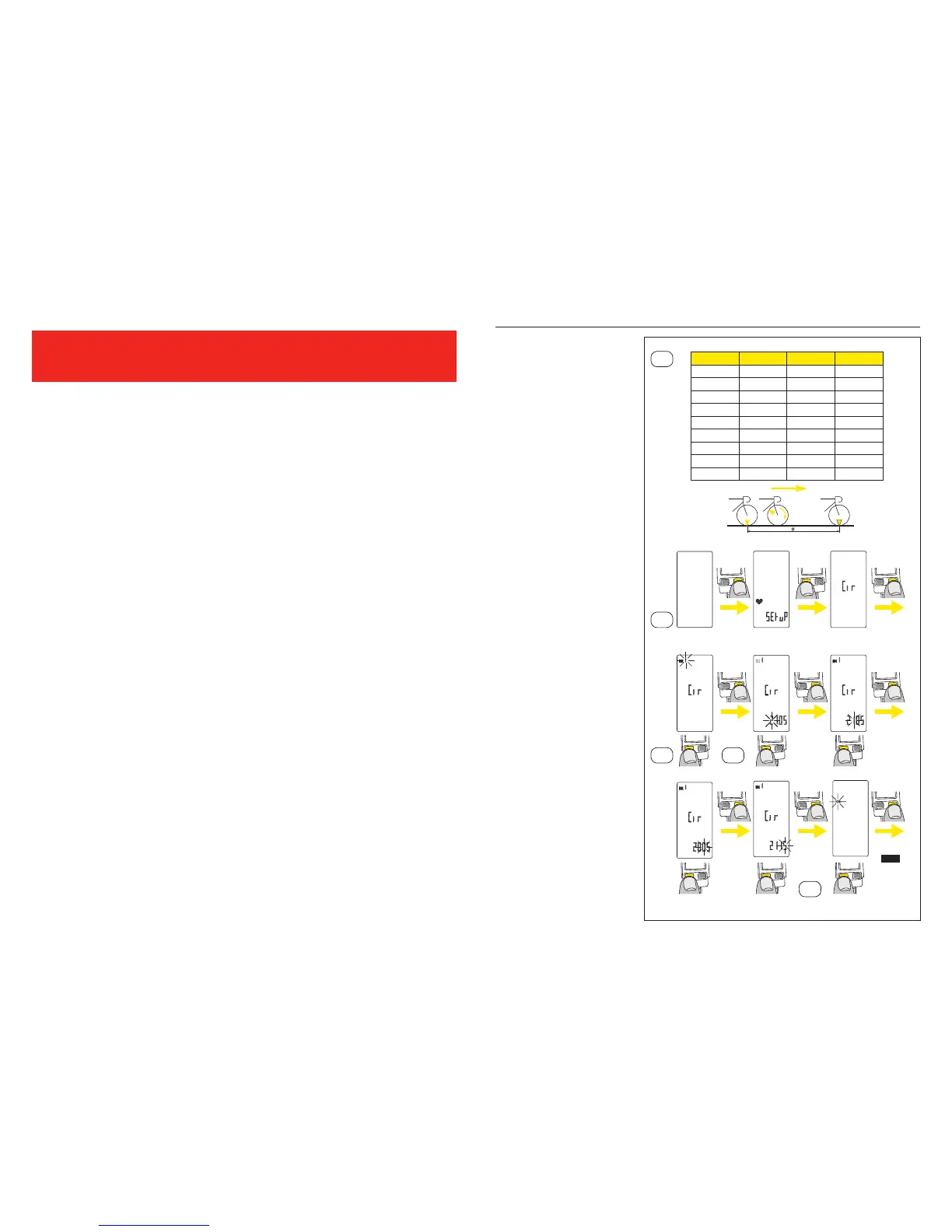
10.4. Wheel circumferences and distance unit set up
Consult the table of
approximate correspondences
to check your wheel
circumference (see table
10.4.). For a more precise
measurement, proceed as
follows:
– Make a mark on the tire and
on the ground at the point of
contact between the tire and
the ground.
– Do one full turn of the wheel
and mark on the ground the
place where the mark on the
tire touches the ground.
– Measure the distance (D)
between these two points in
millimeters.
10.4.1. Enter the Wheel
circumferences set up
menu:
From any active display, press
and hold the right button
(BPR) for 6 seconds.
– On Wintech USB Ultimate,
briey press the left button
(BPL) 3 times to move to the
wheel circumferences and
distance unit set up section.
“Cir” appears on the screen.
– On Wintech USB Alti and
Wintech USB HR, briey
press the left button (BPL)
twice to move to the wheel
circumferences and distance
unit set up section. “Cir”
appears on the screen.
– On Wintech USB, briey
press the left button (BPL)
once to move to the wheel
circumferences and distance
unit set up section. “Cir”
appears on the screen.
Briey press the right button
(BPR) to start the wheel
circumferences and distance
unit settings operations. Cir
and BK appear on the screen
and the bike number ashes
beside BK.
Tyre Circumf. Tyre Circumf.
26’’x1,5 2020 700Cx19 2100
26’’x1,75 2070 700Cx20 2110
26’’x1,9 2090 700Cx23 2130
26’’x2,0 2110 700Cx25 2140
26’’x2,1 2130 700Cx28 2150
26’’x2,2 2150 700Cx32 2170
26’’x2,3 2170 700Cx35 2200
650Cx19 1930
650Cx23 1990
10.4
10.4.1
10.4.2 10.4.3
10.4.4
6 sec.
3 click (Ultimate)
2 click (Alti, HR)
1 click (USB)
1 click
1 click
1 click
1 click
1 click
1 click
1 click
any
screen
select
select
select
select
select
select
EXIT


 To Next Page