SmartDrive User’s Manual 5
2. SmartDrive Set-Up
Drive Unit Attachment
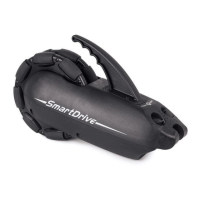
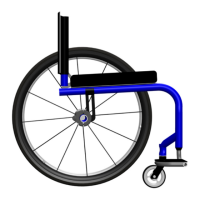
e SmartDrive is designed to easily and quickly attach to all types of manual wheelchairs, both rigid and folding. Refer to
the Specication Sheet to verify the compatibility of the wheelchair.
Use the separate directions provided with your drive unit attachment hardware for correct set-up prior to use.
Adjustments made to the wheelchair set-up could aect the orientation of the SmartDrive. Adjust the
attachment hardware, if needed, whenever changes are made to the chair or its wheels.
Wristband Install and Attachment
e wristband module is designed to be easily installed into the wrist band of size that securely holds it to the top part of
your wrist. It has an embedded accelerometer that veries that your hands are pushing on your handrims before activating the
power assist, and also senses when you tap your hand against the handrim to deactivate the power assist. Additionally, it is
equipped with an LED and vibration motor to indicate dierent states and activations/deactivations that occur during opera-
tion.
Each new SmartDrive drive unit is shipped with a wristband module that is specically paired to it to prevent communica-
tion with other drive units. is is indicated by the same last four (4) digits in the serial number on each [i.e. drive unit serial
number 201234 is paired with wristband module serial number A21234].
Use the separate directions provided with your wristband for module installation and attachment instructions.
Thumb Throttle Buttons [sold separately]
e two (2) SmartDrive frame mounted thumb throttle buttons are easily mounted to a wheelchair to allow for close access
and easy pressing. e buttons can be used to deactivate the motor, as well as provide a means of actively powering the motor.
ese are sold separately as an optional accessory. Use the separate directions provided with the buttons for correct set-up and
operation prior to use.
3. Operating the SmartDrive
Training Mode
SmartDrives are shipped in training mode to allow for familiarity and wristband deactivation practice prior to extensive
use. Training mode is indicated by green [and red] LED indication on the wristband [instead of blue and red for normal
operation as described in the following section]. In this mode, the deactivation means is the same as normal operation [see
Deactivation section], but you are also able to deactivate the power assist by braking on the handrims of the wheelchair.
e SmartDrive recognizes the deceleration that the wheelchair experiences from the braking and turns the motor o. is
mode should be used to perfect the tapping motion needed by the wristband to deactivate the motor, upon which it is time to
switch to normal operation to get the most our of your SmartDrive in all the environments encountered on a daily basis. To
get out of training mode, just press and hold the button on the wristband for ve (5) seconds, at which point you will feel a
vibration and see the wristband LED change to blue; then release the button. You are now in normal operation and can only
deactivate the power assist with the wristband/tapping.
Power Assist Ready
e user of a SmartDrive equipped wheelchair is able to use the power assist whenever desired or turn the device o and
operate their wheelchair as if the SmartDrive was not on their chair.
With the drive unit already attached to the wheelchair and powered on [as described in the attachment hardware directions],
the SmartDrive will wait for the specically paired wristband to be powered on. e wristband is turned on by pressing and
releasing the button on its top side. Once the wristband is turned on [as indicated by the LED on the wristband giving a blue
ash every (1.5) seconds and a single vibration] it will attempt to wirelessly connect to the drive unit. Whenever the wrist-
band is attempting to wirelessly connect to the drive unit, whether because of a loss of connection or from initially turning the
wristband on, the LED on the wristband will ash red. When the wireless connection is made or regained, the red ashing
will stop. Once the wristband has wirelessly connected to the drive unit, the SmartDrive power assist is ready and waiting for
a push to be performed to provide assistive power.


 To Next Page