SmartDrive User’s Manual 7
e push activated power assist can ALWAYS be deactivated by pressing the wristband button to turn it o. If you
have thumb throttle buttons, pressing and releasing either button will also deactivate the motor if driving.
Serious care should always be taken on hills, inclines, ramps, etc.
While the wristband is designed to sense the tap/impact of your wristband wearing hand, other movements done with
your hands while the motor is driving can possibly cause deactivation. Whenever power assist is being provided, it is
recommended to position your hands over your handrims for steering, then a sti wrist tap then brake when desired to
deactivate and slow down.
ALWAYS turn your wristband o before transferring out of your wheelchair and taking the drive unit o to prevent ac-
cidental activation.
Anti-Rollback
Anytime that the power assist is deactivate on an incline or due to a loss of wireless connection [the drive unit will beep for
this second case], automatic rollback resistance lasting (3) seconds will be provided to prevent the wheelchair and the user
from rolling backwards. Whenever the rollback resistance is not activated, the SmartDrive will roll backwards freely.
As warned before, serious care should be taken on all hills, inclines, ramps, etc.
e rollback resistance may not be able to prevent the quick rolling back on especially steep slopes and/or for very
heavy wheelchair users.
Anti-rollback is not a parking brake. Be sure the secure your wheelchair with brakes if stopping on a slope is desired.
• Loose dirt, sand or gravel
• Standing water
• Icy surfaces
• Rough terrain
• Extreme slopes
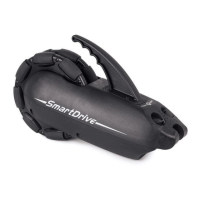
e total weight of the SmartDrive assembly is 13.5 lbs (6.1 kg). is weight should be included in calculating the on-board
weight of the wheelchair. The maximum allowable on-board weight outlined by one’s wheelchair manufacturer should never
be exceeded with the addition of the SmartDrive.
e best way to climb ramps and inclines is to go slow. On cross-slopes, perform a push to get the motor driving, then brake
with the uphill hand on the wheelchair handrim to go straight.
Also, rollers on the omni-drive wheel allow for pivoting of the wheelchair as they smoothly roll side-ways over surfaces. Care
should be taken to make sure the drive unit doesn’t get caught on things like curbs or small sidewalk cracks when you pivot.
e attachment hardware is designed to fail rst, so if you the drive unit stuck, this can break the clamp/folding adaptor bar
and leave you without power assist. Sometimes it is best to turn the SmartDrive o, negotiate the situation manually and then
start using the assistive power again.
If any part of the SmartDrive is accidentally submerged or doused in water, the user should cease usage and allow 12 hours
for it to air dry before attempting to use again. It is recommended to always store the drive unit and wristband indoors. If
your device has been stored in extreme temperatures, allow time for it to warm up or cool down prior to use.
e operating temperature of the SmartDrive is between -25 C and 50 C
If any malfunctions or issues are experienced with the SmartDrive, cease use of the device and contact Max Mobility for as-
sistance.
Operating Conditions
e SmartDrive is designed for typical operating conditions encountered by a manual wheelchair user on a daily basis. Max
Mobility recommends restricting the use of this device to indoor and light outdoor use. All operating conditions set forth by
one’s wheelchair manufacturer should always be heeded, in addition to the avoidance of the following:


 To Next Page