6 max mobility
®
e SmartDrive is able to recognize all types of pushes. Do not alter the way that you push for this could lead to
injuries in the future.
Care should be taken when using the SmartDrive on a decline. Consider switching the wristband o when descending
down a slope.
e acceleration of the SmartDrive could possibly cause the wheelchair to tip-over backwards, causing injury. It is recom-
mended that the user lean slightly forward to prevent this tipping.
Deactivation
As mentioned in the prior section, there are multiple ways to deactivate the power assist. e safest and therefore preferred
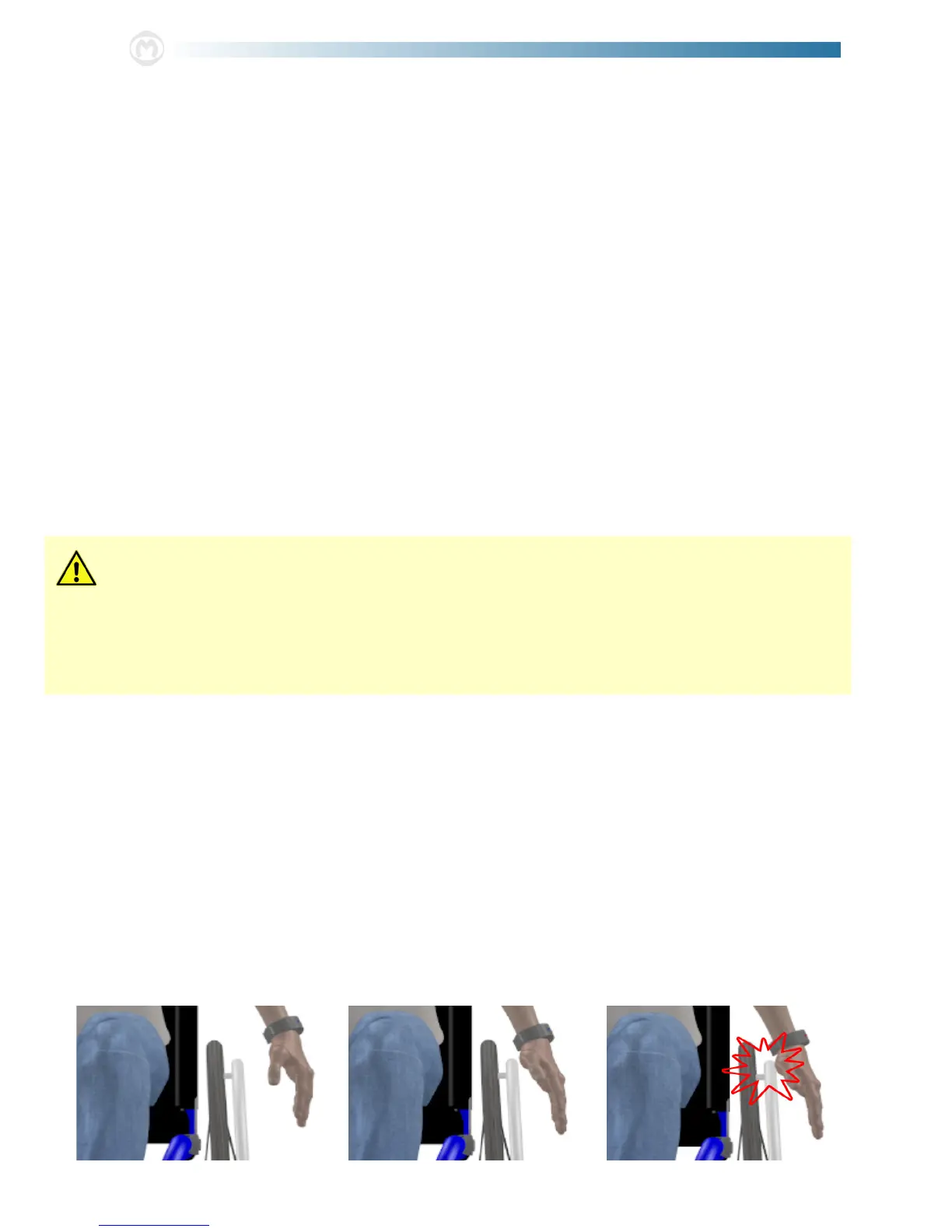
way of deactivation is to perform a hitting motion with your wristband wearing arm. Motion sensors in the wristband sense
this hitting motion [see graphics below] and then deactivate the motor. Ideally, the deactivation motion will be performed by
the user hitting their hand against their handrims with a sti wrist prior to braking. Sucient deactivation motion is indi-
cated by the LED on the wristband illuminating red for one (1) second. is indication is given even when the motor is not
driving, so practice and familiarity should be done prior to use.
Whenever the motor is deactivated, the wristband will vibrate in addition to its LED being illuminated red as indication that
power assist is no longer being provided.
e nal way to deactivate the motor is to press and release the button on the wristband. is means of deactivation will give
a double vibration and red LED indication before the wristband turns o.
If any malfunctions or push detection/braking/thumb throttle button issues are experienced with the SmartDrive, cease use of
the device and contact Max Mobility for assistance.
Pressing and releasing the button on the top of the wristband will turn it o. If the wristband has been turned o, the indica-
tion LED will cease from ashing and a double vibration will be given. With the wristband o, the drive unit will not be able
to activated to provide power assist, so you are able to push the wheelchair around with no power assist.
Cruising Power Assist
With the power assist ready [the drive unit and wristband both on and wirelessly connected], the SmartDrive is able to rec-
ognize when you have performed a push on the wheelchair. In turn, the device activates the omni-drive wheel, and an assistive
drive power is provided, propelling you at a speed equal to that which was attained by the push. e SmartDrive is able to
recognize each individual’s push, so no alterations to one’s propulsion technique is needed. is is ideal for everyday use as it
reduces the number of pushes that have to be performed. Push recognition and motor activation is indicated to the user by a
vibration in the wristband and the LED being illuminated solid blue.
e SmartDrive is designed to continue to drive the user until a tapping motion is performed by the wristband worn arm
or the wristband is turned o [as described in the Power Assist Ready section] OR until another, faster push is performed.
In this last case, the SmartDrive will speed up and begin to drive the user at this faster speed attained when the user pushed
harder [a single vibration will be given while the LED on the wristband will continue to stay lit blue]. Once a push is per-
formed and the motor is activated, position your hands over your handrims [and thumb throttle buttons, if present] to be
prepared to turn o the motor when braking/deactivated power is desired.
Refer to the Specication Sheet for the maximum speed that the SmartDrive is able to drive from push activation.
If any malfunctions or push detection/deactivation/thumb throttle button issues are experienced with the SmartDrive, cease
use of the device and contact Max Mobility for immediate assistance.


 To Next Page