- 6 -
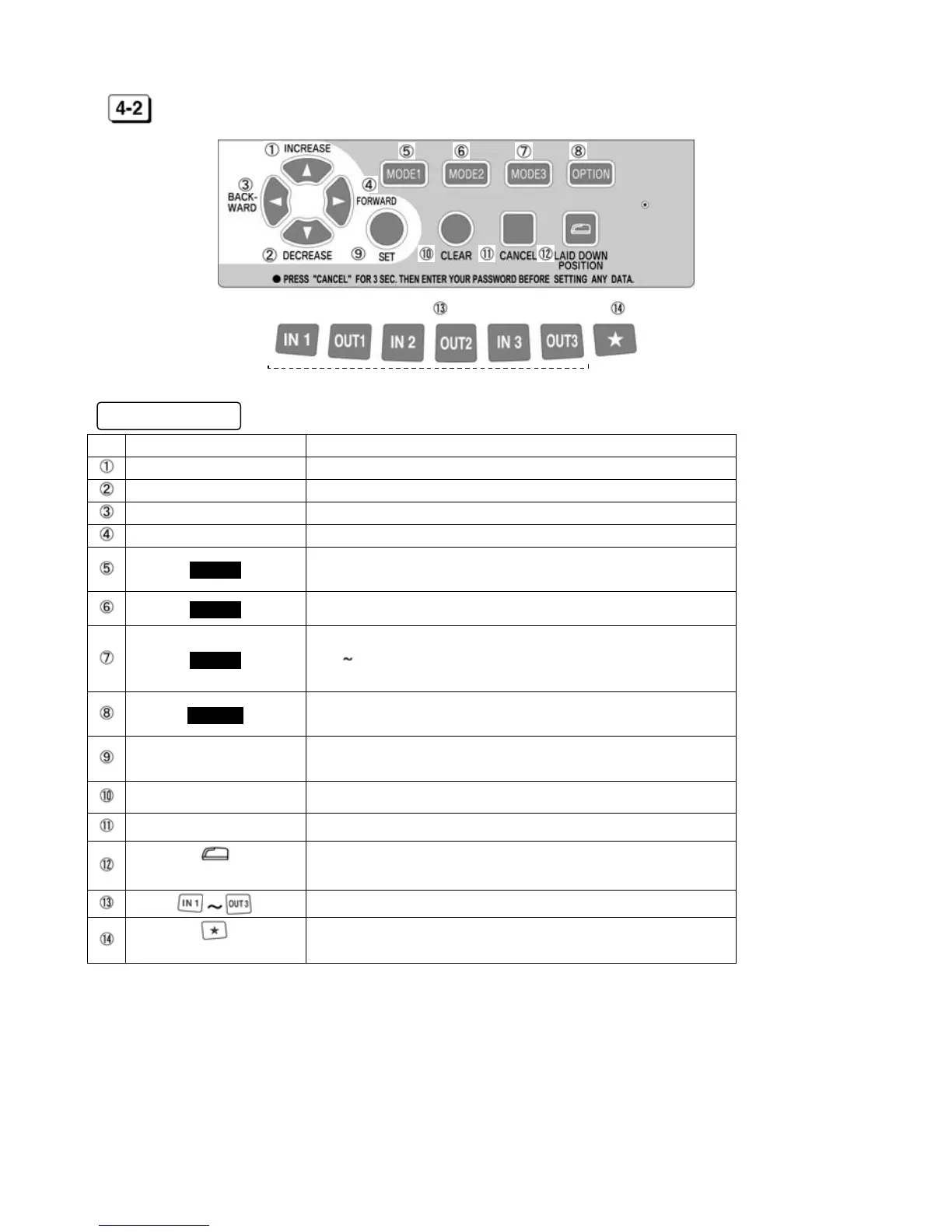
KEYBOARD LAYOUT
Functions of keys
No. Description Functions
INCREASE To increase number.
DECREASE To decrease number.
BACKWARD To back setting item (Code No.).
FORWARD To forward setting item (Code No.).
MODE1
To set Machine Mode1, Machine Mode2, Pay Closing Date, 60
or 100 scale and Daily Total Hours. (See [7] on page 10)
MODE2 To set Year, Month, Date and current Time. (See [8] on page 14)
MODE3
To set Holiday, Special Day, Line Shift Time, Working Time
(IN1 OUT3, OST) and Daylight Saving Time.
(See [9] on page 14)
OPTION
To set Password, Time Length, Time Signal and LCD Backlight.
(See [10] on page 18)
SET
To register all setting data and return to the start of setting
mode.
CLEAR To initialize current setting item.
CANCEL To return to the start of setting mode without registration.
(LAID DOWN POSITION KEY)
To turn the time on the display upside down.
To select a desired column.
To print the time in the same line of the day after Line Shift Time.
(NEXT DAY OVERTIME KEY)
[External Keys]



 To Next Page