EasyManua.ls Logo

MAXDATA M-BOOK 600 - System Map: Front View with LCD Panel Open

MAXDATA M-BOOK 600
93 pages
Print Icon
To Next Page IconTo Next Page
To Previous Page IconTo Previous Page
Loading...
5
English
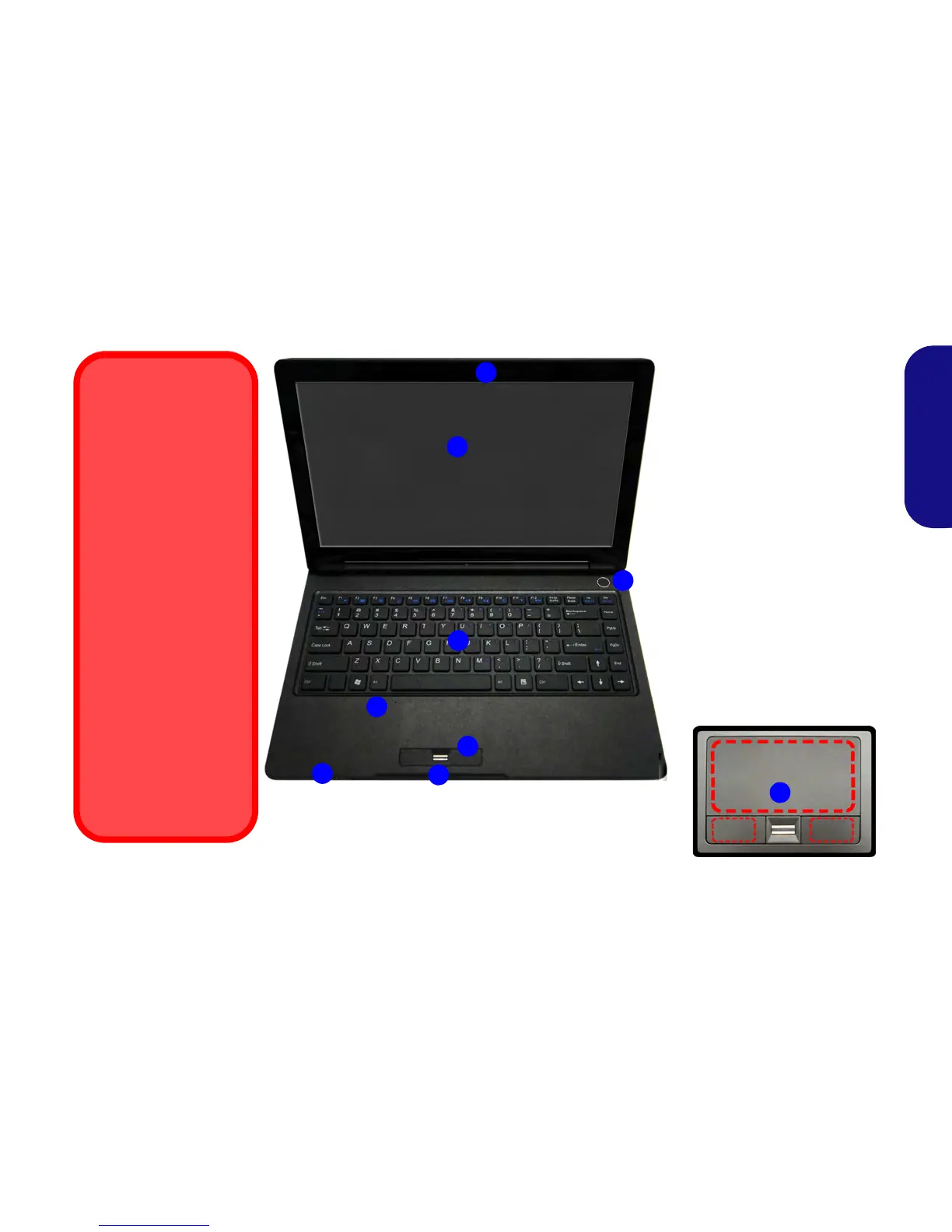
System Map: Front View with LCD Panel Open
Figure 2
Front View with LCD Panel
Open
1. PC Camera (Optional)
2. LCD
3. Power Button
4. Keyboard
5. Built-In Microphone
6. LED Indicators
7. Touchpad & Buttons
8. Fingerprint Reader
7
Wireless Device
Operation Aboard
Aircraft
The use of any portable
electronic transmission
devices aboard aircraft
is usually prohibited.
Make sure the wire-
less modules are OFF
if you are using the
computer aboard air-
craft.
Use the key combina-
tions (or WLAN Switch
for wireless LAN only)
to toggle power to the
3.75G/HSPA/WLAN/
Bluetooth modules,
and check the LED indi-
cator/visual indicator to
see if the modules are
powered on or not (see
Table 1 on page 6 and
Table 2 on page 9).
Note that the Touchpad and Buttons
valid operational area is that indicated
within the red dotted lines above.
2
4
1
3
5
6
8
7

Table of Contents

Other manuals for MAXDATA M-BOOK 600

Related product manuals