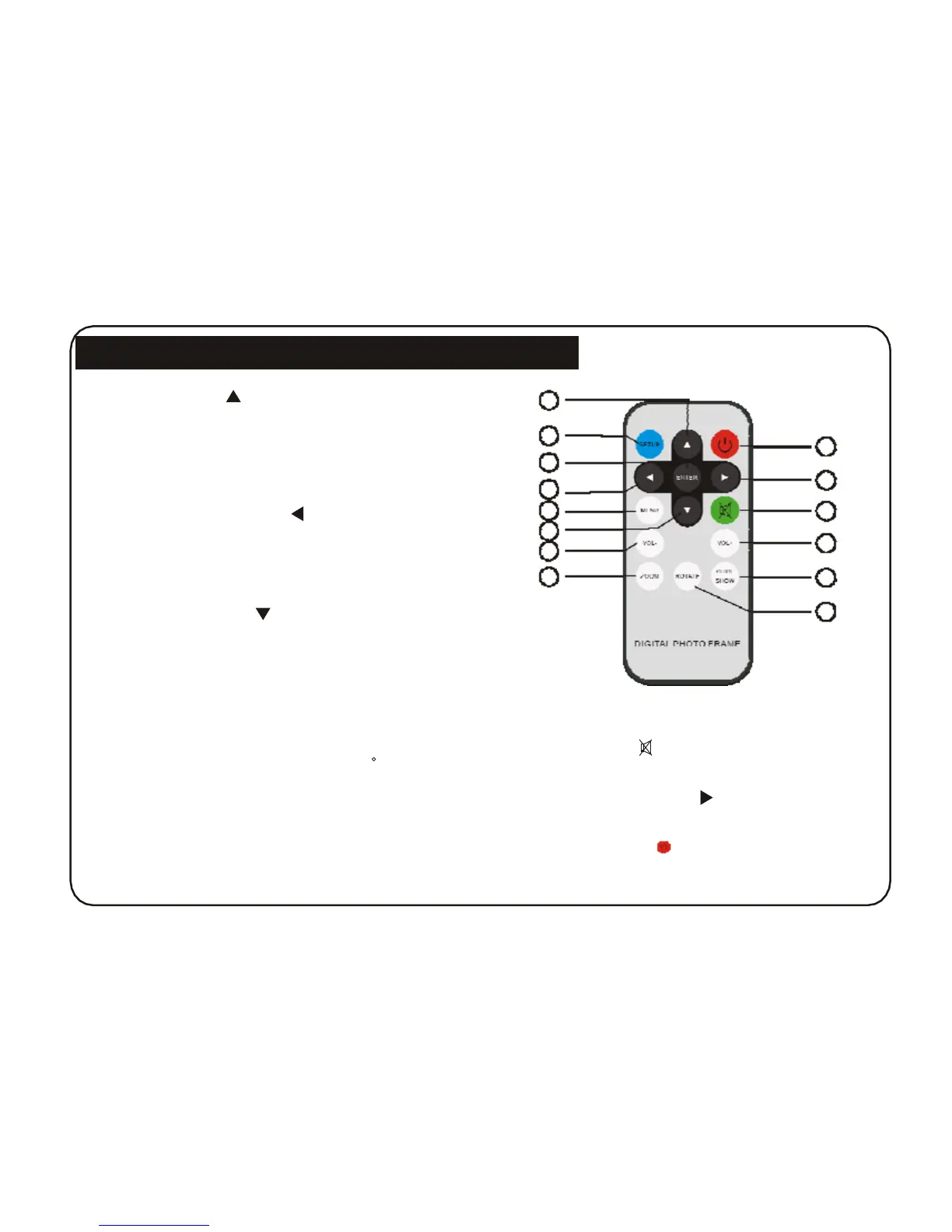
Remote Controller Function Buttons
1. UP BUTTON( ): Up cursor selection.
1
2. SETUP BUTTON: Used to enter the photo frame
2
setup options.
14
3
3. ENTER BUTTON: Used to confirm options.
13
4
4. LEFT SHIFT BUTTON( ): Left cursor selection
5 12
6
5. EXIT BUTTON: Press EXIT key to return into last
interface.
7
11
8
10
6. DOWN BUTTON( ): Down cursor selection.
7. VOL- BUTTON: Used to adjust the volume.
8. ZOOM BUTTON: Used to zoom into the image.
Used to select multiple files in photo menu.
9. ROTATE BUTTON: Picture rotate 90 clockwise.
10. SLIDE SHOW BUTTON: Pressing this the button
will select Photo+Music play.
12. MUTE BUTTON( ): Press once to silence
audio
playback. Press again to resume audio playback.
13. RIGHT SHIFT BUTTON( ): Right cursor
selecting.
11. VOL+ BUTTON: Used to adjust the volume.
14. POWER BUTTON( ): This is used to turn
ON/OFF the player.
4



 To Next Page