EN
Operation Instructions
Charging the headset
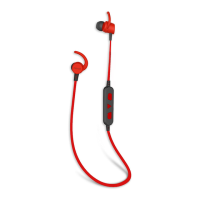
● Your earphone uses a rechargeable built-in battery,make sure the earphone is
fully charged before using it for the first time.
● Connect the USB cable to the charging socket,the earphone can be charged.
Ensure it is connected to a 5v DC power source (e.g. AC Power adaptor / PC USB
socket)
● During charging,the LED indicator light remains red,when charging completed,
it turn off.
Pairing and Connecting the earphone with a phone
● Automatically enter pairing mode: red and blue lights flashing alternately, when
pairing successfully ,the blue indicator light flash.
● Activate the Bluetooth feature on your phone and search for the headset.
● Select the headset (example:EB-BT100) from the list of devices found by your phone.
Turning the earphone on
● Press the power switch button for 3 seconds in shutdown mode,you will hear
voice prompt.
Turning the earphone off
● Press the power switch button for 3 seconds in standby mode,you will hear
a voice prompt.
Reconnecting the headset with a phone
● Your headset will attempt to reconnect automatically each time you turn it on,but
this feature may be unavailable on some devices,you can try to reconnect from paired
devices on phone.
4


 To Next Page