1 2 3 4
5
6
7
8
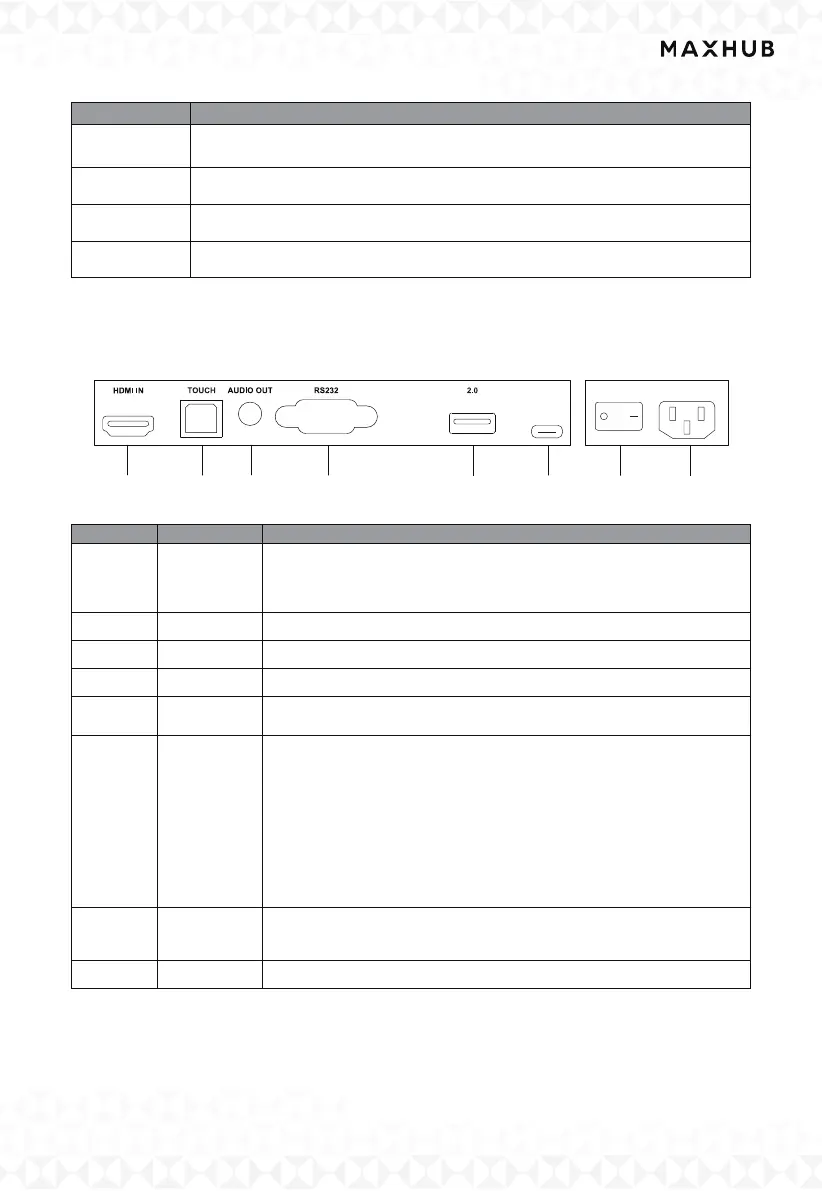
VIII. Terminal Interface
7
USB 3.0 Connect USB devices such as mobile hard disk, U disk, USB
keyboard ,mouse, USB drives, etc.
8 Loudspeaker Sound output
9 Microphone The sound is collected when the microphone is on
10 Camera The images are collected when the camera is on
:
:
:
:
1 HDMI IN
High-definition multimedia interface signal input, connect to devices
with HDMI output interface (personal computer with HDMI output,
set-top box, or another video device).
2 TOUCH Touch signal output to the external computer.
3 AUDIO OUT Audio output to the external speaker.
4 RS232 Serial interface, used for mutual transfer of data between devices.
5 2.0
Connect USB devices such as mobile hard disk, U dis
k, USB keyboard
and mouse, USB drives,etc.
6 USB Type-C
Support charging, data transmission, extension for audio and video
output interface, etc.
Note The maximum rated power of the USB Type-C port of this
product is 5W. When using this port to charge electronic devices, the
charging power of the electronic device cannot exceed the rated
power of this port. If the charging power of the
electronic device
exceeds the rated charging power of this port, please Do not directly
use this port for charging.
7 AC SWITCH
To open or shut down AC power supply. “I”means power on, “O”
means power o.
8 AC IN AC power input, connect AC power supply.
:



 To Next Page