II. Installation Guide
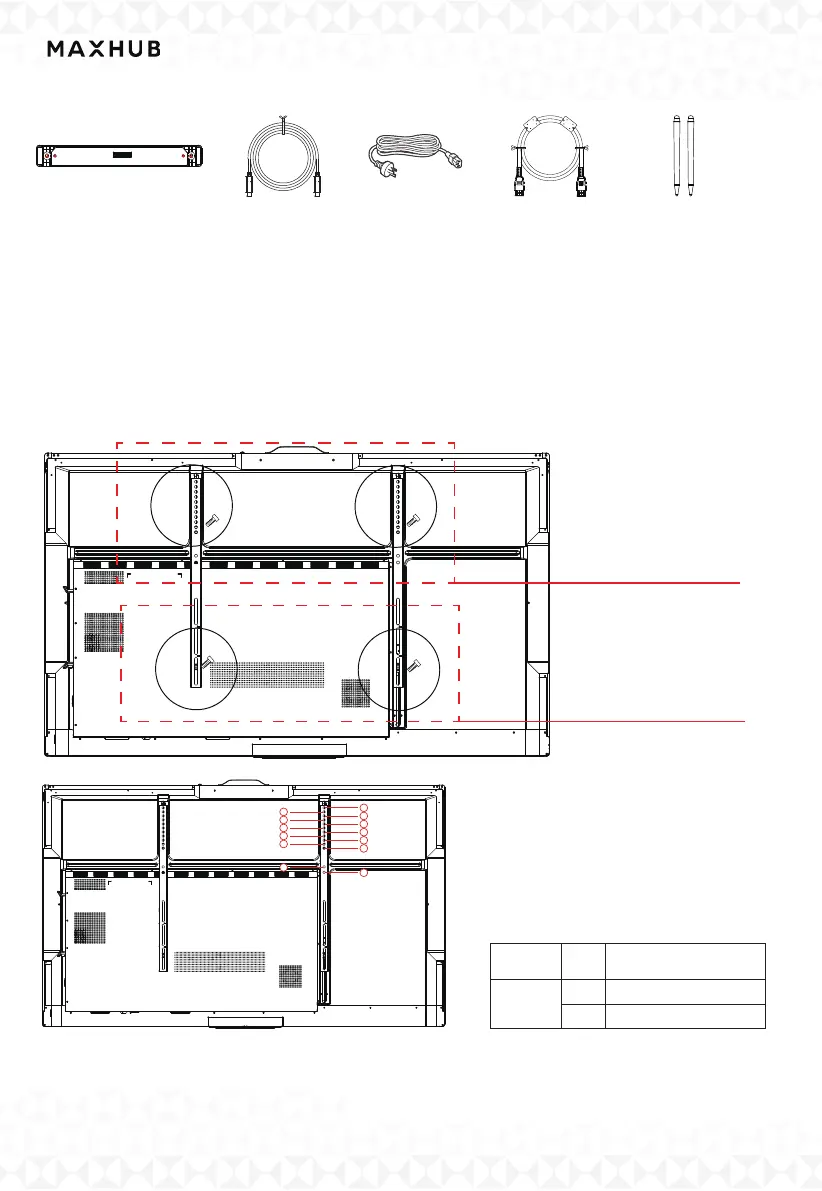
1.Confirm the panel installation position.
Align the wall-mounted screw holes with the studs on the back panel and fasten with 2 wall-mounted
strips.
First, fasten the screws on the top side, then fasten the screws on the bottom side. A total of four
screws are required.
Refer to the table below for the position of the lock hole.
(The picture is for reference only)
1
2
3
9
11
12
4
8
10
13
5
6
7
SizeSeries
ViewPro
Bracket and holes
WIB9060G- hole #11
WIB9060G- hole # 1
65
86
Step 2:fasten the screws
on the bottom
Step 1:fasten the screws
on the top
Power Cord*
Type-C Cable (1.8M)×1
The Wireless Module×1
Note:【*】Power cord could be dierent for dierent regions , pls refer to the actual product.
HDMI Cable (1.5M)×1
Passive Stylus×2



 To Next Page