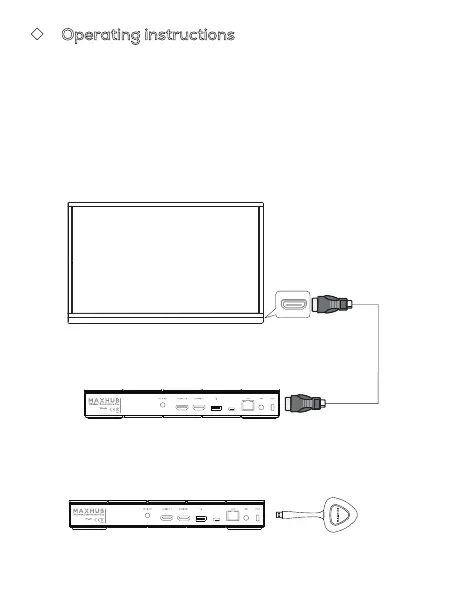
⑷ First time use: please connect the wireless screenshare to the
Wireless Screenshare Box for pairing.
◆ Operating instructions
⑴ Connect the HDMI OUT connector of the Wireless Screenshare
Box
and the HDMI IN connector of the display device with an HDMI
cable.
⑵ Turn on the display device.
⑶ Power the Wireless Screenshare Box.
Note: Support 12V power adapter and POE power supply.
Supply Source:
Made in China
Website: www.maxhub.com/en/
Manufacturer:
Guangzhou Shirui Electronics Co., Ltd.
Address:
192 Kezhu Road, Scientech Park, Guangzhou
Economic & Technology Development District,
Guangzhou, Guangdong, China
Importer:
Linux Tecnology, S.L.
Address:
Calle Estorninos 328320 Pinto, Madrid, Spain
Display Device
Wireless Screenshare Box
Wireless Screenshare Box Wireless screenshare
HDMI IN
HDMI Cable
Supply Source:
Made in China
Website: www.maxhub.com/en/
Manufacturer:
Guangzhou Shirui Electronics Co., Ltd.
Address:
192 Kezhu Road, Scientech Park, Guangzhou
Economic & Technology Development District,
Guangzhou, Guangdong, China
Importer:
Linux Tecnology, S.L.
Address:
Calle Estorninos 328320 Pinto, Madrid, Spain



 To Next Page