◆ Appearance Introduction
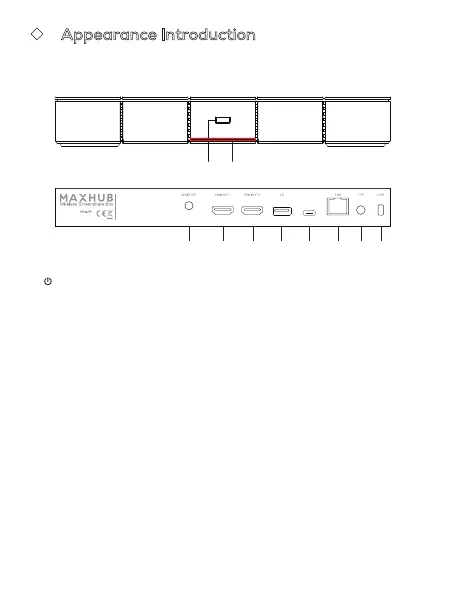
Please be familiar with the device interface and keys before use.
1. Power Button: Switch machine, rest screen, special settings, etc.
2. Indicator Light: Display the status of the machine.
3. AUDIO OUT: Audio output to the external speaker.
4. HDMI OUT: Connect to the devices with HDMI input function.
5. 3.0: Connect USB devices such as mobile hard disk, U disk, USB
keyboard and mouse, USB drives, etc (output: 5V, 0.9A).
6.USB Type-C: Support
wireless screenshare
pairing, connect to
peripherals (output: 5V, 0.5A).
7.LAN: Connect RJ45 terminals.
8.DC IN: Connect DC power supply.
9.LOCK: Lock hole.
1
2
3 4 4 5 6 7 8 9
Supply Source:
Made in China
Website: www.maxhub.com/en/
Manufacturer:
Guangzhou Shirui Electronics Co., Ltd.
Address:
192 Kezhu Road, Scientech Park, Guangzhou
Economic & Technology Development District,
Guangzhou, Guangdong, China
Importer:
Linux Tecnology, S.L.
Address:
Calle Estorninos 328320 Pinto, Madrid, Spain



 To Next Page