92
PDF Files
The PDF section stores and displays all PDF files of saved data. After
entering the PDF database, select a PDF file to view the stored information.
This section uses the standard Adobe Reader application for file viewing and
editing, please refer to the associated Adobe Reader manual for more
detailed instructions.
Review Data
The Review Data section allows you to playback the recorded data frames of
live data streams.
On the Review Data main screen, select a record file to playback.
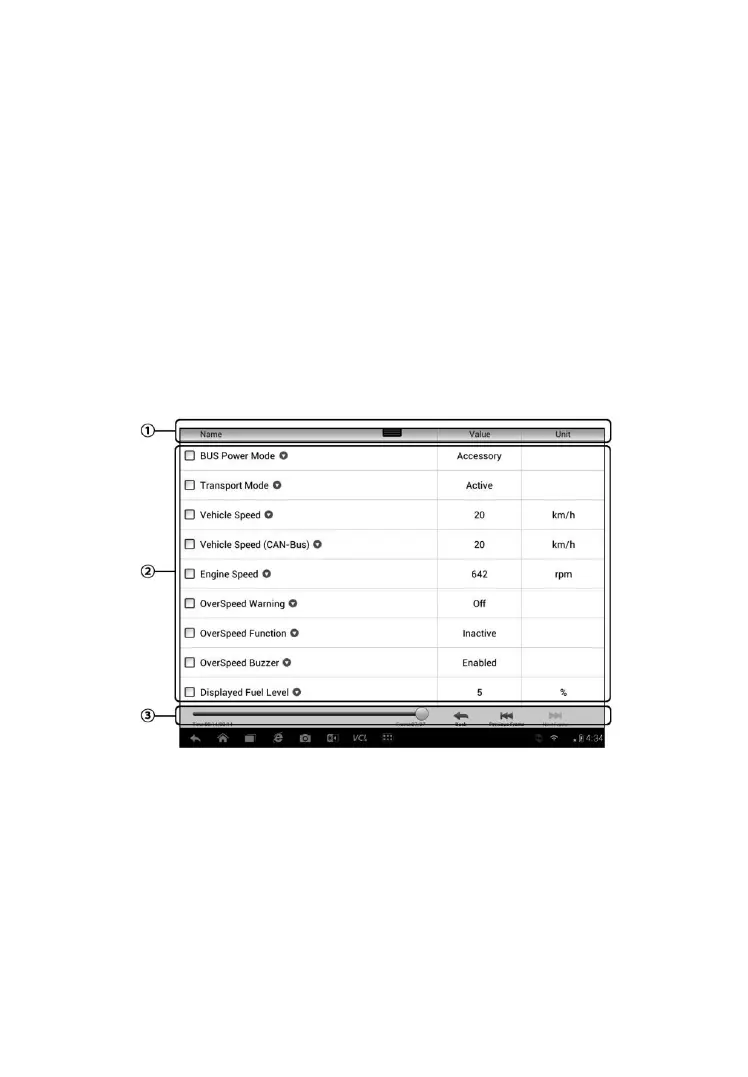
Figure 6-0-13 Sample Data Playback Screen
1. Drop-down Toolbar – tap the button at the top center of the screen to
open the Drop-down Toolbar
2. Main Section – displays the recorded data frames
3. Navigation Toolbar – allows you to manipulate data playback
Use the Navigation Toolbar buttons to playback the record data from frame
to frame.



 To Next Page