5
7. Built-in Battery
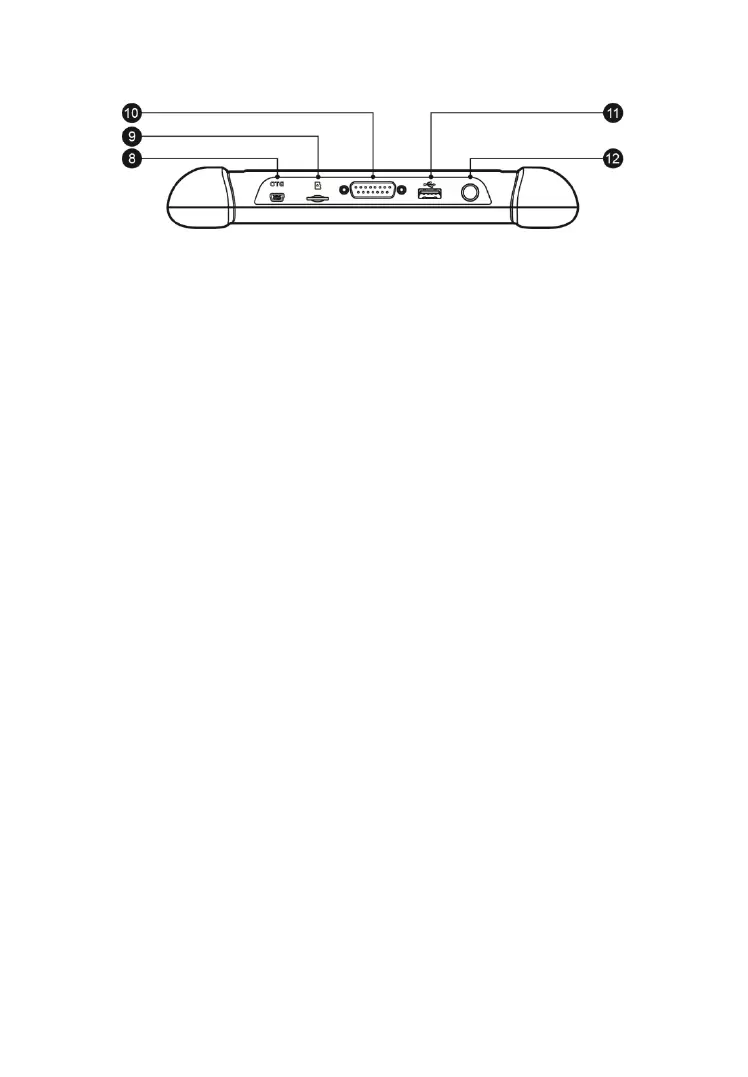
Figure 2-0-3 MaxiCheck MX808 Display Tablet Top View
8. Mini USB OTG Port
9. Micro SD Card Slot - holds the micro SD card.
10. DB15-Pin Port – connects the vehicle DLC cable.
11. USB Port
12. Lock/Power Button – turns the device on & off with long press, or locks
the screen with short press.
Power Sources
The Display Tablet can receive power from any of the following sources:
Internal Battery Pack
Vehicle Power
Mini USB Power Supply
Internal Battery Pack
The Display Tablet can be powered with the internal rechargeable battery,
which if fully charged can provide sufficient power for about 4.5 hours of
continuous operation.
Vehicle Power
The Display Tablet can be powered from the cigarette lighter or other suitable
power port on the test vehicle through a direct cable connection. The vehicle
power cable connects to the DC power supply port on the top side of the
display unit.



 To Next Page