8
3
rd
STEP: TURNING ON
• Connect the supply cable to a 220V plug provided with earth. Three red lights appear on
display “e”.
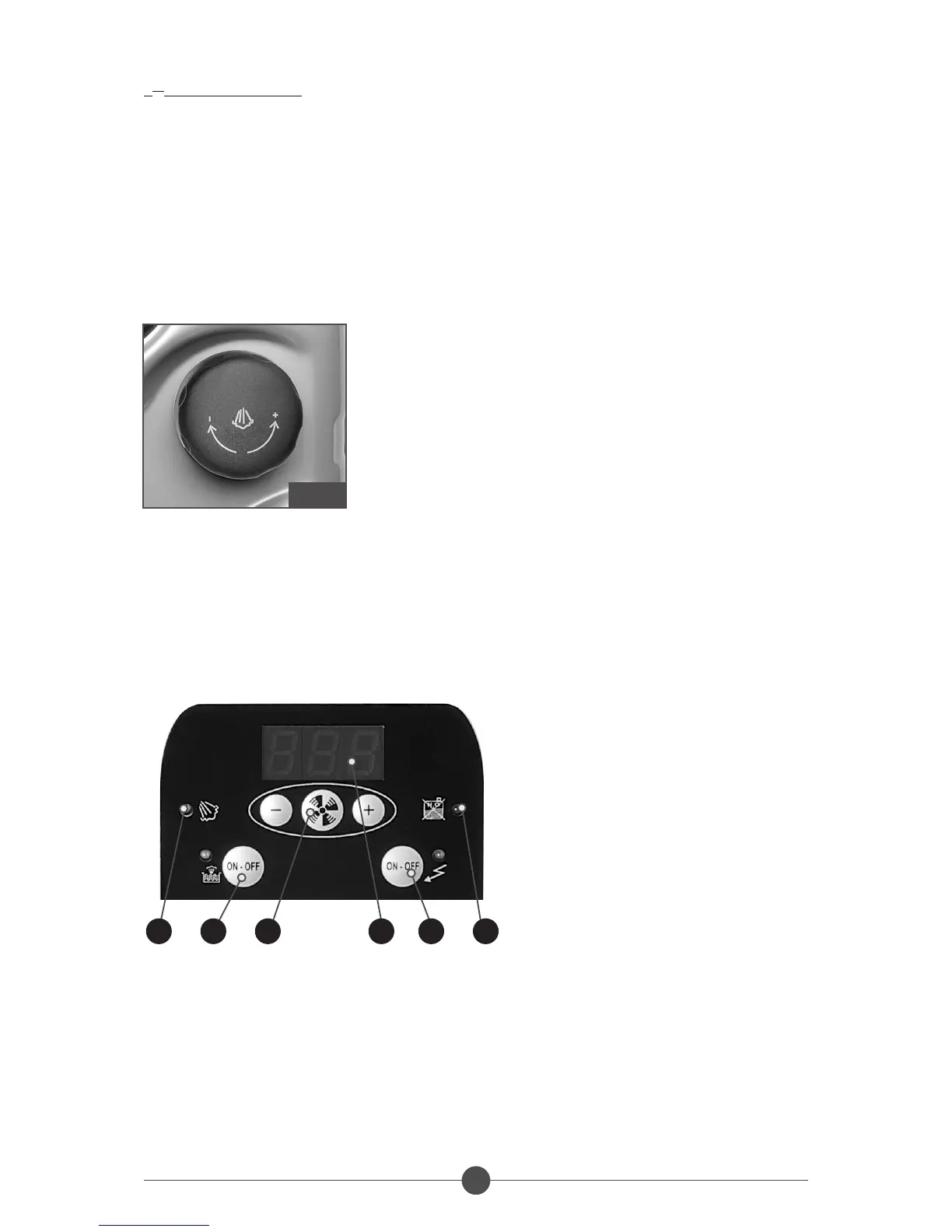
• For the vacuum cleaner function: press push button “B” and ad just the power by means of
keys +/-.
• For the steam function: press push button “a”, after about six minutes pilot light “d” lights up
and the device reaches the optimum working temperature and pressure. The steam must be
adjusted by means of the knob (fig.7) according to the surface to be treated. The temperature
remains displayed on the display. Once the other functions are selected, the display shows
them about 5 seconds.
• For the “electrical accessories” function: press push button “C”, the corresponding pilot light
lights up and the writing “aCC” appears on the display.
NOTE: when pilot light “f” signalling that the water is finished is on, the flashing writing “H2o”
appears on the display and in the meantime the steam delivery is stopped. In this case fill the tank
with water. (step 1).
LIST OF THE PANEL FUNCTIONS
A. Push button to turn the boiler on
B. Push button to start and adjust the motor (+/-)
C. Push button to start the electrical accessories
d. Pilot light signalling the steam is ready
e. Display
f. Pilot light signalling the water is finished
FIG.7
d A B e C f



 To Next Page