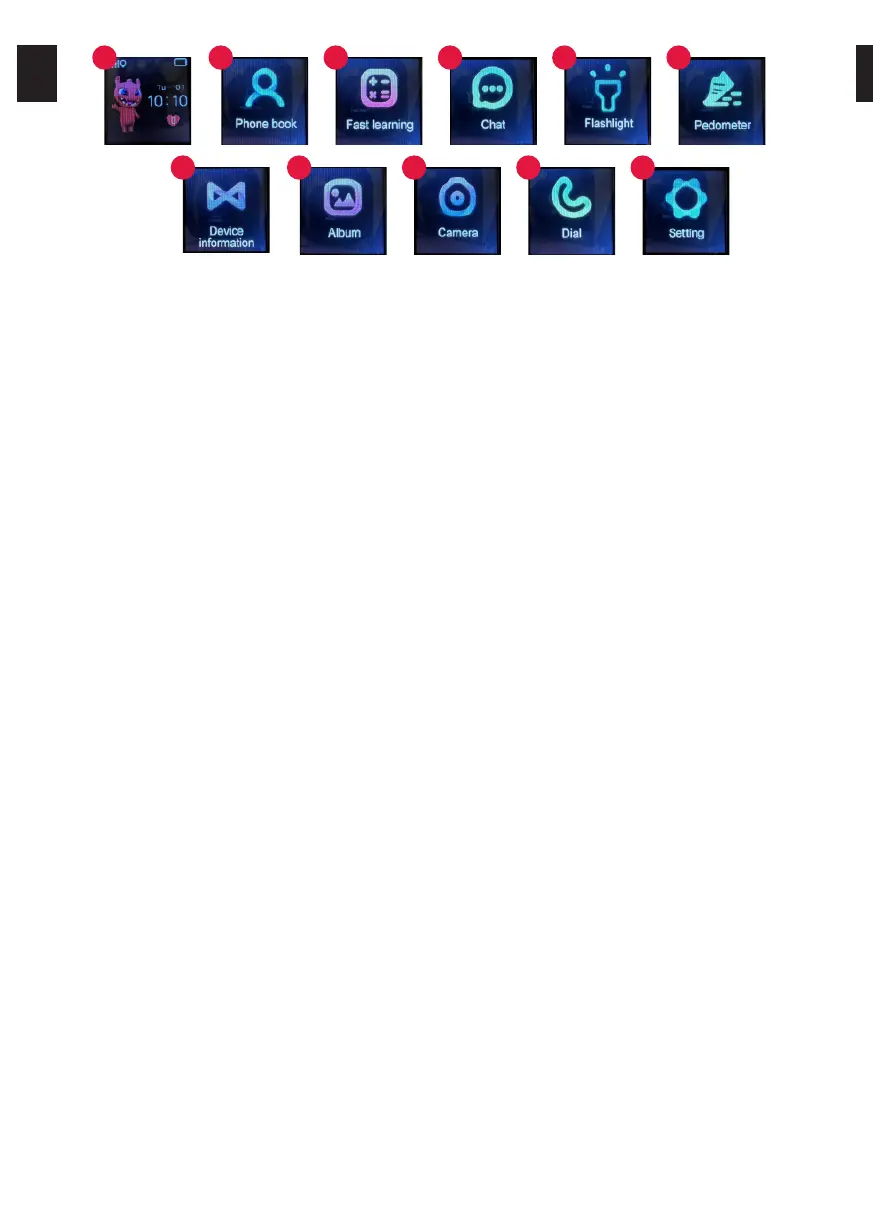
1. The main screen of the watch, showing the current date and time, battery level, icon
for connecting to the mobile network and the icon for the amount of awards received
2. Allows you to make a phone call to the numbers entered in the application
3. Math game
4. Allows you to send voice messages and receive text and voice messages
5. Flashlight
6. Pedometer. The function is activated through the application, the HEALTH tile.
7. Enables you to read the registration QR code for the device and the application QR
code.
8. Photo gallery
9. Camera
10. Dialing
11. Settings
Application support
Search for „SeTracker” in Google Play or App Store. Download and install it.
5. ACCOUNT AND WATCH REGISTRATION
In the registration window, enter your email address, password and the area of use of the
watch. Then enter or scan the watch code (REG CODE) found on the side of the package, on
the label attached to the belt or in the watch menu.
6. APPLICATION FUNCTIONS
- Chat: Send a text or voice message to the watch by typing it on the keyboard or recording it
using the phone’s microphone. Here you can also listen to the voice messages sent from the
watch.
- Route: select the date and time slot to display the traveled route.
- Map: Select the map icon to view the watch’s current location.
- Safety zone: designate a safety zone, when the watch goes outside the selected zone, you
will receive a notification from the application.
- Prize: Select the number of prizes you want to send to your child. After approval, the
information about the award will be sent to the watch.
- Alarm clock: alarm clock settings. Set the desired time and frequency of repeat.
- Find Watch: Select a function to find your device if it’s near you. The watch will ring to inform
you of its location.
- Notifications: This is where you get and preview any notifications and alarms you receive
from the watch.
- Remote camera: take a photo using the watch camera and receive it on your phone. The
captured image appears after a certain waiting time depending on the signal strength of the
cellular network.
- My profile:
• Personal data: Your account settings.
1
2
3
4
5
6
7
8
9
10
11
EN EN
4


 To Next Page