14
General Settings
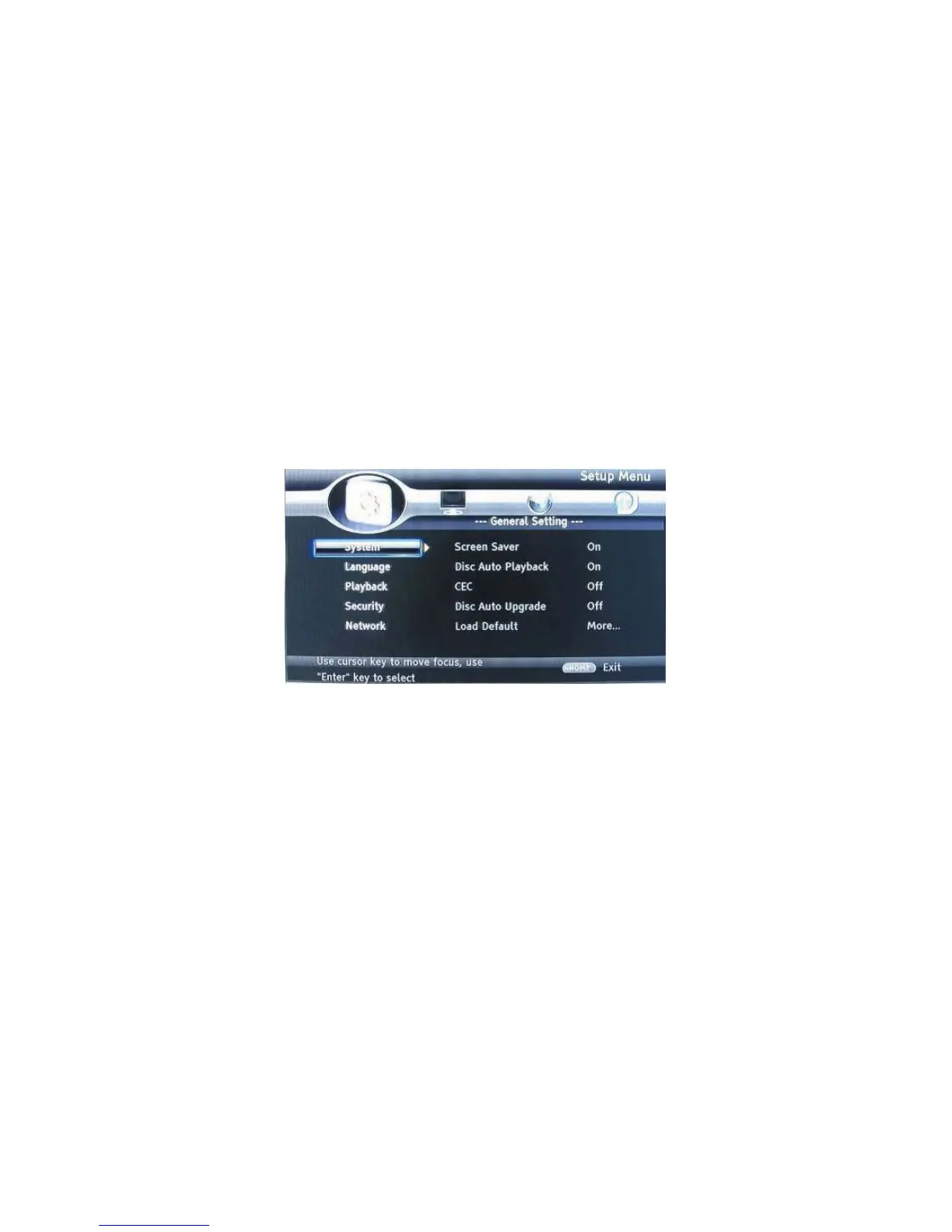
BASIC OPERATION FOR THE MENU
1. Press STOP twice during playback
2. Press SETUP, the SETUP MENU display on the screen.
3. Select a main menu by LEFT/RIGHT.
4. Select the menu you want to setting by UP/DOWN buttons and press RIGHT.
You can press UP to return to main menu.
5. Select the option by UP/DOWN and press RIGHT.
You can press LEFT to return to the previous menu.
6. Select by UP/DOWN buttons and press OK to confirm.
You can press LEFT to return to the previous menu.
7. To return to the mains menu from any submenu, press RETURN.
8. To exit the menu, press SETUP.
GENERAL PLAYER SETTINGS
SYSTEM
1. Screen Saver: Turns the screen saver on/off. The screen saver will display in 3 mins if
there is no operation when the unit is turned on.
2. Disc Auto Playback: Turns the disc auto playback function on/off.
3. CEC: Turns the CEC function on/off.
4. Disc Auto Upgrade: Turns the Disc Auto Upgrade function on/off.
5. Load Default: Return the player to its default settings.
6. Upgrade: select this when you want to upgrade your player software to the latest
version.
7. Easy setup: Make default settings Fast.
8. BUDA: Define memory for BD-Live.
* Notice : BUDA Setup has two-submenu of "External" & "On board". If you choose
"External", you must connect USB first.


 To Next Page