CONTROL PANEL
USAGE
06
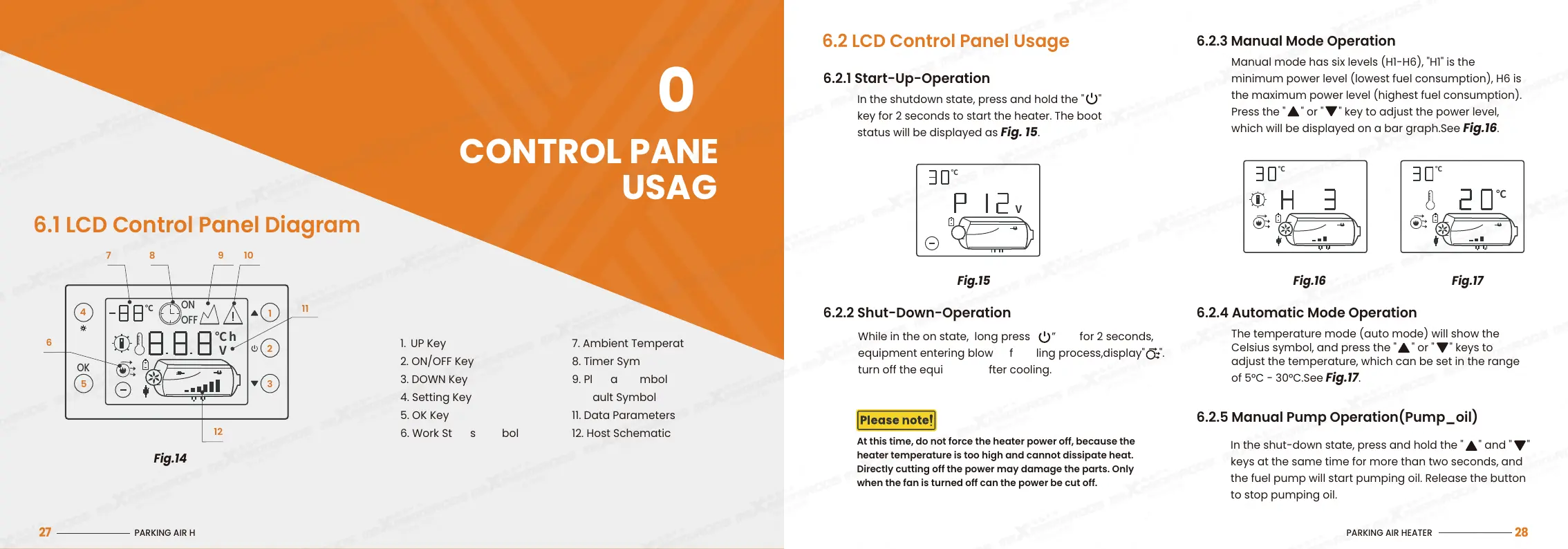
6.1 LCD Control Panel Diagram
Fig.14
1. UP Key
2. ON/OFF Key
3. DOWN Key
4. Setting Key
5. OK Key
6. Work Status Symbol
7. Ambient Temperature
8. Timer Symbol
9. Plateau Symbol
10. Fault Symbol
11. Data Parameters
12. Host Schematic
PARKING AIR HEATER
27
Fig.15 Fig.16 Fig.17
℃
V
℃ ℃
℃
6.2.5 Manual Pump Operation(Pump_oil)
In the shut-down state, press and hold the "
" and " "
keys at the same time for more than two seconds, and
the fuel pump will start pumping oil. Release the button
to stop pumping oil.
6.2 LCD Control Panel Usage
In the shutdown state, press and hold the " "
key for 2 seconds to start the heater. The boot
status will be displayed as Fig. 15.
6.2.1 Start-Up-Operation
6.2.2 Shut-Down-Operation
Manual mode has six levels (H1-H6), "H1" is the
minimum power level (lowest fuel consumption), H6 is
the maximum power level (highest fuel consumption).
Press the " " or " " key to adjust the power level,
which will be displayed on a bar graph.See Fig.16.
6.2.3 Manual Mode Operation
The temperature mode (auto mode) will show the
Celsius symbol, and press the " " or " " keys to
adjust the temperature, which can be set in the range
of 5°C - 30°C.See Fig.17.
6.2.4 Automatic Mode Operation
At this time, do not force the heater power off, because the
heater temperature is too high and cannot dissipate heat.
Directly cutting off the power may damage the parts. Only
when the fan is turned off can the power be cut off.
While in the on state, long press ” ” key for 2 seconds,
equipment entering blow-off cooling process,display" ".
turn off the equipment after cooling.
PARKING AIR HEATER
28
11
12
9 10
87
6
4
5
1
2
3
OK
OFF
ON
℃
℃
V
h


 To Next Page