7
After Sales Support
UK/N.IRELAND HELPLINE N
O
:
REP.IRELAND HELPLINE N
O
:
WEBSITE:
EMAIL:
01270 508538
1800 995 036
www.quesh.co.uk
enquiries@quesh.co.uk
Bluetooth
®
Pairing The Bulb
Turn the light on at the wall. The light should light up with the white
LED and a beep noise will conrm that the bluetooth is ready to pair.
Search on your smart phone’s available device list for
‘Maxtek Bulb (headset)’ in your bluetooth settings and add the bulb.
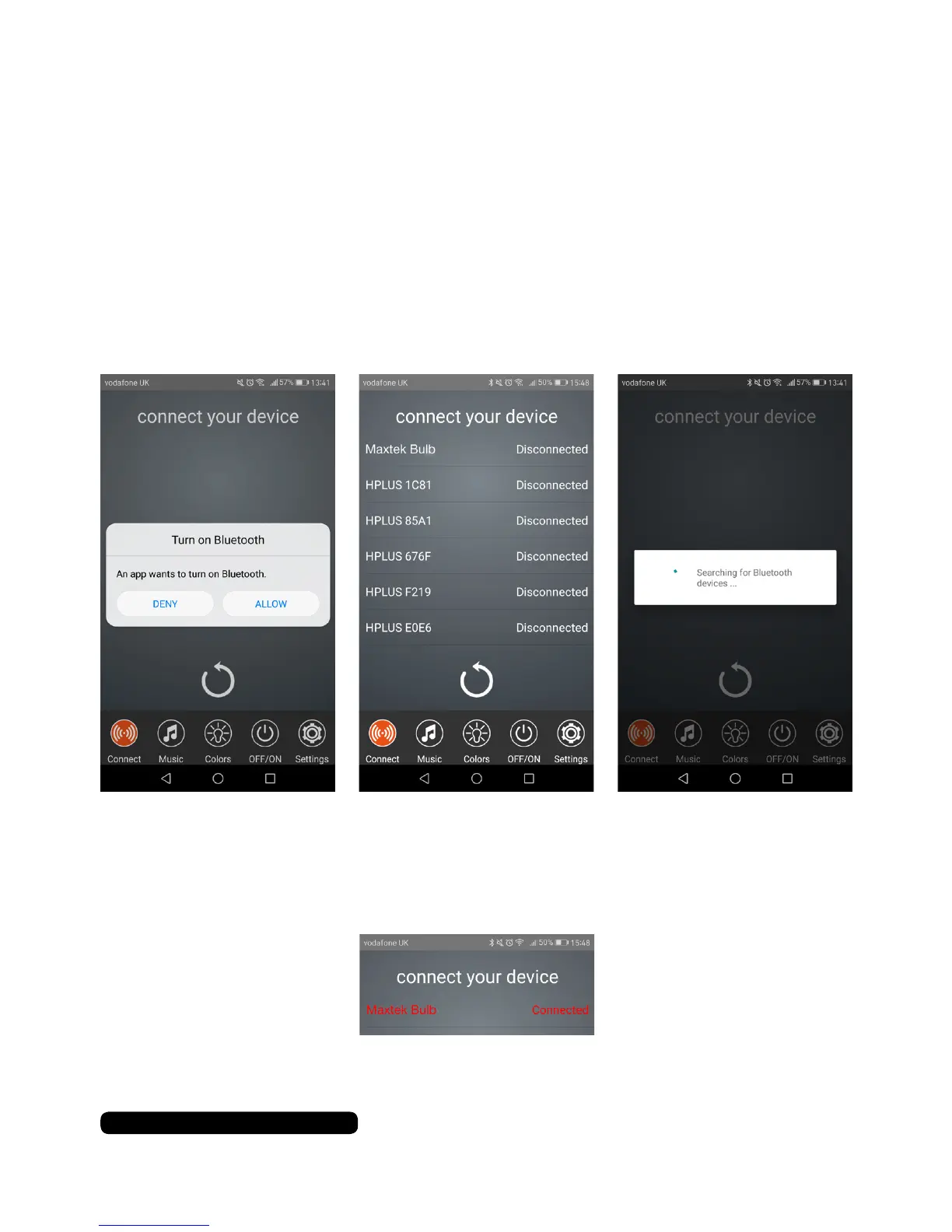
Once you are paired manually, open the ‘Switcher’ app and follow
the on screen prompts.
Select ‘Maxtek Bulb’ from the device list. There is no security on
the bulb so it will just pair with no further prompts. The listing of the
bulb with change to orange and state connected once paired.
You can now use the other features of the Smart LED Speaker Bulb.


 To Next Page