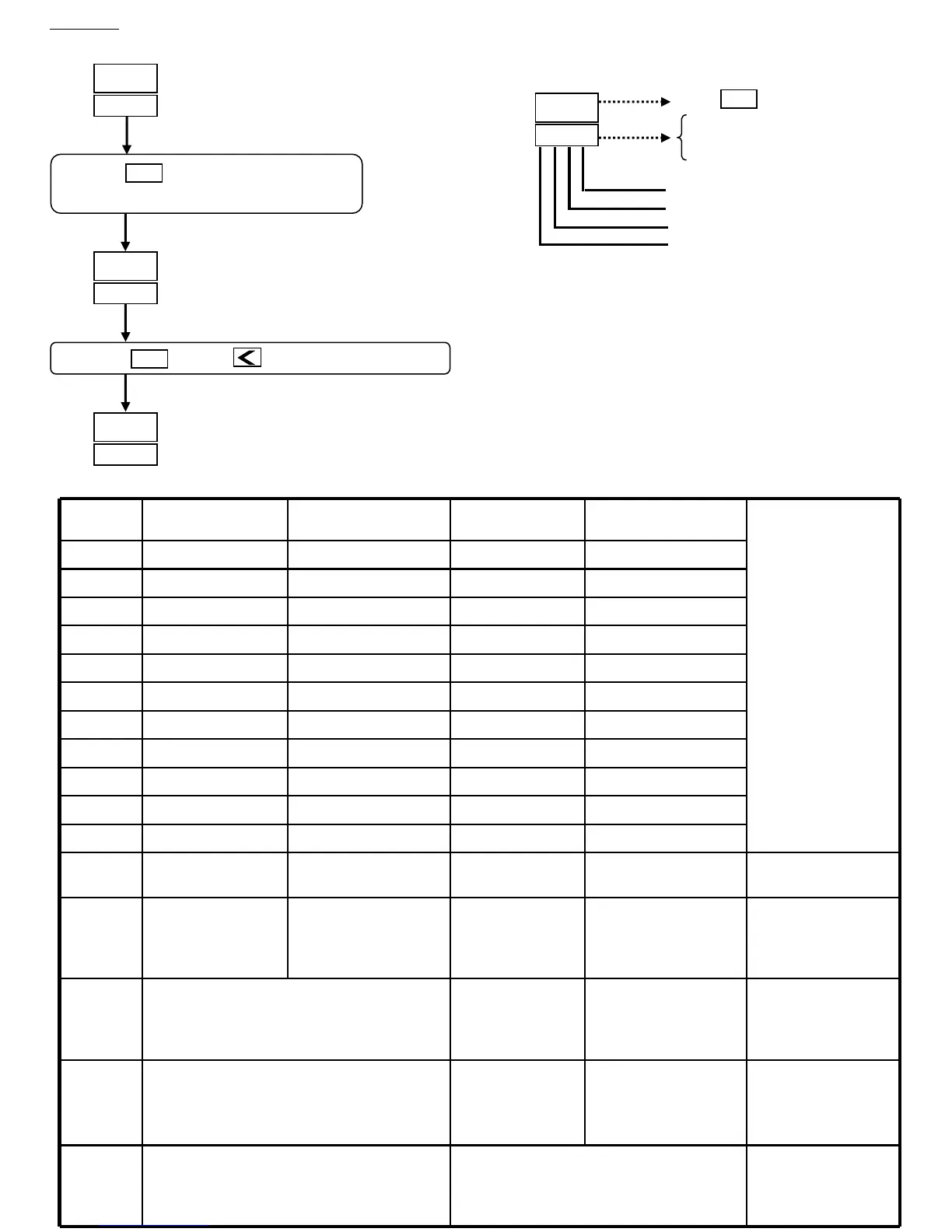
SET. 3 Third digit
Operating display
Level4 (Set level)
Press the key and key for 4 seconds to level 4
27.5
27.5
PV
SV
LCK
1010
PV
SV
SET
SEtl
0101
PV
SV
Press the key for 4 seconds
to level 2 and set “1010” in “LCK”
SET
Repeat same steps
as above to display the
parameters listed at below.
Press key to change SET 0-9
SEtl
0 1 0 1
a. Example:
PV
SV
SET
0=lock (skip)
1=open (display)
SET. 1 First digit
SET. 2 Second digit
SET. 4 Fourth digit
Parameter
Display
4
th
digit 3
rd
digit 2
nd
digit 1
st
digit
SEt1
AL2 AL1 AT OUTL
SEt2
D1 I1 PI AL3
SEt3
HYS1 CYT1 ATVL DB1
SEt4
CYT2 D2 I2 P2
SEt5
AR REST2 REST1 HYS2
SEt6
ALT1 ALD1 LSPL/HSPL DP
SEt7
ALT3 ALD3 ALT2 ALD2
SEt8
RUCY OPRL/OPRH CL01/CH01 HYSA
SEt9
PVOS SVOS IDN0/BAUD WAIT
SEtA
TSH CASC SOFT UNIT
SEtb
TOH
If the digit set at
“0’ the parameter
is skipped.
If the digit set at
“1” the parameter
is opened
.
PrOG
0:Program no repeat
1:Program repeat
0:Without power failure
1:With power failure
0:Start from “0”
1:Start from “PV”
0:Alarm during program
1:Program ending alarm
For Program
function only
FUNC
0:50Hz
1:60Hz
0:Without loop alarm
1:With loop alarm
0:Without master-
slaver function
1:With master-
slaver function
0:With RS485
1:With TTL
(use for master-slaver)
TIm2
00:Others (Relay & SSR Output)
01:Current output or PWM output
10:Transmission output
11:Communication output
0:PV transmission
1:SV transmission
0:Without hold function
1:With hold function
mOdE
00:PV/SV display
01:Program function
10:Ramp and soak
11:Remote SV
0:Hour/min for time
1:Min/sec. for time
0:Without input2
1:with input2
Outy
00:Nomal output
01:Motor valve
10:Single phase PWM output
11:Three phase PWM output
00:non
01:heat
10:cool
11:dual output
b. Function of set:
Password
This level is for the distributor use only



 To Next Page