FEATURES & TROUBLESHOOTING
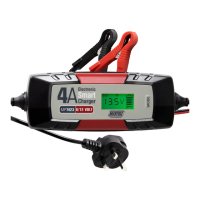
2 LCD DISPLAY
During charging the LCD display backlight will be red, when charging
is
finished it will
turn green.
LCD Display Key:
1. 12V standard lead-acid battery mode.
2. 12V AGM battery mode.
3. Winter mode for 12V
STD
battery and 12V AGM batteries. Suitable for 5°C or less.
4.
6V
standard lead-acid battery mode.
5. Battery level indicator. Each bar represents approximately 20%. The outline border
flashes during charging. When the battery
is
full & during float charging the border
and
all
five bars will be visible.
6. Battery voltage indicator, accurate to
0.1
V.
7. Reverse polarity indicator.
8. Bad battery indicator.
9. Clamp connection indicator.
1
2
3 4
5
I
121s11111121
AGMI
* I
&1
s,;
I
6
,~,,~,
,~,
o,:e.o
V
~
g
::,c
-
7 8 9
Display Fault
Action
Battery
polarity
reversal
symbol
Battery
clamps
reversed
.
Disconnect
and
reconnect
displayed.
correctly.
Clamp
indication
and
voltage
Dirty
or
oxidized
battery
Clean
terminals.
symbols
displayed.
terminals
.
Low
or
unstable
charging
current.
No
Display.
Mains
supply
not
connected
.
Check
socket.
Display
back
light
on
,
display
Battery
not
connected.
Check
clamps,
replace
battery.
showing
O.OV
and
clamp
symbol.
Bad
battery
indicator.
Battery
beyond
recovery.
Battery
requires
replacement.
Clamp
connection
indicator
.
Indicates
poor
connection.
Check
clamps.
Output
lead
fuses
should
be
checked
and
replaced
as
necessary
(SA
blade)
in
connection
with
all
faults.
Also
check
the
fuse
in
the
mains
plug
,
which
should
only
be
replaced
with
a
3A
BS1362
fuse
.
Persistant
fuse
replacement
may
indicate
a
fault
with
the
charger
or
leads.
Check
these
before
each
use
and
do
not
use
if
worn
or
damaged.


 To Next Page