Maytronics Remote Control Unit
Setting the Automatic Mode
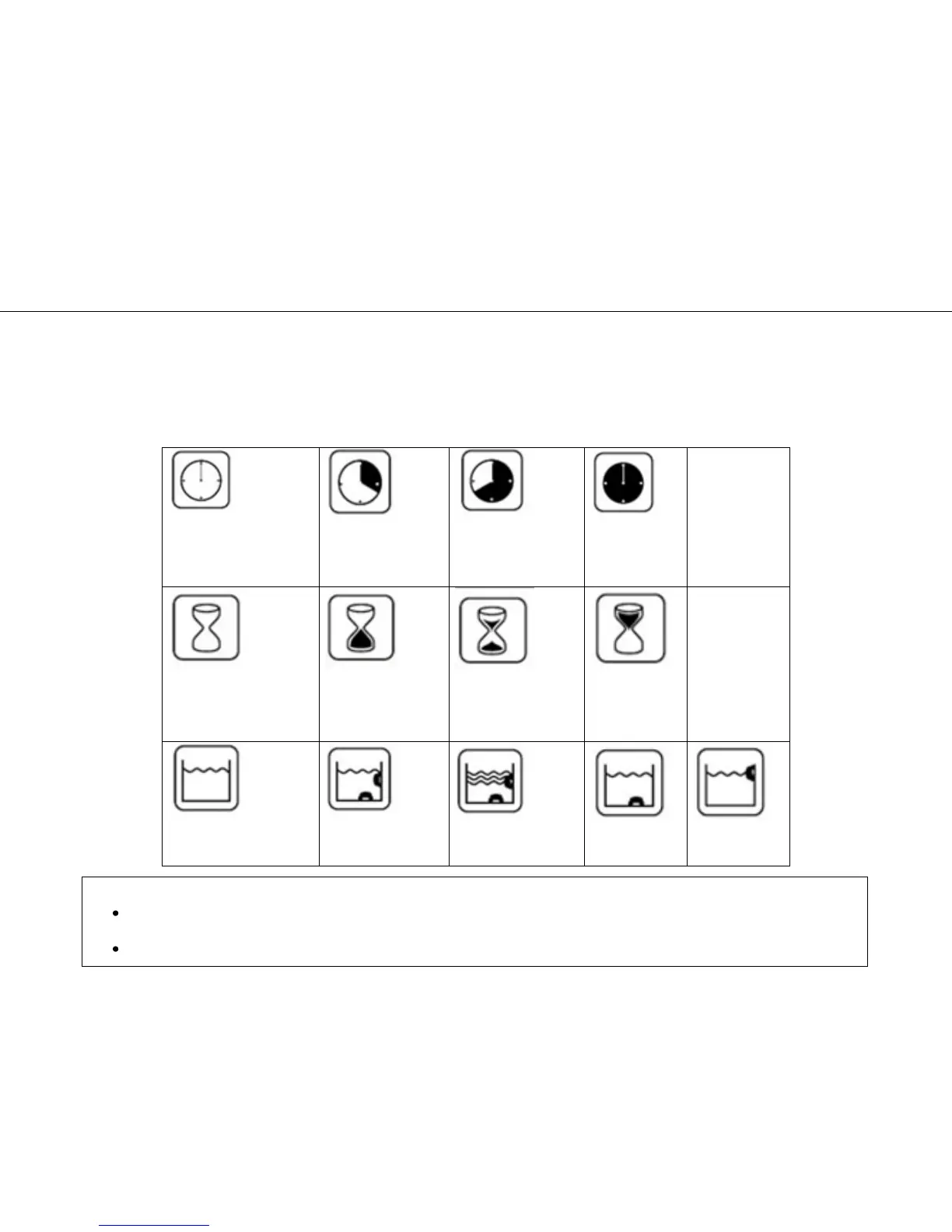
Cleaning cycle indicator
This determines the cleaning
cycle time. The RCU allows
you to choose between the
following options.
Efficient
(Default Setting)
3 hour cycle for
everyday use
Delay Time indicator
This determines when the
pool cleaner starts to work. A
delay allows the dirt to settle
to the bottom of the pool.
Immediate start
(Default Setting)
Cleaning action indicator
Allowing you to choose from
the following options.
Standard
Floor and wall cleaning
(Default Setting)
Ultra-Clean
Stronger suction and
slower movement.
Floor Only
Cleans only the
floor and coves.
Walls Only
Cleans walls and
waterline only
To Change the Automatic Mode settings
First press the Manual/Automatic select button, then set according to the following table:
Note:
After 2 minutes, if no button is pressed, the Remote Control Unit will shut-down and the Pool cleaner will continue to work
in the previous settings.
When the “Ultra-Clean,” and “Walls Only” options finish their cycles, the RCU will return to default settings.








 To Next Page