EasyManua.ls Logo

Maytronics Dolphin POOL UP - User Manual

Maytronics Dolphin POOL UP
11 pages
Print Icon
To Next Page IconTo Next Page
Loading...
8151705
EN
by
by
Robotic Pool Cleaner
POOL UP
Robotic Pool Cleaner POOL UP
Operating Instructions
POOL UP
Question and Answer IconNeed help?

Do you have a question about the Maytronics Dolphin POOL UP and is the answer not in the manual?

Summary

INTRODUCTION

SPECIFICATIONS

WARNINGS AND CAUTIONS

Warnings

Lists critical safety instructions regarding power supply and pool entry.

Cautions

Specifies recommended water conditions (chlorine, pH, temp, NaCl) for using the cleaner.

POOL CLEANER PARTS

Brushes

Describes the different types of optional brushes available for various pool surfaces.

Filtration

Explains the two filtration system options: filter bag or cartridge.

Power Supply Unit

Identifies the power supply unit as a key component of the cleaner system.

USING THE POOL CLEANER

Setup

Provides step-by-step instructions for correctly setting up the power supply and connecting the cable.

Putting the Pool Cleaner into the pool

Details the procedure for preparing and immersing the pool cleaner into the water.

Removing the Pool Cleaner from the pool

Explains the correct method for safely removing the cleaner from the pool after use.

MAINTENANCE

Cleaning the filtration system

Details how to clean the filter bag or cartridge filters for effective pool cleaning.

Cleaning the impeller

Instructs on how to clean debris trapped in the pool cleaner's impeller.

Cable Management

Provides advice on managing the floating cable, including removing kinks.

Off-season storage

Outlines the steps for properly storing the pool cleaner during off-season periods.

Overview

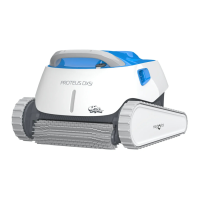
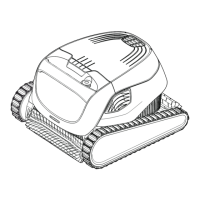
The device is a Robotic Pool Cleaner, specifically the "POOL UP" model, designed for reliable, convenient, and cost-effective pool cleaning. It features advanced cleaning technologies, long-lasting performance, and easy maintenance, ensuring maximum pool hygiene through its reliable filtration and all-surface climbing brush.

Technical Specifications

Motor Protection: The device has an IP 68 rating for motor protection. Depth: It operates within a minimum depth of 0.80m (2.6ft) and a maximum depth of 5m (16.4ft). Power Supply: The Robotic Pool Cleaner utilizes a Digital "Switch-Mode" Power Supply with the following characteristics:

  • Input: 100-250 AC Volts
  • Frequency: 50-60 Hertz
  • Power: 180 Watt
  • Output: <30 VDC
  • IP Rating: IP 54

Water Conditions: For optimal and safe operation, the pool cleaner should be used under specific water conditions:

  • Chlorine: Maximum 4 ppm
  • pH: 7.0 - 7.8
  • Temperature: 6 - 34°C (43-93°F)
  • NaCl (Salt): Maximum 5000 ppm

Usage Features

Setup:

  1. Power Supply Placement: Position the power supply approximately in the middle of the longest side of the pool, at a distance of at least 3m (10ft) from the edge. Ensure the power supply is kept out of standing water.
  2. Cable Connection: Attach the floating cable to the power supply. Align the notch on the connector with the groove in the socket on the power supply, then turn clockwise to secure.
  3. Brush Preparation (Wonder/Foam Brushes): If the Wonder (foam) brushes or Wonder rings are dry, soak them in water until soft before placing the cleaner in the pool.
  4. Submerging the Cleaner: Shake the Pool Cleaner from side to side or turn it upside down to release any trapped air. Allow it to sink to the pool floor.
  5. Operation: Turn the power supply ON to start the cleaning cycle.

Removal from Pool:

  1. Automatic Shut-off: The Pool Cleaner will automatically shut off at the end of its cleaning cycle.
  2. Power Disconnection: Turn OFF and unplug the power supply before attempting to remove the cleaner.
  3. Retrieval: Use the floating cable to bring the Pool Cleaner to the pool's edge. Important: Do NOT pull the Pool Cleaner from the pool using the cable itself, as this can cause damage.

Brushes: The cleaner comes with one of three optional brush types, each designed for optimal traction on different pool surfaces:

  • PVC Brush: Suitable for concrete, PVC, fiberglass, and liner pools.
  • Combined Brush: An all-surface climbing brush, ideal for most pool surfaces.
  • Wonder (foam) Brush: Designed for smooth ceramic tiles.

Maintenance Features

Filtration System: The device offers two filtration system options: a filter bag or a cartridge system. Only one type is provided with the robot pool cleaner.

Cleaning the Filter Bag:

  1. Safety First: Unplug the power supply.
  2. Access: Turn the Pool Cleaner upside-down and open the bottom lid.
  3. Removal: Remove the filter bag from the frame.
  4. Washing: Clean the filter bag thoroughly with a hose. For deeper cleaning, it is recommended to periodically wash the filter bag in a washing machine using a gentle cycle program.
  5. Brush Cleaning: Periodically clean the brushes with a hose.
  6. Replacement: Place the filter bag over the frame, ensuring the strap is in the middle of the shortest side and the bag is properly positioned on the frame.

Cleaning the Cartridge Filters:

  1. Safety First: Unplug the power supply.
  2. Access: With the pool cleaner upside down, open the bottom lid and pull out the cartridge unit.
  3. Disassembly: Open the clips on the cartridge unit and remove the individual filters.
  4. Washing: Clean the filters with a hose. Note: Do not let the cartridge filters dry out before cleaning.
  5. Reassembly: Insert the filters back into the cartridge unit with the plastic backing facing outwards. Insert the assembled cartridge unit back into the cleaner.

Cleaning the Impeller:

  1. Safety First: Unplug the power supply.
  2. Debris Removal: If debris is noticed trapped in the impeller, open the impeller cover and remove the debris.

Cable Maintenance: To remove kinks from the floating cable, stretch it out completely and let it sit in the sun for at least a day.

Off-Season Storage: If the pool cleaner will not be used for an extended period, follow these steps:

  1. Drainage: Ensure no water is left in the pool cleaner.
  2. Filter Cleaning: Thoroughly clean the filter bag or cartridge and re-insert it in place.
  3. Cable Storage: Roll up the cable carefully to prevent kinks.
  4. Storage Location: Store the Pool Cleaner in a protected area, preferably upside-down (not resting on its brushes). The recommended storage temperature range is 5°C (41°F) to 45°C (113°F).

Maytronics Dolphin POOL UP Specifications

General IconGeneral
BrandMaytronics
ModelDolphin POOL UP
CategorySwimming Pool Vacuum
LanguageEnglish

Related product manuals