99996212-LSWIF
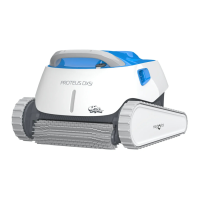
Proteus DX5i
A Cautions& Warnings
Use the originally supplied power supply only.
Do not use an extension cable in any case
whatsoever
Ensure the electrical outlet is protected by
a ground fault interrupter (GFI)or an earth
leakage interrupter.
Ensure that the power supply is not in a wet
environment.
Do not enter the pool while the pool cleaner is
in the water.
Unplug the power supply before servicing.
Do not use the cable to take the pool cleaner
out of the water.
1 Recommendation
The power supply Should be placed in a well
ventilated and shaded location.
• If the Dolphin is fitted with combined or wonder
brushes, gently squeeze the brushes until they
are soaked with water and only then start the
cleaning process.
Release minimal required floating cable length
to ensure proper pool coverage.
Leave excess cable rolled outside the pool.
maytrnnics
Dolp in
Use the Pool Cleaner in the following water
conditions only: Chlorine Max 4 ppm;
pH 7.0 - 7.8; Temperature 6 - 350C (43-950F);
NaClMaximum = 5000 ppm.
Keep the Robotic Pool Cleaner out of the reach of
children or persons with reduced physical, sensory,
or mental capabilities, or lack of experience
and knowledge, unless they have been given
supervision or instruction.
Digital Power Supply
Input: 100-125ACVolts
50-60 Hertz 2A
Output: ao VDC6A 120W
54
Specifications:
Motor protection: IP 68
Minimum depth: 0.4m/1.33ft
Maximum depth: 5m/16.4ft
•
After each cleaning cycle wash the filters or
cartridge. Clogged filters reduce scanning and
cleaning efficiency.
In case the cable has some kinks, stretch it out
completely and let it sit for at least a day in the sun.
Store the pool cleaner in a shady place on the
caddy.
Operating the robot using the MyDoIphinTM Plus app
Plug in the power supply
Download the MyDoIphinTMPlus app.
Activate Bluetooth@ and Wi-Fi@ on your smart device.
Start the registration process.
Scan the QR code printed on the power supply, and complete the process.
Follow the instructions as showed in the app.
For online product warranty registration:
registration.maytronics.com
99996212-LSWIF
Quick start guide
Proteus DXSi
Thank you for purchasing a Maytronics Dolphin Robotic Pool Cleaner.
The Robotic Pool Cleaners by Maytronics deliver advanced cleaning technologies,
long lasting performance and easy maintenance. You and your family will be free
to enjoy swimming with full confidence that your pool is completely clean.
For a detailed manual (including videos):
manuals.maytronics.com/en/ gggg6212-LSWlF

 Need help?
 General








 To Next Page