When Driving
24
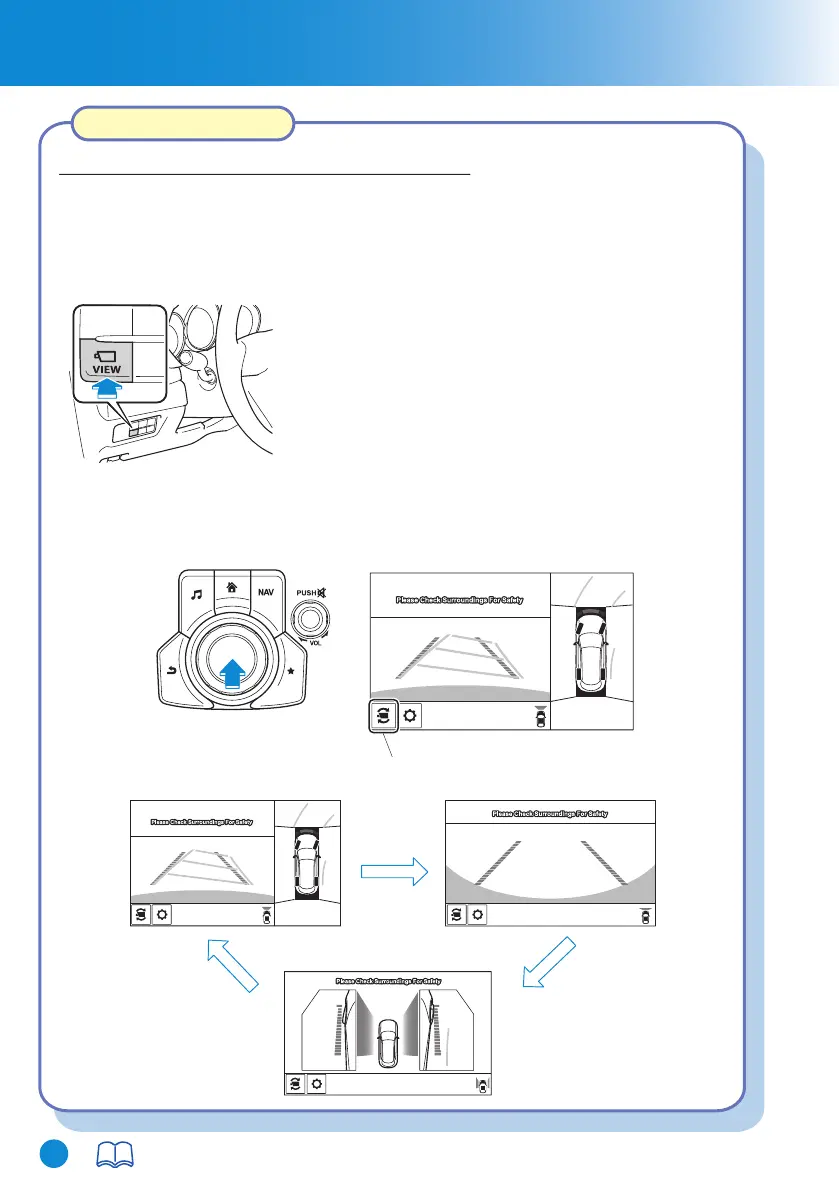
Top view/Front view
Front wide view
Side view
Switch camera icon
For details, refer to Section 4, “i-ACTIVSENSE”.
How to Use the System
Indication
Images are displayed on the screen when the 360°View Monitor switch is pressed
with all of the following conditions met.
Display switching
You can change the displayed screen by pressing the commander knob or by
touching the switch camera icon on the screen while the top view/front view, front
wide view, or the side view is displayed.
• The ignition is switched ON.
• The shift lever/selector lever is in a position other than R.
Top view/Front view, Front wide view, Side view
CX-8_8HJ9-EI-19E_Edition2_QuickGuide.indb 26CX-8_8HJ9-EI-19E_Edition2_QuickGuide.indb 26 2020/04/15 9:02:102020/04/15 9:02:10



 To Next Page