When Driving
28
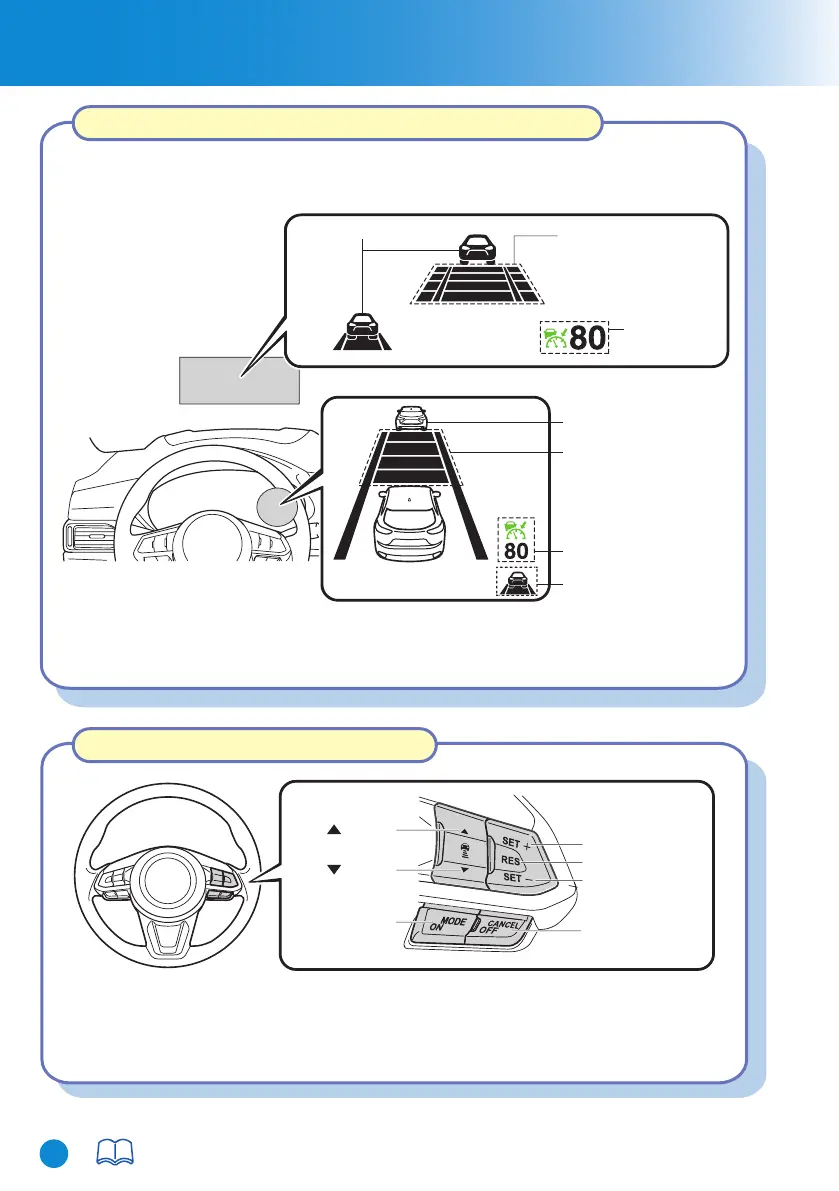
MRCC Distance
between vehicle
display
MRCC Set vehicle speed
Vehicle ahead display
Vehicle ahead display
MRCC Distance
between vehicle
display
MRCC Set
vehicle speed
Active driving display
Multi-information display
Vehicle ahead display
If the indication on the active driving display has been
turned off using the personalisation features, the indication
is displayed on the multi-information display.
*1:
*1
OFF/CANCEL
switch
RES switch
SET- switch
SET+ switch
switch
switch
MODE switch
For details, refer to Section 4, “i-ACTIVSENSE”.
When the MODE switch is pressed once, the MRCC system turns on, and the MRCC
main indication (white) turns on and the vehicle speed and the distance between the
vehicles while in headway control can be set.
The MRCC setting status and operation conditions are indicated on the
multi-information display and the active driving display.
Mazda Radar Cruise Control (MRCC) Display Indication
Mazda Radar Cruise Control (MRCC)
CX-8_8HJ9-EI-19E_Edition2_QuickGuide.indb 30CX-8_8HJ9-EI-19E_Edition2_QuickGuide.indb 30 2020/04/15 9:02:112020/04/15 9:02:11



 To Next Page