Black plate (322,1)
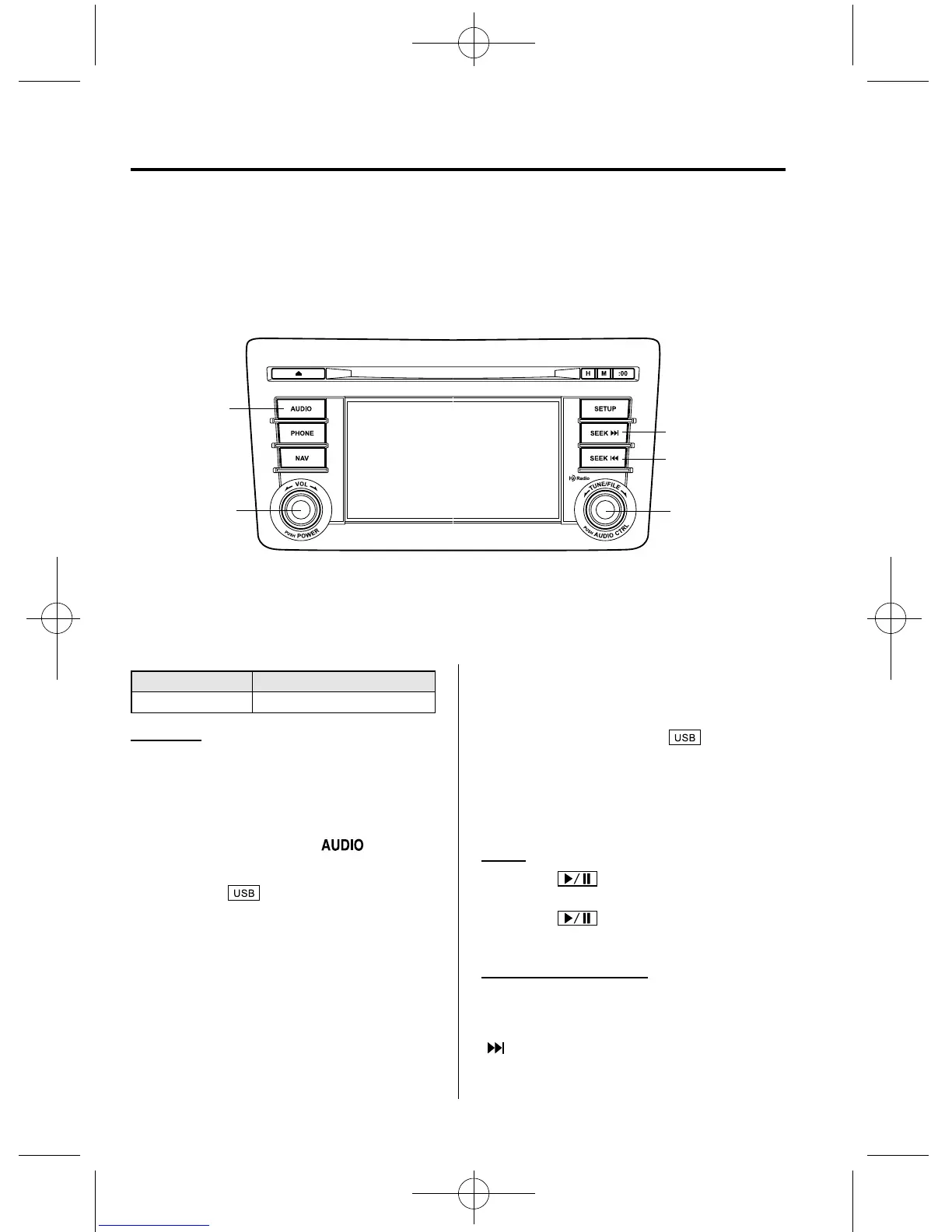
qHow to use USB mode
Audio button
Power/Volume
dial
Track up/Fast-
forward button
File dial
Track down/
Reverse button
Type Playable data
USB mode MP3/WMA/AAC file
Playback
1. Switch the ignition to ACC or ON.
2. Press the power/volume dial to turn the
audio system on.
3. Press the audio button (
)to
display the audio screen.
4. Touch the
on-screen tab to
switch to USB mode and star t
playback.
NOTE
l
When a USB memory is not connected to
the USB port, the mode does not switch to
the USB mode even if the
on-screen
tab is touched.
l
Do not remove the USB memory while in
the USB mode. Otherwise, the data could
be damaged.
Pause
Touch the
on-screen button to
pause playback.
Touch the
on-screen button while
playback is paused to cancel the pause.
Fast-forward/Reverse
Operations using audio panel
Press and hold the fast-forward button
(
) to advance through a track at high
speed.
6-58
Interior Comfort
Audio System
CX-9_8CM9-EA-12I_Edition1 Page322
Thursday, September 13 2012 2:37 PM
Form No.8CM9-EA-12I



 To Next Page