Black plate (407,1)
Bluetooth® Audio
Applicable Bluetooth
®
specification
Ver. 2.0 or higher
Response profile
l
A2DP (Advanced Audio Distribution
Profile) Ver. 1.0/1.2
l
AVRCP (Audio/Video Remote Control
Profile) Ver. 1.0/1.3/1.4
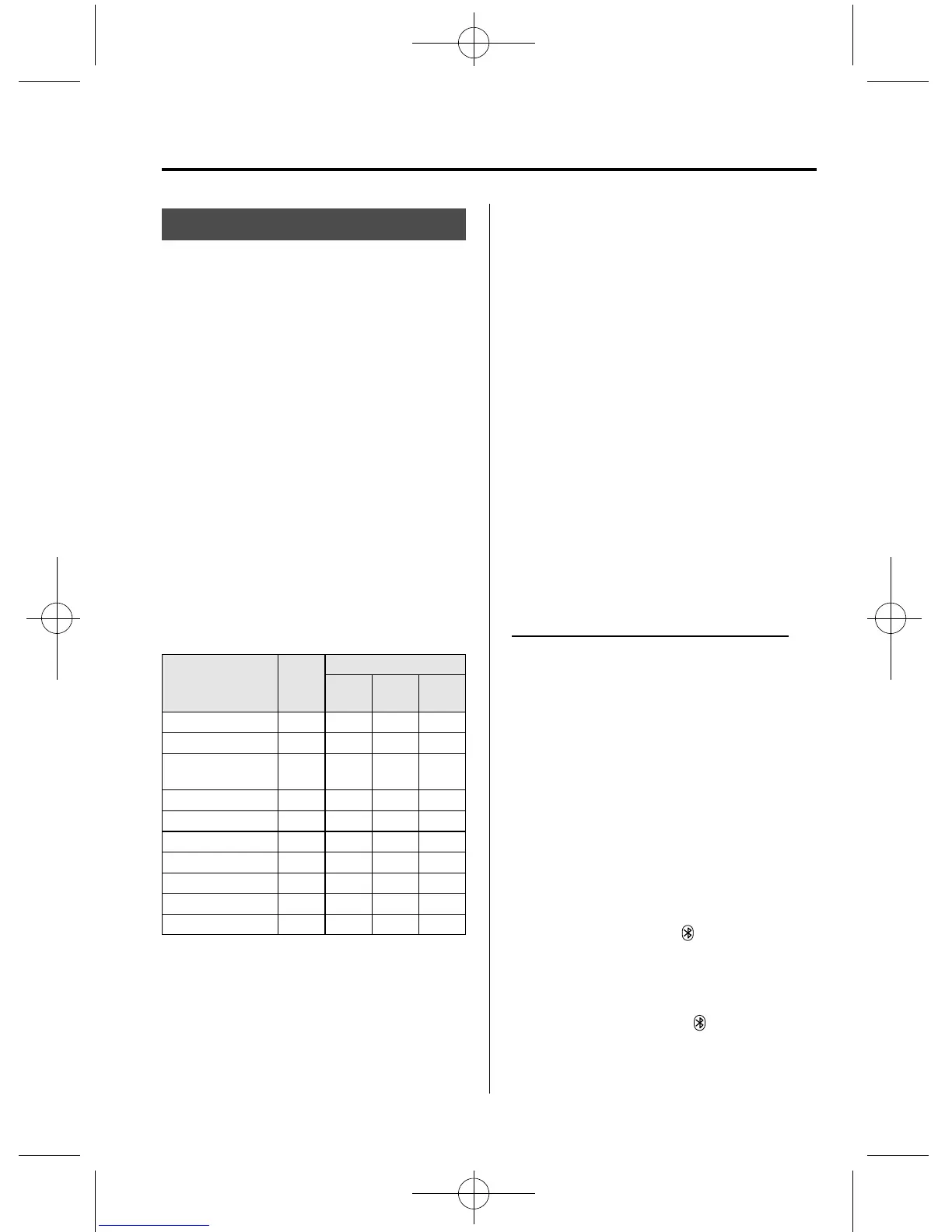
A2DP is a profile which transmits only
audio to the Bluetooth
®
unit. If your
Bluetooth
®
audio device corresponds only
to A2DP, but not AVRCP, you cannot
operate it using the control panel of the
vehicle's audio system. In this case, the
Bluetooth
®
audio device can be operated
by controlling the device itself, the same
as when a portable audio system without
the Bluetooth
®
communication function is
connected to the AUX terminal.
Function A2DP
A2DP·AVRCP
Ver.
1.0
Ver.
1.3
Ver.
1.4
Playback ― XXX
Pause ― XXX
File (Track)
up/down
― XXX
Reverse ―― XX
Fast-forward ―― XX
Text display ―― XX
Folder up/down ――― X
Repeat ――― X
Shuffle ――― X
Scan ――― X
X: Available
―: Not available
NOTE
l
To make sure that your Bluetooth
®
audio
device is Ver. 1.0, 1.3 or 1.4, refer to the
Owner's Manual for the Bluetooth
®
audio
device.
l
The battery consumption of Bluetooth
®
audio devices is higher while Bluetooth
®
is
connected.
l
If a general mobile phone device is USB
connected during music playback over the
Bluetooth
®
connection, the Bluetooth
®
connection is disconnected. For this reason,
you cannot have music playback over a
Bluetooth
®
connection and music playback
using a USB connection at the same time.
l
The system may not operate normally
depending on the Bluetooth
®
audio device.
qHow to Use the Bluetooth®
Audio System
Switching to Bluetooth
®
audio mode
To listen to music or voice audio recorded
to a Bluetooth
®
audio device, switch to
the Bluetooth
®
audio mode to operate the
audio device using the audio system
control panel. Any Bluetooth
®
audio
device must be programmed to the
vehicle's Bluetooth
®
unit before it can be
used.
Refer to Blueto oth® Preparation on page
6-120.
1. Switch the ignition to ACC or ON.
2. Turn on the Bluetooth
®
audio device's
power.
Make sure that the “
” symbol is
displayed in the audio unit's display.
NOTE
Some Bluetooth
®
audio devices need a certain
amount of time before the “
” symbol is
displayed in the audio unit's display.
Interior Comfort
Bluetooth®
6-143
CX-9_8CM9-EA-12I_Edition1 Page407
Thursday, September 13 2012 2:38 PM
Form No.8CM9-EA-12I



 To Next Page