SETTINGS AND ADJUSTMENTS
This chapter describes how to set and how to adjust using the on-screen
SETUP menu.
USING THE SETUP MENU
Using the setup display, you can configure the initial setup and adjust
the picture quality. You can also select a language for the on-screen
menu and Setup Menu. You can also select viewing ratings to limit play
back by children.
1. Press the SETUP button to display the “setup menu” on the TV
screen.
2. Select the main item you want using the cursor (
) buttons,
and then press
button to enter option selection. Press ENTER to
confirm selection.
3. Press the
button to return to the Setup Menu or press the Setup
button to exit the Setup Menu.
To Cancel Using the Setup Display: Press SETUP button on the
remote.
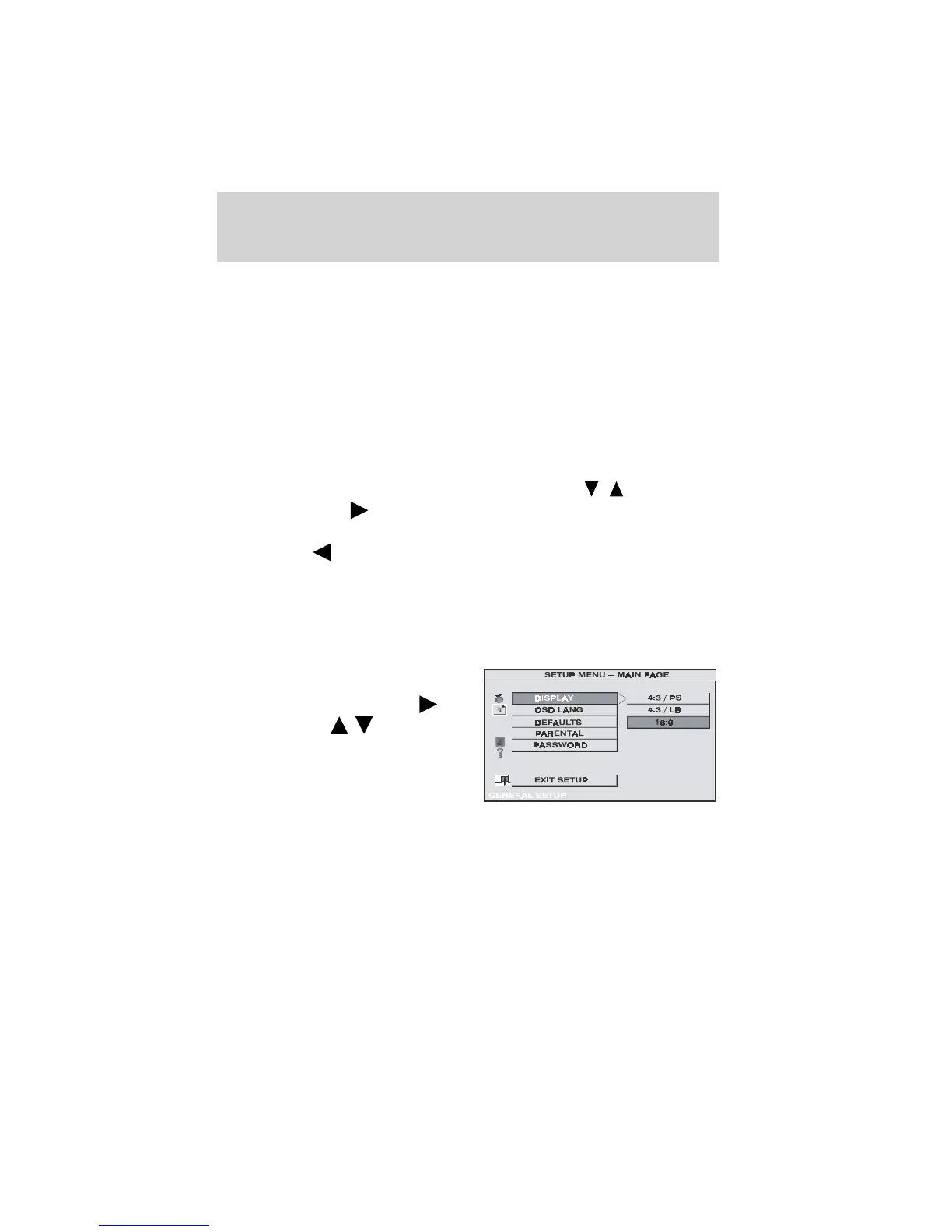
Settings for Display: This menu allows the user to select the aspect
ratio of the monitor.
Press SETUP and select ‘Display’.
The DISPLAY SETUP allows you to
adjust the aspect ratio. Press
and then press ( ) to select
the appropriate settings.
• 4:3 / PS —Displays a wide picture
on the screen with a portion of
the left and right side removed.
• 4:3 / LB — Displays a wide
picture with black bands on the upper and lower portions of the
screen.
• 16:9 — This displays a picture with black bands on the upper and
lower portion of the screen.
Press ENTER to confirm your selection.
Features
18



 To Next Page