128
Operation
Hitching an implement
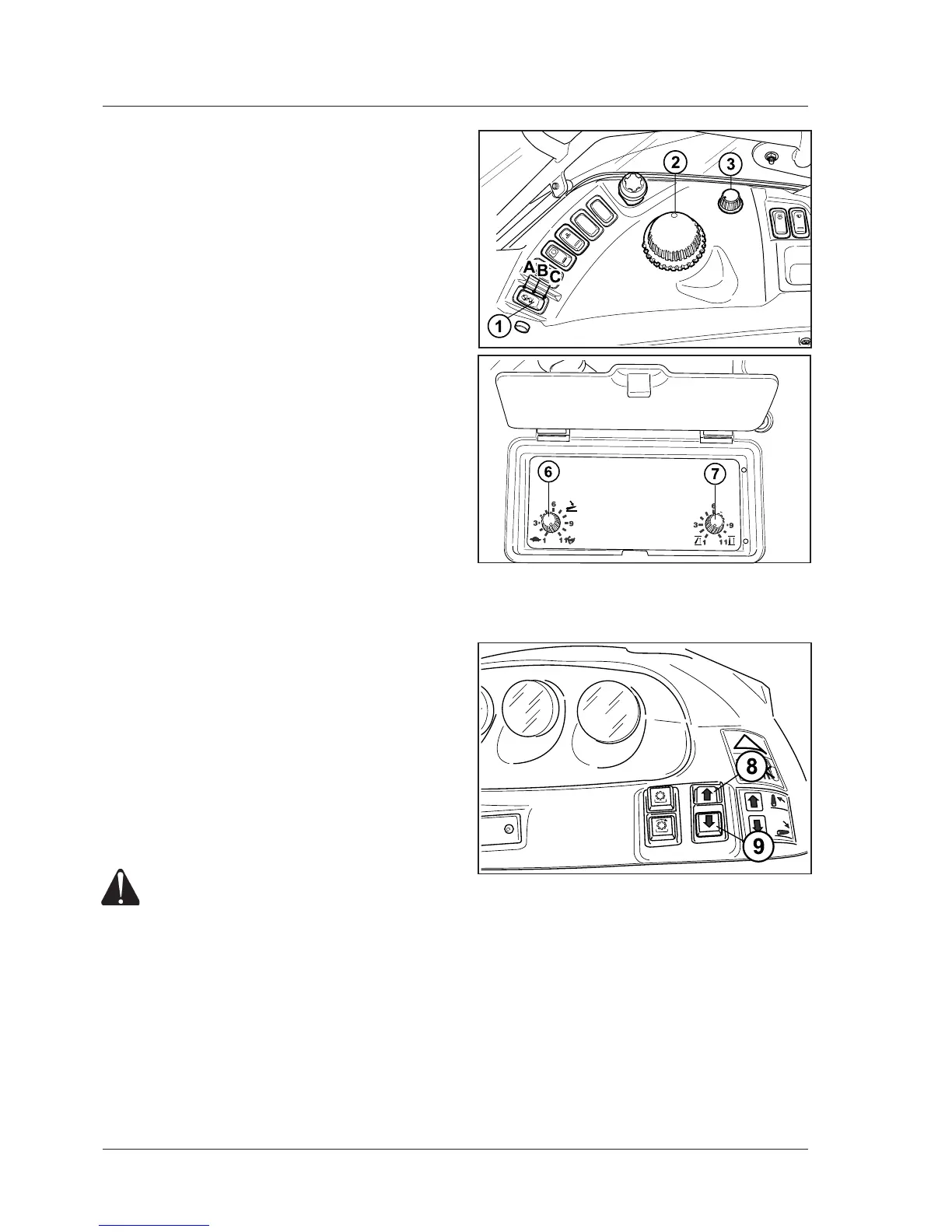
From the internal control panel
- Turnthepowerliftcontrolswitch(1)toPos.Cto
enablethepower-liftcontrolpanel.
- Turnthecontrolswitchtotheworkingposition(A).
- Turnthefunctionselector(3)clockwisetoselect
positioncontrolmode.
- Turntheknob(2)anti-clockwisetolowerthearms.
Thearms-downindicatorshouldlightup.
- Manoeuvrethetractortotherightpositionandhitch
theimplement’sball-endsontotheendsofthelinks.
Fitsafetypinstosecurethehitch.
Hitchupthetoplink.
- Turnknob(2)clockwisetoraisetheimplement.
Thearms-upindicatorshouldlightup.
With the external control buttons (8 - 9)
Thereisnoneedtoenablethepowerliftinordertouse
theexternalcontrolbuttons(8-9).
Tousetheexternalcontrols,justpressonthebuttons
toraiseorlowertheliftarms.Nowenablethepowerlift
controlpanelbymeansoftheswitch(1).
NOTE:
- Arm movement stops as soon as the buttons are rele-
ased.
- Descent speed is 30% slower than max. speed with
the external controls. Down speed regulation remains
disabled.
- To enable the control panel controls after the external
ones have been used, release the safety device by set-
ting the switch (1) to Pos. C and then to working position
A.
8-up 9-down
WARNING: External controls must be operated
at a safe distance, standing on one side out-
side the tractor and out of the overall width of
mudguards. It is expressly forbidden to ope-
rate the controls from the rear of the tractor
or standing on the inner side of wheels. [4.2.b]



 To Next Page