Doc no: PT00098114 Revision A Aircraft Medical Ltd © 2019 www.medtronic.com/mac-first
3.1 Device Cleaning
Clean with 70% IPA Wipe, With McGRATH® 3.6V Battery Removed
The following process steps should be followed to clean the device: Using a 70% IPA wipe, clean the
device systematically working from Steps 1 through 7 (from top to bottom of the device). Ensure that
the 70% IPA wipe comes in contact with all surfaces of the device even if no visible soiling is present.
Ensure a minimum contact time of 1 minute on all surfaces when using 70% IPA wipes.
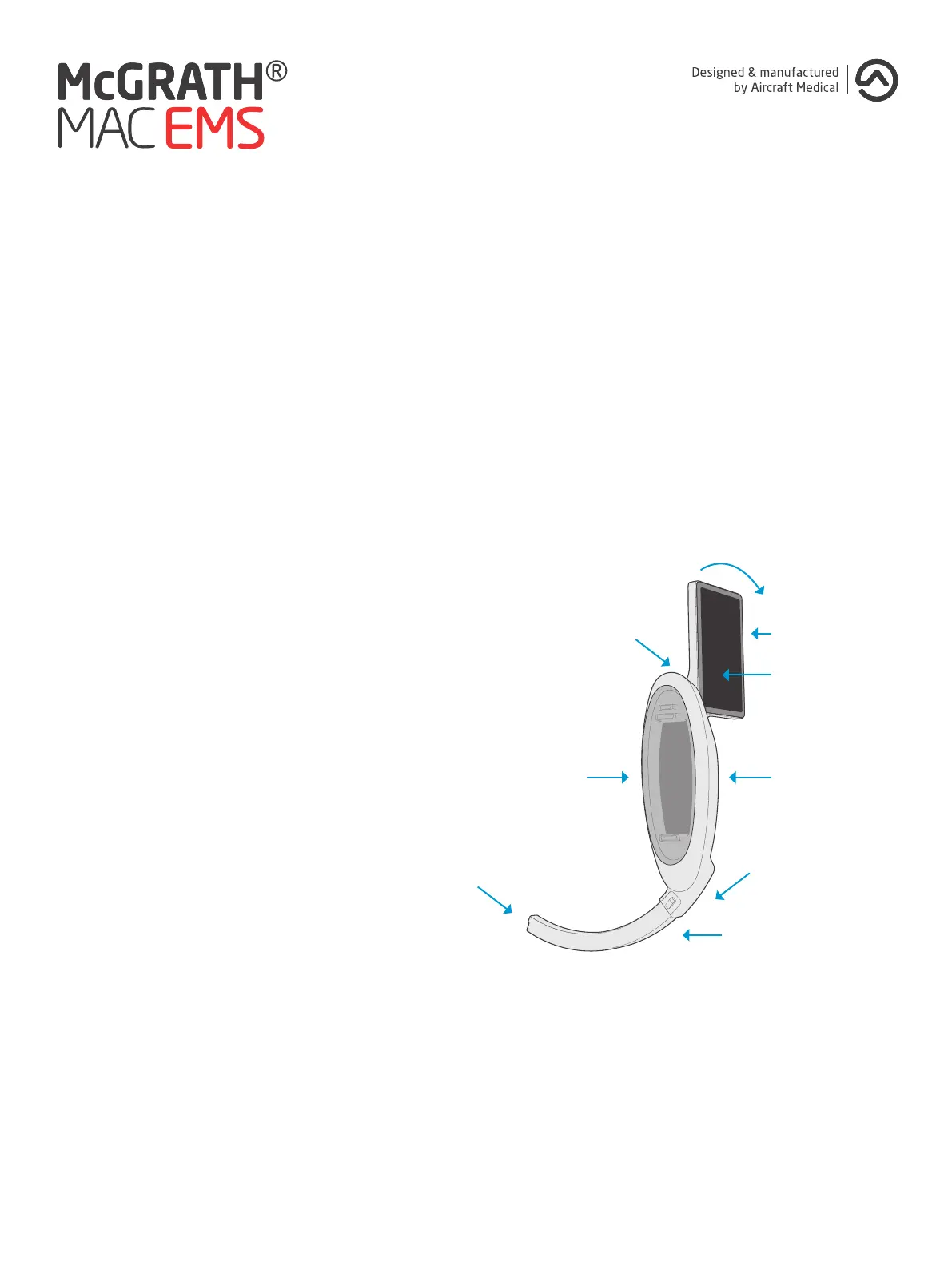
1. Monitor: Ensure the 70% IPA wipe gets
into the various grooves around the
screen.
2. Monitor Hinge: Rotate the monitor
to the upright position. Feed the 70%
IPA wipe into the space between the
monitor and handle to ensure eective
penetration. Rotate the monitor to its
opposite position and repeat.
3. Battery Bay: Ensure all surfaces of
the Battery Bay (with battery removed)
are thoroughly treated with the 70%
IPA wipe. Ensure that the join between
the battery module and the handle is
thoroughly treated with the 70% IPA
wipe.
4. Handle: Ensure all surfaces of the
handle are thoroughly treated with the
70% IPA wipe.
5. Clip and Heel Area: Take particular
care in ensuring that the small metal
clip feature is clean, in particular the
internal corner between the clip and the
surrounding plastic body.
6. Camera Stick: Ensure all surfaces of
the camera stick are thoroughly treated
with the 70% IPA wipe.
7. Camera Lens: Clean the camera lens
with the 70% IPA wipe, ensure that the
interface between the metal Camera
Stick and camera lens is clean.
Subsequent cleaning should be repeated where visible soiling is still present using a new 70% IPA wipe.
13
4. Handle3. Battery Bay
6. CameraStick™
45 °
5. Clip and
Heel area
2. Monitor hinge
1. Monitor
LCD screen
7. Camera &
light source



 To Next Page