5
SMARTLOG DASHBOARD
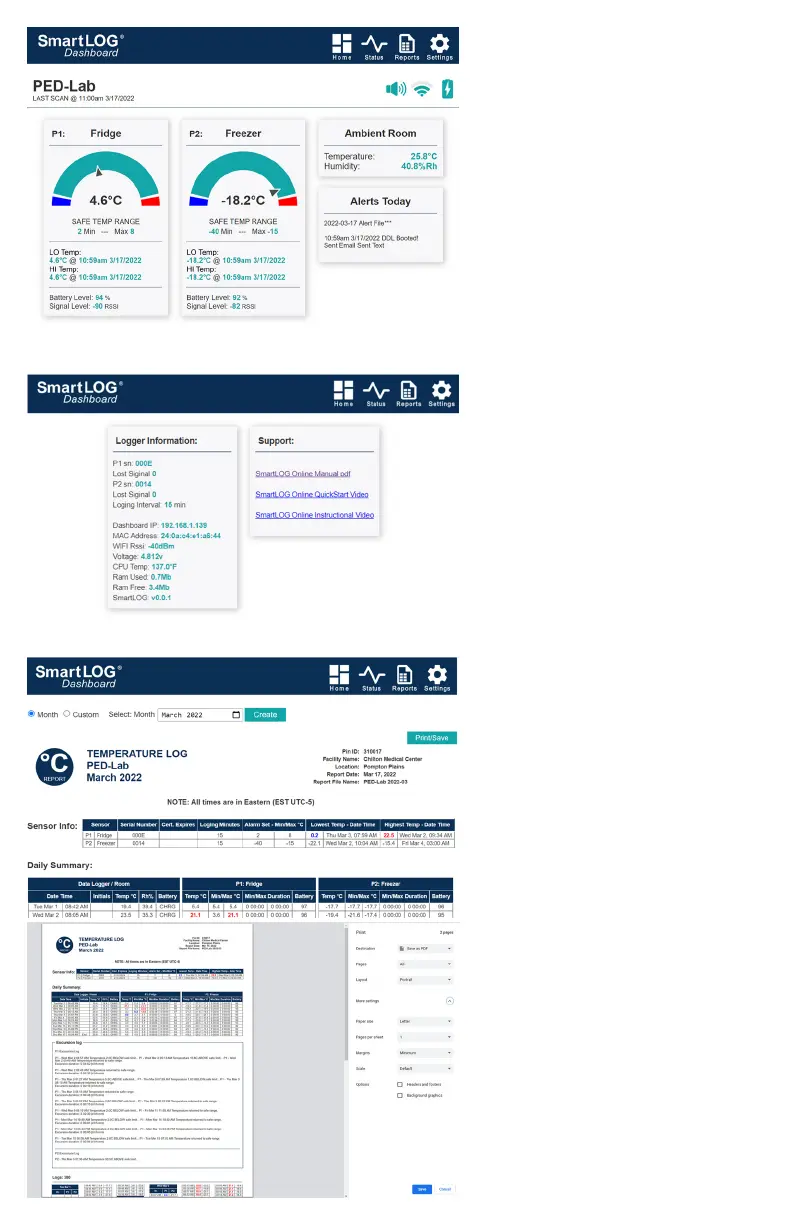
HOME PAGE
Navigation Icons
Logger Name, Alarm Spk, Wi-Fi, Pwr icons
Tap Speaker icon to acknowledge alarm. This
will mute Alarm Buzzer and send ACK alert
Sensor(s) Name
Temperature Gauge
relative to Min/Max set points
Current temperature
Min/Max settings values
Lowest and Highest recorded
Temperature, Date and Time
Sensor Battery power remaining
Signal strength
STATUS PAGE
Logger Information: Sensor serial number
Consecutive lost signals from wireless sensor,
Logging interval
Wi-Fi IP addr, Mac addr, Signal strength
CPU temperature, Ram used and free
Firmware version running
Support: Links to online manual, QuickStart
video, instructional video.
REPORT PAGE
Month: selection starts on 1st and reports to
last record of month.
Custom: user picks from/to dates for report.
Create: button generates the report
NOTE: Report generation can take up to 1 min
to create. If no response, refresh web page (F5)
and create report again.
Report has 4 sections
1. Sensor Info
2. Daily Summary
3. Excursion Logs
4. Status/Alert Logs
5. Logs
All excursion values are color coded red for
high values, blue for low values.
Print/Save: button opens print menu, select
save as PDF option to create a permanent file
on your PC.



 To Next Page