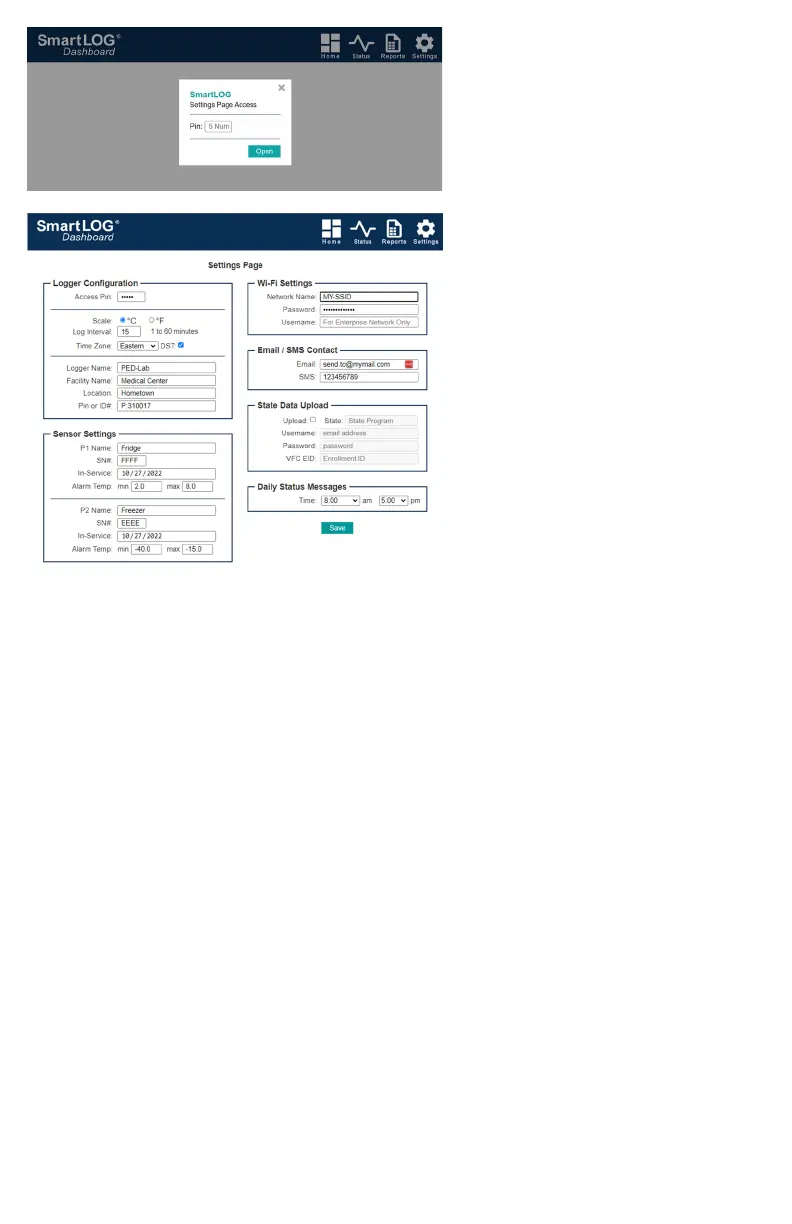
SETTINGS PAGE ACCESS POPUP
Pin: 5 digit number
If created during initial setup, enter Pin number,
otherwise, leave blank and click Open.
SETTINGS PAGE
Logger Configuration
Access Pin: 5 digit number (required to save)
Scale: Display & Report in °C or °F.
Log Interval: Select from 1 to 60 minutes.
Time Zone: Set your local Time Zone.
DST: Daylight Savings Time, sets clock forward
by one hour when checked.
Time is automatically synchronized from internet.
Logger Name: Name is used in reposts, emails &
SMS messages sent. Do not use the same name
if using additional data loggers on the same
network. Use up to 12 alphanumeric characters,
hyphen “-”, no spaces.
Facility Name: Location:, Pin or ID#: are optional
fields that show on reports.
Sensor Settings
P1 & P2 Name: A drop down list to select Fridge or Freeze that will auto-populate Alarm Temp: min and max values.
Custom name & min/max values can be entered. For single sensor application, set P2 to No Sensor.
Sensor SN#: Enter 4 digit serial number located on back of wireless sensor or new replacement sensor.
In-Service: Auto-populates with current date. Reports will display Sensor Expires date (+2 yrs from In-Service date).
Wi-Fi Setting
These fields are populated from the initial SmartLOG SETUP.
If you need to change the network:
Network Name: SSID (Service Set Identifier)
is the name of your wireless network.
Password: network password.
Username: is for Enterprise Networks.
Email/SMS Contact
Email: Address to send alert email to.
SMS: 10 digit phone number to send text message to.
State Data Upload
Logs can be sent daily directly to state VFC servers. Feature will be available in future update.
Daily Status Messages
Select one or both an am or pm time for daily notifications of sensor(s) current, min, max temps and battery level plus
ambient room temperature, humidity and SmartLOG battery state. These messages will be displayed in Reports
Status/Alert Logs section. Time: can be set to OFF for both am and pm to disable status messages.
TEMPERATURE EXCURSIONS
If a temperature sensor detects an excursion, the SmartLOG alarm led will flash, buzzer will sound and DDL display and
dashboard tiles will change to warning colors. See ACK BUTTON for more information
DDL OPTIONS SCREEN:
Tapping “Main” screen anywhere opens the “Options” screen. fig. 8
Tap X to close options screen if no change are needed.



 To Next Page
 Loading...