7
EMAIL / SMS MESSAGES
Alert
Messages
* sent every
hour until
acknowledged
ACK
Time Date
DDL Booted!
*
Time Date
Temperature Excursion
Name
: Temp 8.5C (above limit of 8.0C)
Time Date
Temperature Notice
Name
: Returned to safe temp 7.5C"
*
Time Date
POWER Failure ON Battery Backup 100% remaining
Time Date
POWER Restored OFF Battery Backup
*
Time Date
Sensor Signal Lost
Name
: Check sensor battery or distance from logger
Time Date
Sensor Signal Found
Name
: Check sensor battery or distance from logger
*
Time Date
Sensor Battery Low
Name
: Replace battery 24% remaining
Alert
Messages
From Buttons
Time Date
User Stopped Logging
Time Date
User Started Logging
Time Date
Alarm Acknowledged
Time Date
Test Message Dev-Logger IP address is: xxx.xxx.xxx.xxx
Time Date
User Reset Min Max
Daily Status
Messages
Name
: Cur:7.6C Min:5.0C Max:7.6C Bat:100%
Name
: Cur:-20.0C Min:-20.0C Max:-20.0C Bat:100%
Amb:22.8C/48.5% Bat:CHRG
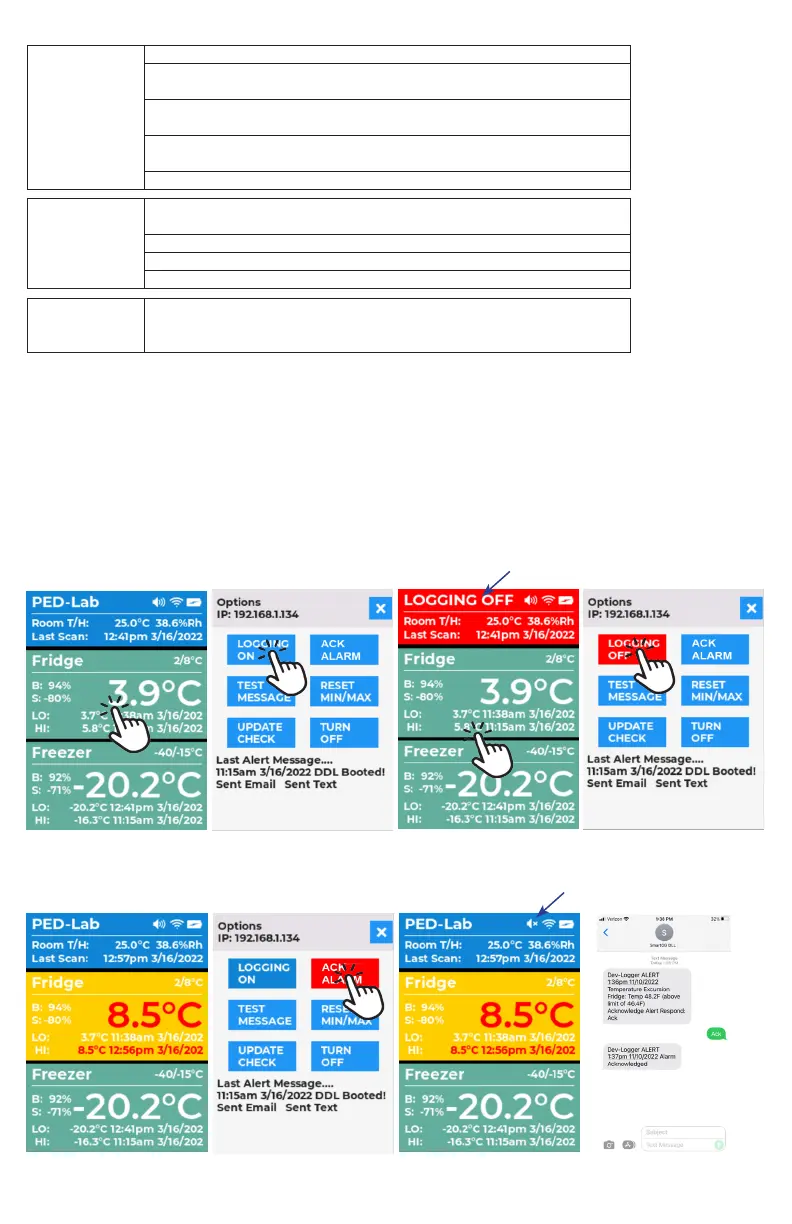
LOGGING BUTTON: When set to OFF, data recording will stop and alerts will be disabled from being sent
NOTE: Alerts are sent every hour until alarm condition clears, or if logging is off.
LOGGING OFF
1. If button reads “LOGGING ON,” it is in the ON state, logging data active.
2. Tap this button to turn LOGGING OFF. Wait for button to transition as email/SMS alerts are being sent out.
When alerts are complete, the screen will switch back to the main screen automatically showing DDL tile in red
and logger name replaced with “LOGGING OFF”.
LOGGING ON
1. If button reads “LOGGING OFF,” it is in the OFF state, logging data stopped.
2. Tap this button to turn LOGGING ON. Wait for button to transition as Email/SMS alerts are being sent out.
When alerts are sent, the screen will switch back to the main screen automatically showing DDL tile blue and
“LOGGING OFF” replaced with logger name.
ACK BUTTON: When temperature excursions are acknowledged with the ACK button the audible buzzer will be muted
and an alert message will be sent. The screen will switch back to the main screen automatically after Email/SMS are
sent. Speaker icon will have an X indicating speaker is muted. You can acknowledge an alarm with text message also.
If ACK BUTTON was clicked and temperature returns to a safe range, DDL display and dashboard will return to normal.



 To Next Page
 Loading...