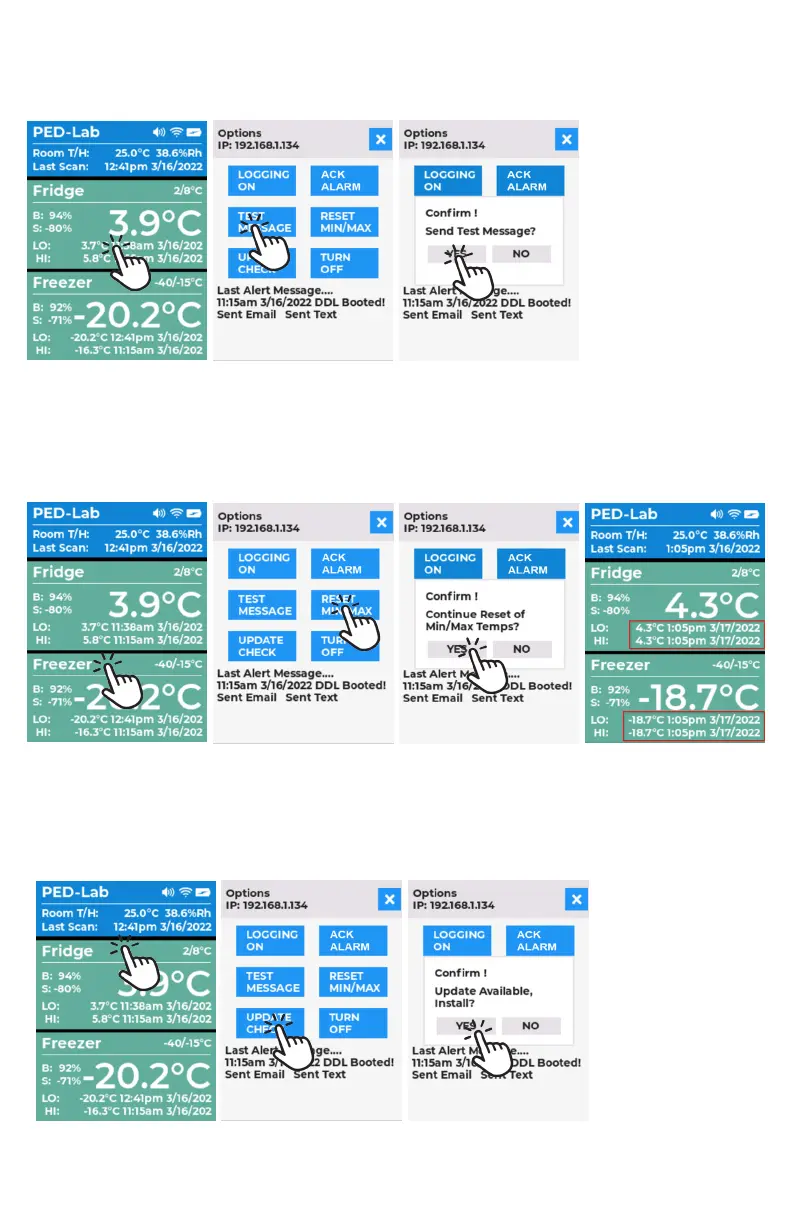
TEST MESSAGE BUTTON: Will send an email and/or SMS to recipients in contact list. Received message links will open
Dashboard in a browser.
1. Tap TEST MESSAGE button.
2. Tap YES in Confirm pop-up window, will send a Test Email and SMS message then return to main screen. If you
tap NO, the pop-up will close and you will be sent back to main screen automatically.
RESET MIN/MAX BUTTON: Sets memory recorded min and max values to current temperature, time and date and re-
moves alert and alarm colors from display if excursion was triggered.
1. Tap RESET MIN/MAX button.
2. Tap YES in confirm pop-up window to reset values. Wait for button to transition as email/SMS alerts are being sent
out. Pop-up will close and switch back to the main screen automatically. If you tap NO, the pop-up will close and
will be sent back to main screen automatically.
UPDATE CHECK BUTTON: Checks online for new firmware. If new firmware is available, user has option to update.
NOTE: Only recommended if having issues or new features you require.
1. Tap UPDATE CHECK.
2. Taping YES in confirm pop-up window will download and install firmware then return to main screen. If you
tap NO, the pop-up will close and will be sent back to main screen automatically. Other responses: No Wi-Fi:
SmartLOG not connected to network, No Updates: SmartLOG is up to date.



 To Next Page