EasyManua.ls Logo

MCS 6710 - Maintenance Procedures; Stylus and Record Cleaning; Care and Troubleshooting; Troubleshooting Common Issues

MCS 6710
12 pages
Print Icon
To Next Page IconTo Next Page
To Previous Page IconTo Previous Page
Loading...
Maintenance
Keep
the
stylus
and
your
records
clean
If
the
stylus
is
not
kept
clean,
it
will
not
contact
the
record
groove
properly,
nor
track
perfectly,
resulting
in
sound
deterioration
as
well
as
damage
to
both
the
record
and
the
stylus
tip.
Be
especially
careful
to
clean
away
all
dust
and
dirt
from
the
stylus
tip
with
a
soft
brush
or
blower.
DO
NOT
USE
YOUR
FINGER.
YOU
MAY
DAMAGE
THE
STYLUS.
We
recom-
mend
having
your
stylus
checked
periodically
by
J.C.
Penney
Store.
Remember,
a
worn
or
damaged
stylus
can
permanently
damage
your
record
collection.
Attach
the
stylus
protector
when
not
in
use,
and
keep
the
turntable
dust
cover
closed
both
when
playing
a
record
and
when
the
turntable
is
not
in
use.
Records
should
be
kept
free
of
dust
and
finger
marks,
and
stored
in
their
protective
jackets
when
not
in
use.
Records
not
kept
clean
will
cause
scratchy
sound,
and
deterioration
of
the
record
and
stylus.
Clean
your
records
regularly
witha
record
cleaning
kit
available
at
J.C.
Penney.
@
Wipe
the
dust
cover
and
turntable
base
wth
a
soft,
dry
cloth.
Never
use
any
cleaners
containing
alcohol,
benzine
or
thinner.
Use
of
a
chemical
dust
cloth
should
also
be
avoided.
Be
sure
that
the
dust
cover
is
not
exposed
to
insecticide
spray.
To
remove
stubborn
finger
prints
or
grease
spots,
detach
the
dust
cover
and
disconnect
the
AC
power
plug.
Use
a
soft
cloth
slightly
moistened
with
a
mild
soap
and
water
solution.
Do
not
wipe
the
dust
cover
during
play,
or
the
tonearm
may
be
attracted
toward
the
dust
cover
due
to
the
generation
of
static
electricity.
10
Care
In
the
Event
of
Trouble
Hum...Your
turntable
utilizes
a
DC
motor
to
reduce
inductive
hum.
If
annoying
inductive
hum
is
heard,
it
can
be
caused
by
the
electromagnetic
field
produced
from
the
motors
or
transformers
used
in
another
device.
Do
not
place
the
turntable
near
a
device
in
which
a
motor
or
transformer
is
used.
To
prevent
the
turntable
from
being
affected
by
the
power
transformer
of
your
amplifier,
receiver
or
tape
deck,
place
the
turntable
on
the
opposite
side
of
the
power
transformer.
Acoustic
Feedback
..
.Cartridges
are
very
sensitive
and
may
pick
up
slight
sound
pressure
or
vibrations
of
the
speaker
coming
along
the
floor
or
even
though
the
air
if
close
enough.
Therefore,
the
location
of
your
turntable
is
very
important.
See
paragraph
‘‘placement”’
on
page
5.
Automatic
mechanism...While
moving
the
tonearm
to-
ward
the
record,
there
may
be
cases
where
the
tonearm
tends
to
return
to
the
arm
rest.
In
such
a
case,
rotate
the
turntable
platter
clockwise
about
10
times.
This
will
disengage
the
automatic
mechanism
from
the
tonearm
gear,
which
in
rare
cases
may
have
moved
out
ofits
normal
position
during
transportation.
Service
...Contact
your
J.C.
Penney
store
or
Product
Service
Center
if
any
service
is
ever
necessary.
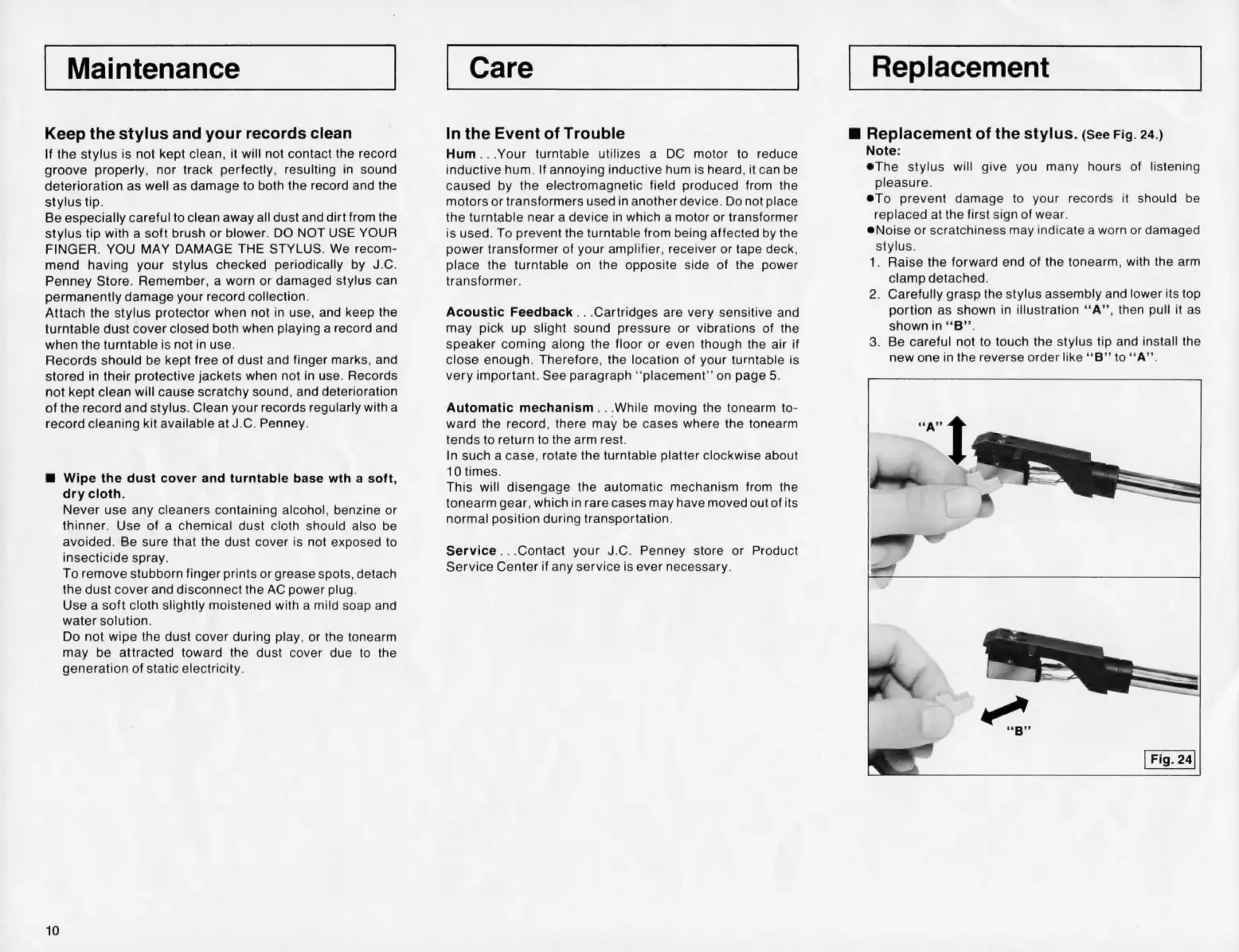
Replacement
@
Replacement
of
the
stylus.
(See
Fig.
24.)
Note:
@The
stylus
will
give
you
many
hours
of
listening
pleasure.
@To
prevent
damage
to
your
records
it
should
be
replaced
at
the
first
sign
of
wear.
@Noise
or
scratchiness
may
indicate
a
worn
or
damaged
stylus.
1.
Raise
the
forward
end
of
the
tonearm,
with
the
arm
clamp
detached.
2.
Carefully
grasp
the
stylus
assembly
and
lower
its
top
portion
as
shown
in
illustration
‘‘A’’,
then
pull
it
as
shown
in
“B’’.
3.
Be
careful
not
to
touch
the
stylus
tip
and
install
the
new
one
in
the
reverse
order
like
“‘B”’
to
“‘A’”’.