EasyManua.ls Logo

MCS 6710 - Operating the Turntable; Manual Single-Play Operation; Fully Automatic Single-Play; Single Record Repeat Play

MCS 6710
12 pages
Print Icon
To Next Page IconTo Next Page
To Previous Page IconTo Previous Page
Loading...
How
to
operate
@
Single-play
@
Manual
play
of
a
record
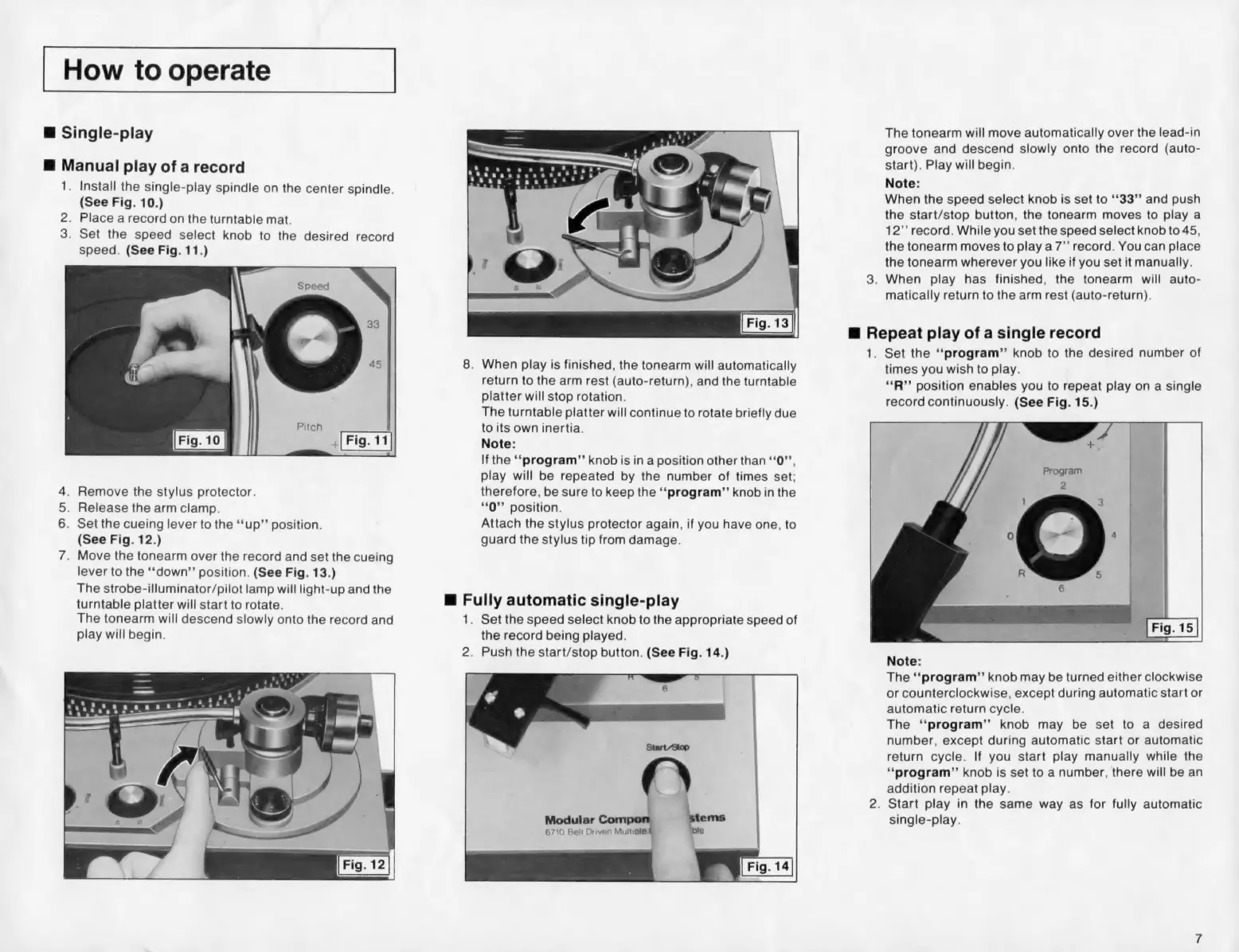
Install
the
single-play
spindle
on
the
center
spindle.
(See
Fig.
10.)
.
Place
arecord
on
the
turntable
mat.
Set
the
speed
select
knob
to
the
desired
record
speed.
(See
Fig.
11.)
dy
2
3.
.
Remove
the
stylus
protector.
.
Release
the
arm
clamp.
Set
the
cueing
lever
to
the
‘‘up”’
position.
(See
Fig.
12.)
Move
the
tonearm
over
the
record
and
set
the
cueing
lever
to
the
‘‘down”’
position.
(See
Fig.
13.)
The
strobe-illuminator/pilot
lamp
will
light-up
and
the
turntable
platter
will
start
to
rotate.
The
tonearm
will
descend
slowly
onto
the
record
and
play
will
begin.
.
When
play
is
finished,
the
tonearm
will
automatically
return
to
the
arm
rest
(auto-return),
and
the
turntable
platter
will
stop
rotation.
The
turntable
platter
will
continue
to
rotate
briefly
due
to
its
own
inertia.
Note:
If
the
‘‘program”’
knob
is
in
a
position
other
than
‘‘0”’,
play
will
be
repeated
by
the
number
of
times
set;
therefore,
be
sure
to
keep
the
‘‘program”’
knob
in
the
**0”’
position.
Attach
the
stylus
protector
again,
if
you
have
one,
to
guard
the
stylus
tip
from
damage.
@
Fully
automatic
single-play
1.
Set
the
speed
select
knob
to
the
appropriate
speed
of
the
record
being
played.
2.
Push
the
start/stop
button.
(See
Fig.
14.)
The
tonearm
will
move
automatically
over
the
lead-in
groove
and
descend
slowly
onto
the
record
(auto-
start).
Play
will
begin.
Note:
When
the
speed
select
knob
is
set
to
‘*33’’
and
push
the
start/stop
button,
the
tonearm
moves
to
play
a
12’’
record.
While
you
set
the
speed
select
knob
to
45,
the
tonearm
moves
to
play
a7’’
record.
You
can
place
the
tonearm
wherever
you
like
if
you
set
it
manually.
.
When
play
has
finished,
the
tonearm
will
auto-
matically
return
to
the
arm
rest
(auto-return).
@
Repeat
play
of
a
single
record
1.
Set
the
‘“‘program”’
knob
to
the
desired
number
of
times
you
wish
to
play.
**R”’
position
enables
you
to
repeat
play
on
a
single
record
continuously.
(See
Fig.
15.)
Note:
The
‘‘program’”’
knob
may
be
turned
either
clockwise
or
counterclockwise,
except
during
automatic
start
or
automatic
return
cycle.
The
‘‘program’’
knob
may
be
set
to
a
desired
number,
except
during
automatic
start
or
automatic
return
cycle.
If
you
start
play
manually
while
the
‘‘program”’
knob
is
set
to
a
number,
there
will
be
an
addition
repeat
play.
2.
Start
play
in
the
same
way
as
for
fully
automatic
single-play.