EasyManua.ls Logo

MCS 6710 - Multiple Record Playback Modes; Multiple Record Repeat Play; Playing 45-rpm Records; Long-Term Storage Guidelines

MCS 6710
12 pages
Print Icon
To Next Page IconTo Next Page
To Previous Page IconTo Previous Page
Loading...
@
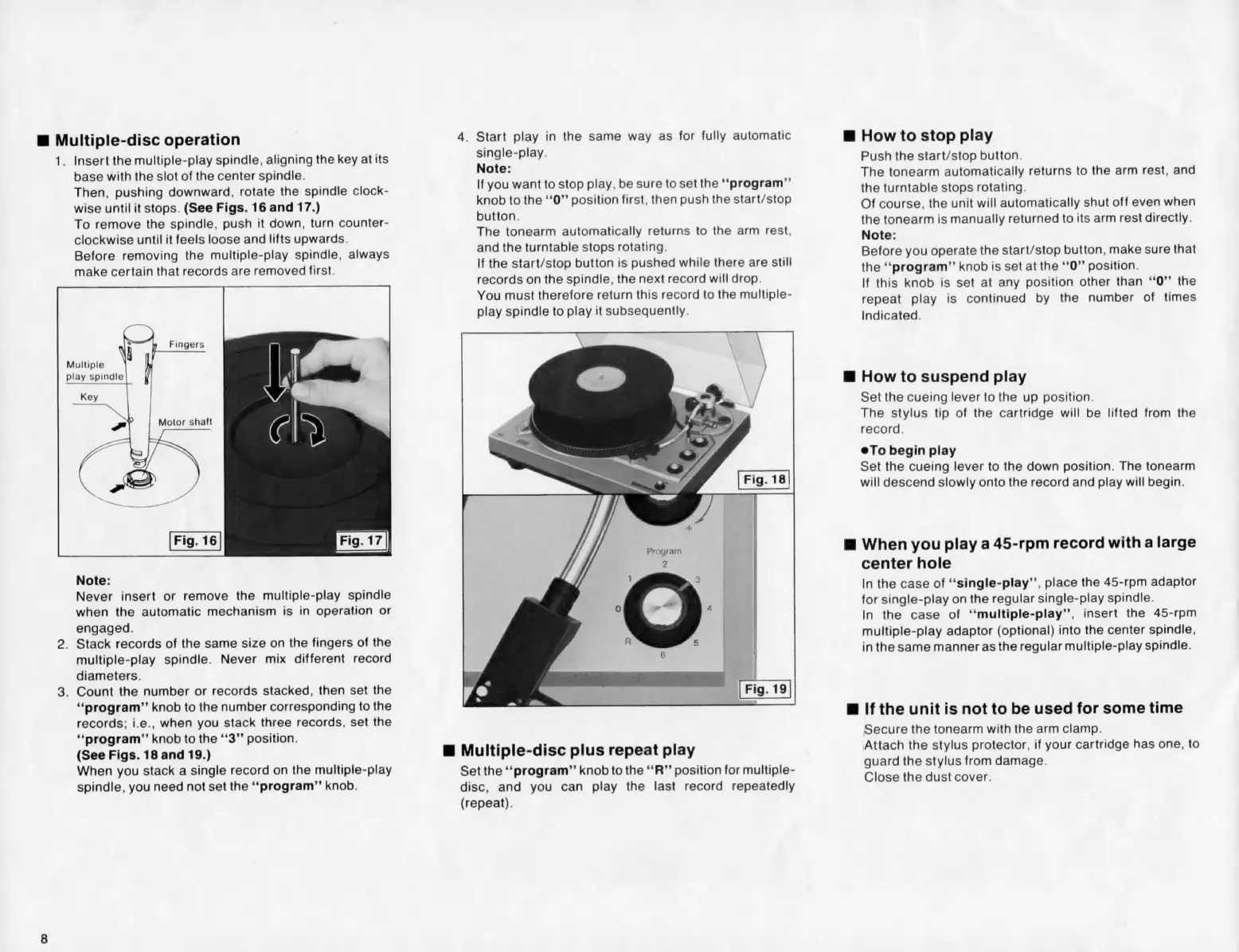
Multiple-disc
operation
Te
Insert
the
multiple-play
spindle,
aligning
the
key
at
its
base
with
the
slot
of
the
center
spindle.
Then,
pushing
downward,
rotate
the
spindle
clock-
wise
until
it
stops.
(See
Figs.
16
and
17.)
To
remove
the
spindle,
push
it
down,
turn
counter-
clockwise
until
it
feels
loose
and
lifts
upwards.
Before
removing
the
multiple-play
spindle,
always
make
certain
that
records
are
removed
first.
Fingers
Multiple
play
spindle
Motor
shaft
Note:
Never
insert
or
remove
the
multiple-play
spindle
when
the
automatic
mechanism
is
in
operation
or
engaged.
.
Stack
records
of
the
same
size
on
the
fingers
of
the
multiple-play
spindle.
Never
mix
different
record
diameters.
.
Count
the
number
or
records
stacked,
then
set
the
“program”
knob
to
the
number
corresponding
to
the
records;
i.e.,
when
you
stack
three
records,
set
the
‘*‘program’”’
knob
to
the
“‘3”’
position.
(See
Figs.
18
and
19.)
When
you
stack
a
single
record
on
the
multiple-play
spindle,
you
need
not
set
the
‘“‘program”’
knob.
4.
Start
play
in
the
same
way
as
for
fully
automatic
single-play.
Note:
If
you
want
to
stop
play,
be
sure
to
set
the
“‘program”’
knob
to
the
‘‘0”’
position
first,
then
push
the
start/stop
button.
The
tonearm
automatically
returns
to
the
arm
rest,
and
the
turntable
stops
rotating.
If
the
start/stop
button
is
pushed
while
there
are
still
records
on
the
spindle,
the
next
record
will
drop.
You
must
therefore
return
this
record
to
the
multiple-
play
spindle
to
play
it
subsequently.
@
Multiple-disc
plus
repeat
play
Set
the
‘‘program”
knob
to
the
‘‘R”’
position
for
multiple-
disc,
and
you
can
play
the
last
record
repeatedly
(repeat).
@
How
to
stop
play
Push
the
start/stop
button.
The
tonearm
automatically
returns
to
the
arm
rest,
and
the
turntable
stops
rotating.
Of
course,
the
unit
will
automatically
shut
off
even
when
the
tonearm
is
manually
returned
to
its
arm
rest
directly.
Note:
Before
you
operate
the
start/stop
button,
make
sure
that
the
‘‘program”
knob
is
set
at
the
‘*0”’
position.
If
this
knob
is
set
at
any
position
other
than
“‘0”’
the
repeat
play
is
continued
by
the
number
of
times
Indicated.
@
How
to
suspend
play
Set
the
cueing
lever
to
the
up
position.
The
stylus
tip
of
the
cartridge
will
be
lifted
from
the
record.
®To
begin
play
Set
the
cueing
lever
to
the
down
position.
The
tonearm
will
descend
slowly
onto
the
record
and
play
will
begin.
@
When
you
play
a
45-rpm
record
with
a
large
center
hole
In
the
case
of
“‘single-play”’,
place
the
45-rpm
adaptor
for
single-play
on
the
regular
single-play
spindle.
In
the
case
of
“‘multiple-play’’,
insert
the
45-rpm
multiple-play
adaptor
(optional)
into
the
center
spindle,
in
the
same
manner
as
the
regular
multiple-play
spindle.
@
If
the
unit
is
not
to
be
used
for
some
time
Secure
the
tonearm
with
the
arm
clamp.
Attach
the
stylus
protector,
if
your
cartridge
has
one,
to
guard
the
stylus
from
damage.
Close
the
dust
cover.