EasyManua.ls Logo

MCS 6710 - Turntable Preparation and Setup; Component Checklist; Platter and Belt Installation; Balance Weight Installation

MCS 6710
12 pages
Print Icon
To Next Page IconTo Next Page
To Previous Page IconTo Previous Page
Loading...
Preparation
for
use
Attach
the
dust
cover
last,
so
that
assembly
has
been
completed.
@
Checklist
of
parts
ACE
TADEN
EIN
Urcete
te
so
wens
c
oe
Nan
Gr
teins
ote
aie
sonic.
ayaa
est
1
MPTITEEN
ILE
....
roars
4
toate
wk eh
wahaons
Ses
Keleavorn
1
ES
rere
a
ea
iss
so
unstsbov
cus’
ss
Savane
aUeexcvedolena
eee
astie
osieue
See
1
TRIMMER:
oo
ty
cote
has
«
Key
hele
EUR
iow
tween
hc
1
DYUSUCOVG
tre:
eta
ate
recs
clels
oteecataue
clei
aie
cious
nea
einisiaiate.
1
Multinle-plav
Spindle:
«ss...
acdc
cese
son
camer
acaes
1
SINGIOMOIGY
GOING
5
.c5s
suk
angie
nus
Fei
vs
erm
emierrsans
1
EEN
N
RE
MAAU
MM
ol
EE
co
3d
Sieh
a
ica
Bae
Na
abe
ae
6)
1
(for
single-play)
EEOEACGUVGNOIND
Ss
kideoh
so
ag
Ric
Derg
ey
By
Fars
atalaena
aral
1
@
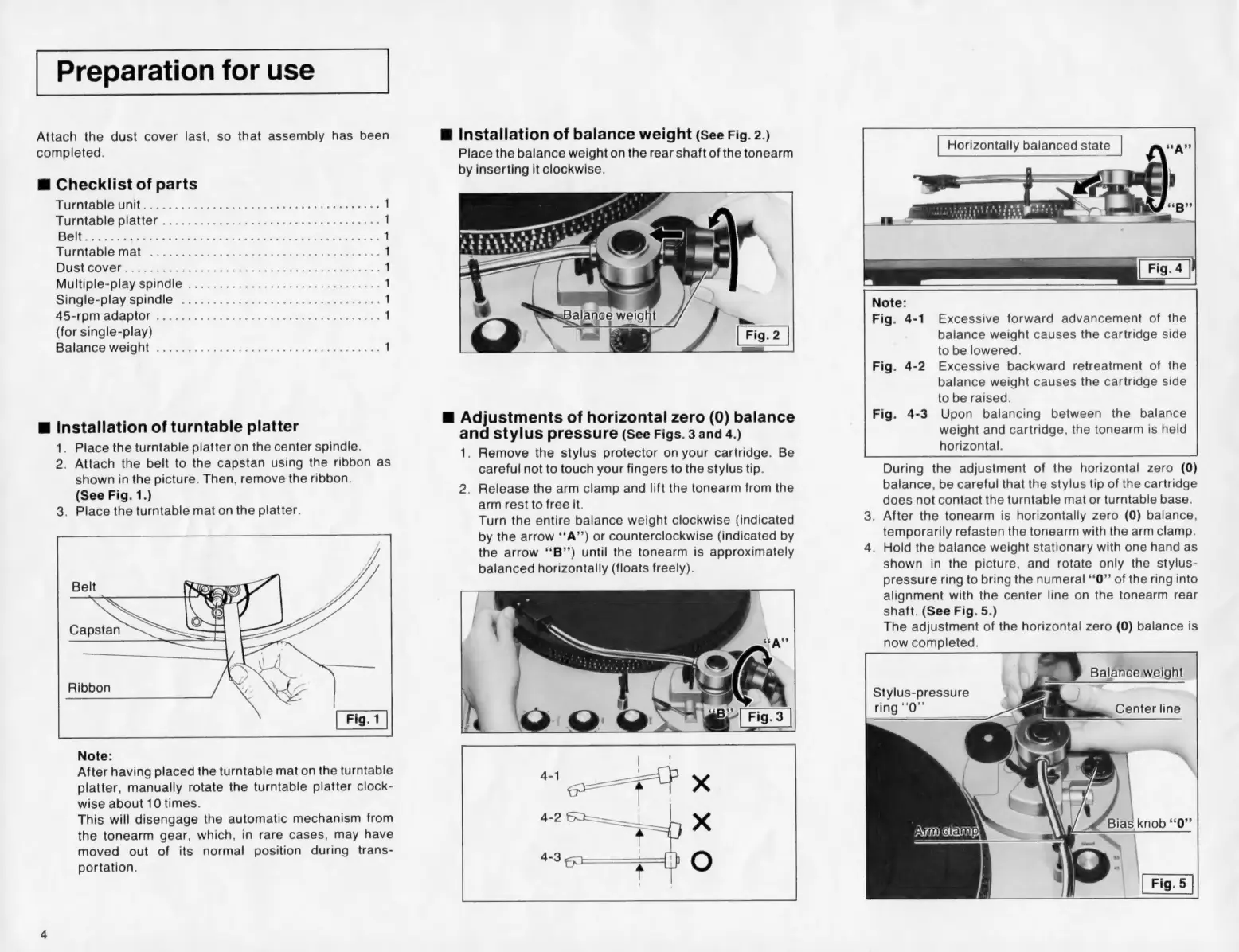
Installation
of
turntable
platter
1.
Place
the
turntable
platter
on
the
center
spindle.
2.
Attach
the
belt
to
the
capstan
using
the
ribbon
as
shown
in
the
picture.
Then,
remove
the
ribbon.
(See
Fig.
1.)
3.
Place
the
turntable
mat
on
the
platter.
Ca
Ribbon
Note:
After
having
placed
the
turntable
mat
on
the
turntable
platter,
manually
rotate
the
turntable
platter
clock-
wise
about
10
times.
This
will
disengage
the
automatic
mechanism
from
the
tonearm
gear,
which,
in
rare
cases,
may
have
moved
out
of
its
normal
position
during
trans-
portation.
@
Installation
of
balance
weight
(See
Fig.
2.)
Place
the
balance
weight
on
the
rear
shaft
of
the
tonearm
by
inserting
it
clockwise.
Balarjoe
weigf
“swat
@
Adjustments
of
horizontal
zero
(0)
balance
and
stylus
pressure
(See
Figs.
3
and
4.)
1.
Remove
the
stylus
protector
on
your
cartridge.
Be
careful
not
to
touch
your
fingers
to
the
stylus
tip.
2.
Release
the
arm
clamp
and
lift
the
tonearm
from
the
arm
rest
to
free
it.
Turn
the
entire
balance
weight
clockwise
(indicated
by
the
arrow
‘‘A’’)
or
counterclockwise
(indicated
by
the
arrow
‘‘B’’)
until
the
tonearm
is
approximately
balanced
horizontally
(floats
freely).
Note:
Fig.
4-1
Excessive
forward
advancement
of
the
balance
weight
causes
the
cartridge
side
to
be
lowered.
Fig.
4-2
Excessive
backward
retreatment
of
the
balance
weight
causes
the
cartridge
side
to
be
raised.
Fig.
4-3
Upon
balancing
between
the
balance
weight
and
cartridge,
the
tonearm
is
held
horizontal.
During
the
adjustment
of
the
horizontal
zero
(0)
balance,
be
careful
that
the
stylus
tip
of
the
cartridge
does
not
contact
the
turntable
mat
or
turntable
base.
.
After
the
tonearm
is
horizontally
zero
(0)
balance,
temporarily
refasten
the
tonearm
with
the
arm
clamp.
.
Hold
the
balance
weight
stationary
with
one
hand
as
shown
in
the
picture,
and
rotate
only
the
stylus-
pressure
ring
to
bring
the
numeral
‘‘0”’
of
the
ring
into
alignment
with
the
center
line
on
the
tonearm
rear
shaft.
(See
Fig.
5.)
The
adjustment
of
the
horizontal
zero
(0)
balance
is
now
completed.
a.
©
Balanceweight
Stylus-pressure
;
.
ring
‘‘0”’
<=
Center
line
\
ATG
amp