A
B
C
G
D
E
F
31
8-EMERGENCY PANEL
Technical Dept. - All rights reserved - Reproduction is prohibited
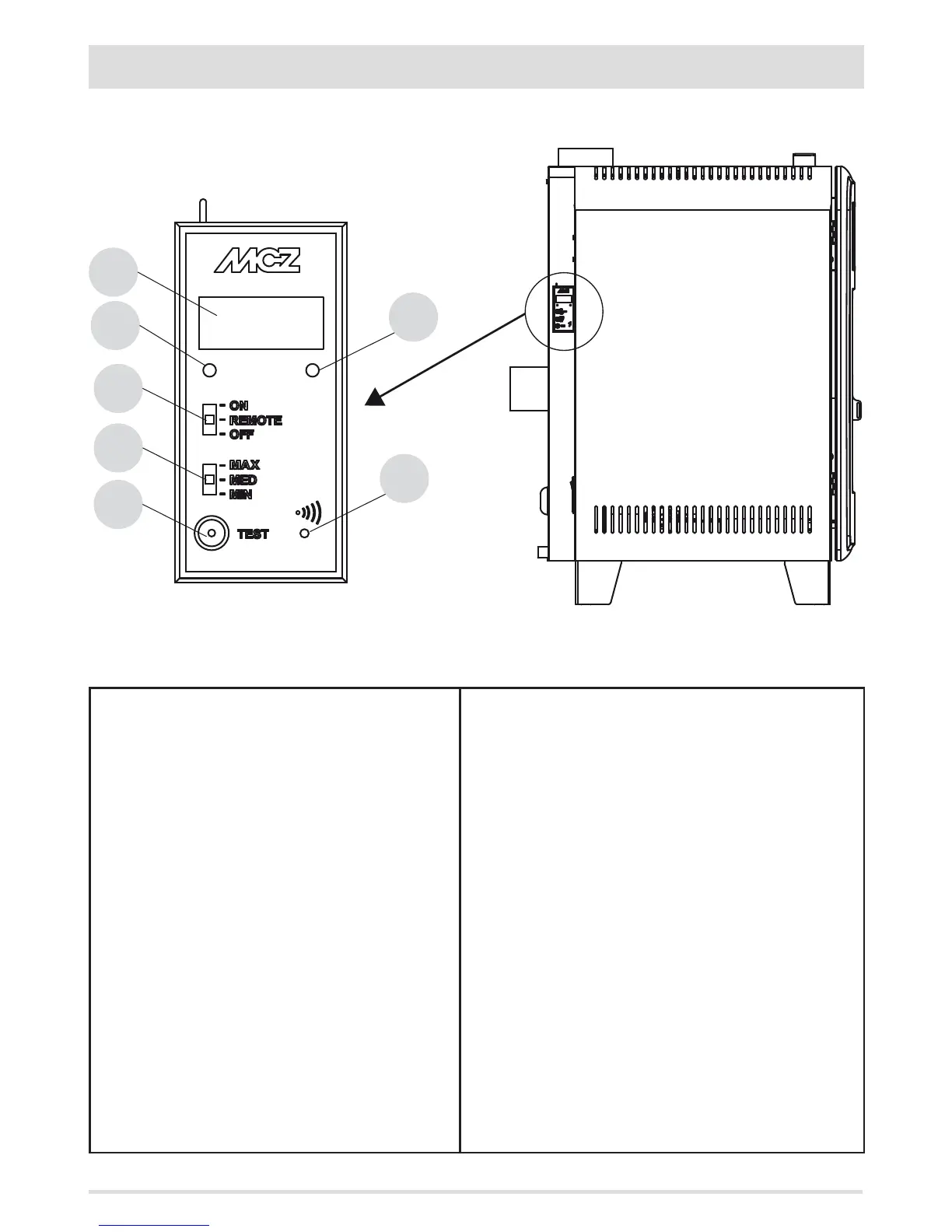
There is an emergency panel on the side-rear part of the stove, designed to detect any malfunctions and also for product control if the
remote control is not working.
KEY
A - DISPLAY; indicates a series of information on the stove, as
well as the identication code of any malfunction.
B - GREEN LED that indicates:
• OFF = Stove o
• FLASHING ON = Stove in ignition stage
• FIXED ON = Stove on
C - RED LED that indicates:
• OFF = Stove on
• ON WITH SLOW FLASHING = Stove in shutdown stage
• ON WITH FAST FLASHING = Stove in alarm conditions
(combined with a beep sound for the rst 10 minutes)
• FIXED ON = Stove o
D - Three-position selector for the following functions
• OFF = Stove switched o manually without remote
control
• REMOTE = Stove controlled exclusively from the remote
control
• ON = Stove switched on manually without the remote
control
E - Three-position selector to select the power
• MIN = Selector to make the stove work at MINIMUM power
without the remote control and with selector 4 on ON
• MED = Selector to make the stove work at MEDIUM power
without the remote control and with selector 4 on ON
• MAX = Selector to make the stove work at MAXIMUM power
without the remote control and with selector 4 on ON
F - Button for diagnostic functions relating to the operating status
of the stove
G - Button to put the stove in communication with a new remote
control (via the procedure explained below)
SELECTOR "D" MUST BE SET ON "REMOTE" TO MAKE
THE STOVE OPERATE WITH THE REMOTE CONTROL.


 To Next Page