EasyManua.ls Logo

Mec 8567 Grabber - Page 8

Default Icon
20 pages
Print Icon
To Next Page IconTo Next Page
To Previous Page IconTo Previous Page
Loading...
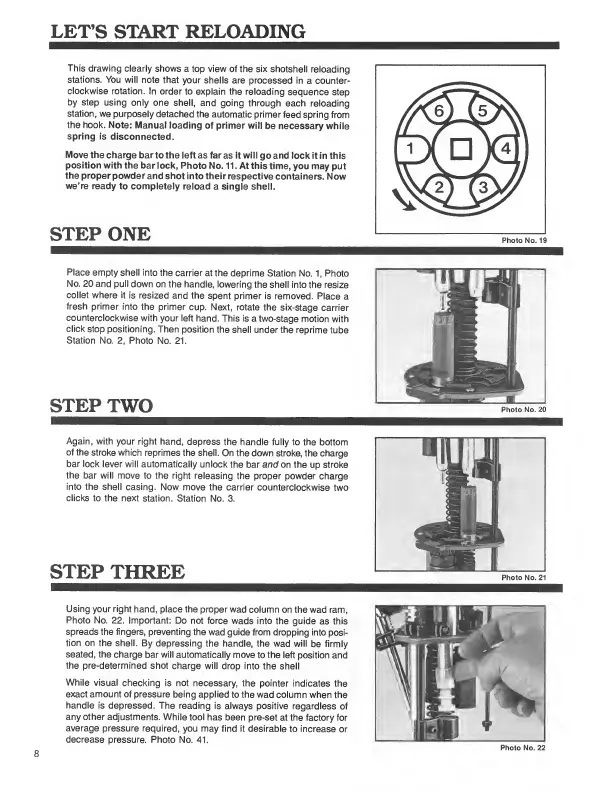
LET’S
START
RELOADING
This
drawing
clearly
shows
a
top
view
of
the
six
shotshell
reloading
stations.
You
will
note
that
your
shells
are
processed
in
a
counter¬
clockwise
rotation.
In
order
to
explain
the
reloading
sequence
step
by
step
using
only
one
shell,
and
going
through
each
reloading
station,
we
purposely
detached
the
automatic
primer
feed
spring
from
the
hook.
Note:
Manual
loading
of
primer
will
be
necessary
while
spring
is
disconnected.
Move
the
charge
bar
to
the
left
as
far
as
it
will
go
and
lock
it
in
this
position
with
the
bar
lock,
Photo
No.
11.
At
this
time,
you
may
put
the
proper
powder
and
shot
into
their
respective
containers.
Now
we’re
ready
to
completely
reload
a
single
shell.
STEP
ONE
Place
empty
shell
into
the
carrier
at
the
deprime
Station
No.
1,
Photo
No.
20
and
pull
down
on
the
handle,
lowering
the
shell
into
the
resize
collet
where
it
is
resized
and
the
spent
primer
is
removed.
Place
a
fresh
primer
into
the
primer
cup.
Next,
rotate
the
six-stage
carrier
counterclockwise
with
your
left
hand.
This
is
a
two-stage
motion
with
click
stop
positioning.
Then
position
the
shell
under
the
reprime
tube
Station
No.
2,
Photo
No.
21.
STEP
TWO
Again,
with
your
right
hand,
depress
the
handle
fully
to
the
bottom
of
the
stroke
which
reprimes
the
shell.
On
the
down
stroke,
the
charge
bar
lock
lever
will
automatically
unlock
the
bar
and
on
the
up
stroke
the
bar
will
move
to
the
right
releasing
the
proper
powder
charge
into
the
shell
casing.
Now
move
the
carrier
counterclockwise
two
clicks
to
the
next
station.
Station
No.
3.
STEP
THREE
Using
your
right
hand,
place
the
proper
wad
column
on
the
wad
ram,
Photo
No.
22.
Important:
Do
not
force
wads
into
the
guide
as
this
spreads
the
fingers,
preventing
the
wad
guide
from
dropping
into
posi¬
tion
on
the
shell.
By
depressing
the
handle,
the
wad
will
be
firmly
seated,
the
charge
bar
will
automatically
move
to
the
left
position
and
the
pre-determined
shot
charge
will
drop
into
the
shell
While
visual
checking
is
not
necessary,
the
pointer
indicates
the
exact
amount
of
pressure
being
applied
to
the
wad
column
when
the
handle
is
depressed.
The
reading
is
always
positive
regardless
of
any
other
adjustments.
While
tool
has
been
pre-set
at
the
factory
for
average
pressure
required,
you
may
find
it
desirable
to
increase
or
decrease
pressure.
Photo
No.
41.
Photo
No.
22

Related product manuals