page 22
% drop set to 20%
% DROP sub-menu 1
% DROP sub-menu 2
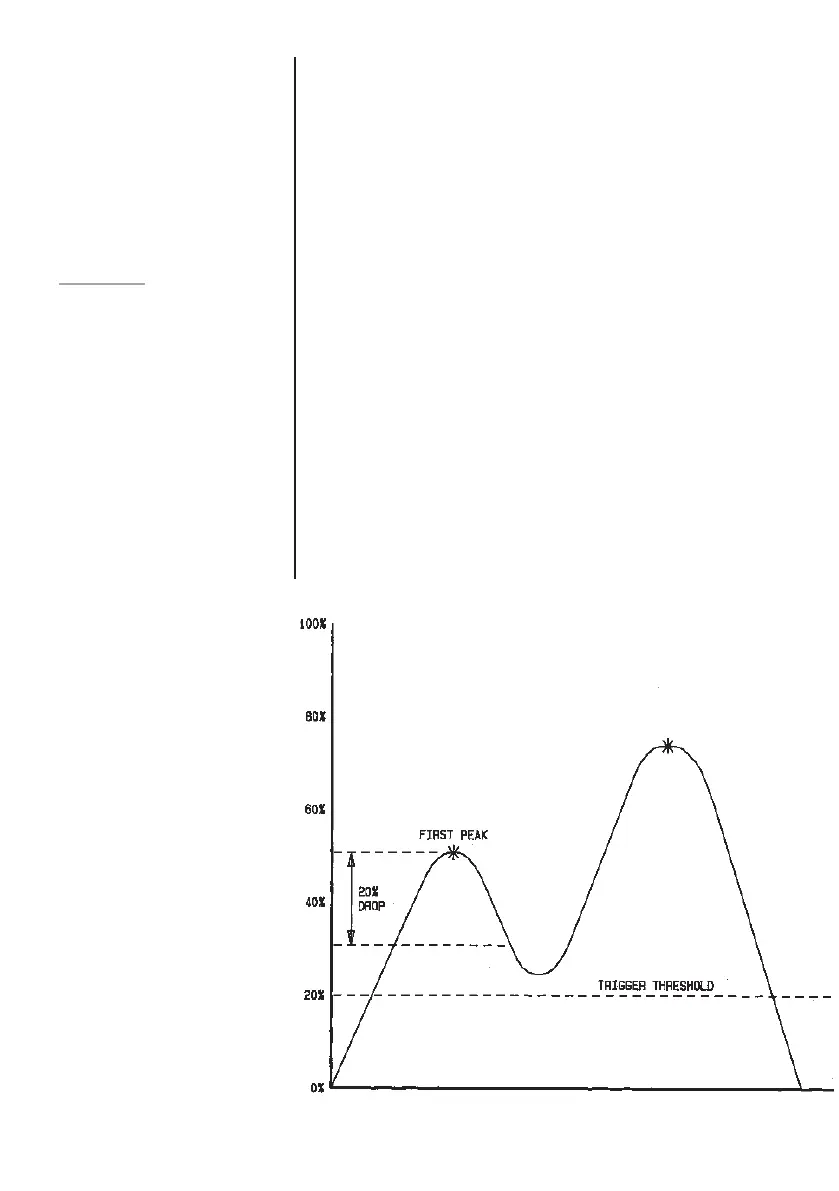
EXAMPLE
This test would produce a first
peak result
The display will show % DROP OFF and SET. Press the ENTER
key to change % DROP OFF to % DROP ON. Press DOWN key
to move the arrow cursor to SET % and press ENTER key.
To determine what precisely is considered a break, you must
define the % drop of full-scale value from the peak load
observed prior to the break occurring.
To set the required % drop use UP and DOWN keys to adjust
the value and press ENTER key to confirm the selection.
The % drop value selected also acts as a threshold, below
which the % drop function will not be active.
To disable the % DROP function, press the ENTER key. % DROP
OFF will now be displayed.
Example: AFG 100N has % drop of 20 (= 20N). If the peak load
before sample break is 50N, the load must drop to 30N in order for
the AFG to detect a 1st peak of 50N. If load continues to be applied
above 50N (e.g. to 75N), the AFG will return 75N as MAX and 50N
as 1st peak.
MMAAXX PPEEAAKK



 To Next Page