Panel Controls
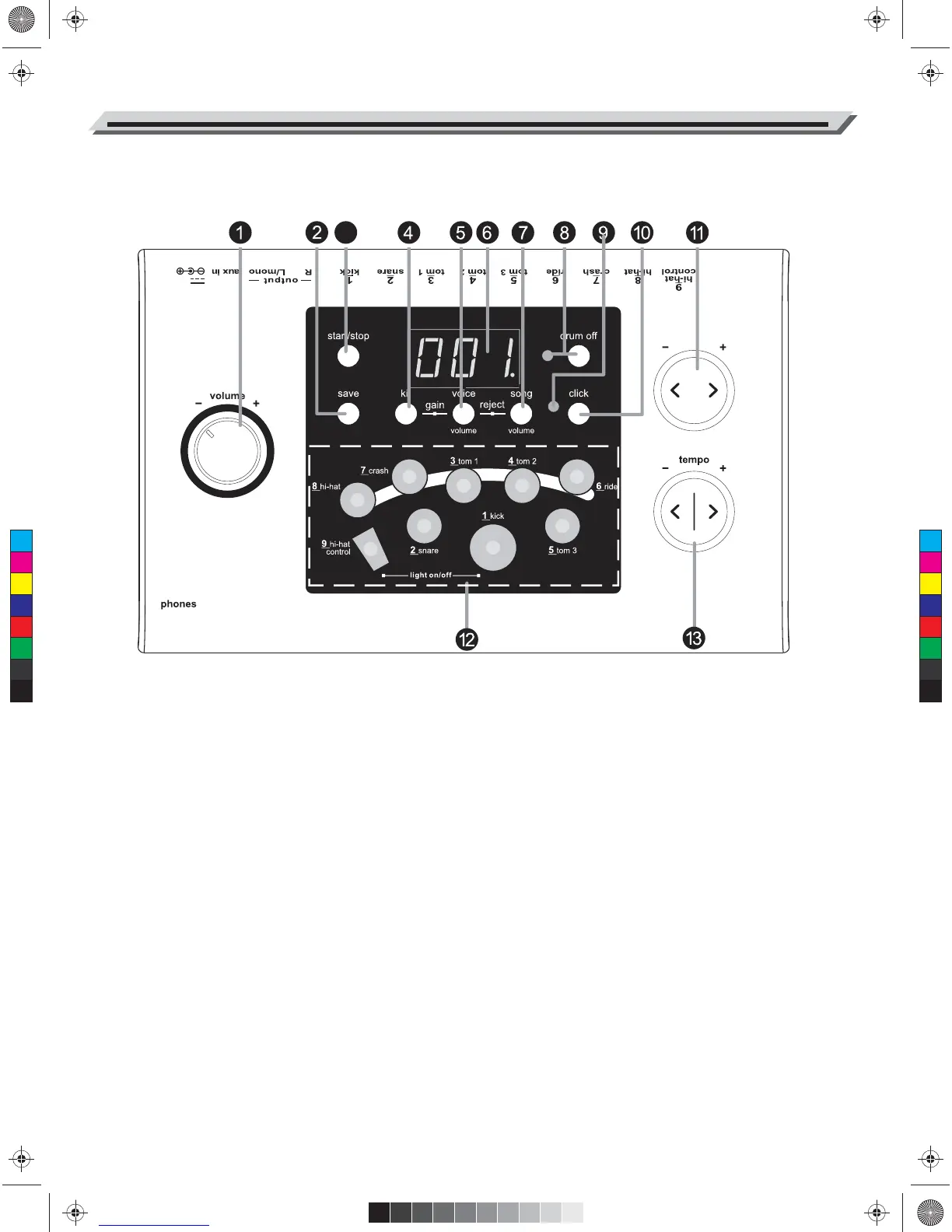
Front Panel
MIDI out
9V
3
1. Volume knob
Control the volume of phone and line output.
Turn it clockwise to increase the volume and
anticlockwise to decrease it.
2. [save] button
Save current kit setting to a user kit.
3. [start/stop] button
Start or stop song playing.
4. [kit] button
Display the drum kit number or reverb setting.
5. [voice / volume] button
Display the voice number, volume value orpitch
value.
6. 3-digit LED display
Display the parameters of current menu mode.
7. [song / volume] button
Display the song number or accompaniment
volume value.
8. [drum off] button and indicator
This button is used to turn on or turn off theper
cussion of song.
9. Beat indicator
Beat of metronome or a song is playing
10. [click] button
Turn on or off the metronome.
11. [ + ] and [ - ] buttons
These buttons are used to change the setting
number of kit, voice, song and adjust the Pad
volume.
12. Pad select buttons and indicators
Select current pad and adjust the pad volume.
When you press them, the corresponding
indicator lights up.
13. [ tempo - / + ] buttons
Change current tempo.
4
C
M
Y
CM
MY
CY
CMY
K
AW_DD504D_Manual_G01_040709.ai 4 2014/7/9 10:57:50AW_DD504D_Manual_G01_040709.ai 4 2014/7/9 10:57:50


 To Next Page